
Scalability Testing in Software Testing Explained

So, what exactly is scalability testing? Think of it less like a stress test designed to find the breaking point and more like a controlled experiment to see how gracefully your application can grow. It’s all about measuring performance and stability as you gradually ramp up the user load, ensuring you can handle growth without ruining the user experience.
What Happens When Your Application Goes Viral

Imagine your small, local coffee shop gets a glowing feature on a famous food blog. The next morning, there’s a line of customers snaking around the block, all itching to try your espresso. Can your single barista and small coffee machine keep up? Or will service grind to a halt and the quality of each coffee plummet?
This is exactly what happens in the digital world. An unexpected marketing hit, a viral social media post, or a seasonal shopping rush can send a flood of new users your way. Without proper preparation, that dream-come-true moment can quickly sour into a nightmare of slow load times, system crashes, and angry customers.
Scalability testing is how you prepare for success. It’s about making sure your system can expand its capacity to meet rising demand, protecting both your revenue and your brand’s reputation when you hit the big time.
Preparing for Predictable Growth
This is where the practice of scalability testing becomes so critical. It’s the discipline of methodically checking your application’s ability to “scale” up or out. The real goal is to get clear answers to some make-or-break business questions:
- How many concurrent users can we actually support before performance starts to tank?
- At what specific point do we need to add more hardware or start optimizing our code?
- Can our current architecture handle 10x our user base, or are we headed for a total redesign?
Understanding the Two Paths to Scale
When you’re planning for growth, applications generally take one of two paths—much like our coffee shop. Getting your head around these strategies is fundamental to knowing what you’re actually testing for.
H3: Vertical Scaling (Scaling Up)
This is like swapping your small coffee machine for a massive, industrial-grade one. In the software world, it means adding more resources—like CPU, RAM, or disk space—to an existing server to make it more powerful. It’s a pretty straightforward approach, but it often has a hard ceiling and can get very expensive, very fast.
H3: Horizontal Scaling (Scaling Out)
Now, this strategy is like opening up several new coffee shop locations to serve different neighborhoods. For an application, it means adding more machines or servers to your network to distribute the load. This approach is incredibly flexible and is the backbone of most modern cloud-based systems, allowing for nearly limitless expansion.
By understanding these core concepts, you can start building a testing strategy that truly validates your application’s ability to grow. That way, when your moment in the spotlight arrives, you’re ready to shine.
The Pillars of a Scalable System
Before you can effectively test for scalability, you have to get a feel for what makes a system truly scalable in the first place. It’s not just about hammering an application with traffic until it falls over. Instead, think of it as a methodical investigation into its core design—finding its strengths and, more importantly, its breaking points. The real goal is to figure out how gracefully your system can grow without compromising the user experience.
Good scalability testing in software testing really comes down to three things. First, you want to find your system’s performance limits, not just to crash it, but to truly understand its capacity ceiling. Second, you need to confirm that performance stays stable and predictable as more users pile on. And finally, it serves as a powerful diagnostic tool, helping you hunt down those tricky architectural bottlenecks hiding in your database, network, or server hardware.
This focus on future-proofing explains why businesses are pouring more resources into this area. Driven by the explosion of cloud computing and microservices, the market for scalability testing services is expected to jump from $2 billion in 2025 to nearly $5 billion by 2033. You can explore these trends in more detail over at the scalability testing service market report on datainsmarket.com.
Understanding Your System’s Vital Signs
When you’re running these tests, you’re basically taking your application’s pulse under pressure. The metrics you track aren’t just abstract numbers; they’re vital signs, and each one tells a critical part of the story.
- Response Time: How long does it take from the moment a user clicks a button to when they get a full response? A low and consistent response time is the hallmark of a healthy, snappy application.
- Throughput: This is all about volume. It measures how many requests your system can successfully juggle in a given period, often measured in requests per second. High throughput means you have an efficient and powerful system.
- Resource Utilization: This keeps an eye on your CPU, memory, and network bandwidth. Healthy utilization means your hardware is working efficiently without being pushed into the red.
These metrics are deeply connected. For example, if you see response times suddenly shoot through the roof while throughput flatlines, you’ve almost certainly found a major bottleneck that needs attention right away.
Where Scalability Testing Fits In
It’s easy to get lost in the jargon of performance testing. There are several disciplines that sound similar but have very different goals. Knowing the difference helps you pick the right tool for the job and avoid chasing the wrong outcomes.
While related, each performance testing type asks a different question. Load testing asks, “Can we handle the expected traffic?” Stress testing asks, “Where do we break?” But scalability testing asks, “How well do we grow?”
To make these distinctions crystal clear, let’s break them down side-by-side.
Scalability Testing vs Other Performance Tests
This table helps put each testing type into context, showing what it’s for and when you’d use it.
| Testing Type | Primary Goal | Typical Load |
|---|---|---|
| Scalability Testing | To measure how performance changes as load increases, confirming the system can grow efficiently. | Gradually increasing load, from low to beyond expected peaks. |
| Load Testing | To verify that the system can handle its expected, normal user load without performance degradation. | A specific, predetermined load that mirrors typical peak usage. |
| Stress Testing | To find the system’s breaking point by pushing it beyond its capacity and observing its failure behavior. | An extreme load that intentionally overwhelms the system’s resources. |
| Performance Testing | A broad umbrella term for evaluating overall system speed, responsiveness, and stability. | Varies depending on the specific sub-type of test being conducted. |
With this framework in mind, you can target your efforts with precision. If you’re prepping for a big product launch, load testing is your go-to. If you need to understand how your system recovers from failure, stress testing is the answer. But if your goal is long-term, sustainable growth, then scalability testing is the one you can’t afford to skip.
So, how can you tell if your system is genuinely built for growth or just holding on for dear life? The answer isn’t a gut feeling—it’s buried in the data. Figuring out your application’s true growth potential means you have to become a bit of a data detective, hunting for the clues that reveal its real capacity. We need to move beyond simple “pass/fail” tests and start digging into the metrics that tell the whole story.
Think of it like a doctor monitoring a marathon runner. You wouldn’t just check if they crossed the finish line, right? You’d be tracking their heart rate, breathing, and pace throughout the race to see how their body was really handling the stress. Scalability testing in software testing is the exact same idea—we use key metrics as vital signs to diagnose performance before a total collapse.
This isn’t just a niche practice anymore. Scalability testing is a huge part of the software testing and QA services market, which is on track to jump from $50,672.4 million in 2025 to a massive $107,248 million by 2032. That explosion shows just how critical it is for businesses to build systems that can scale without breaking. For a closer look at the numbers, check out the full report on the software testing and QA services market.
The Four Core Scalability Metrics
To get the full picture, you need to zero in on a handful of interconnected metrics. Each one gives you a different piece of the puzzle, and when you put them together, you get a crystal-clear view of your system’s scalability.
1. Response Time
This is the one your users feel most directly. It’s the total time from the moment a user clicks “Add to Cart” to the moment they get a full response back. Simple as that.
- What to Look For: In a truly scalable system, response time should stay low and steady, even as you throw more and more users at it. If it starts to climb, you’ve got a problem.
- Red Flag: If adding 100 more users makes your average response time shoot up from 200ms to 2 seconds, you’ve just uncovered a serious bottleneck.
2. Throughput
Think of throughput as your system’s raw processing power. It measures how many requests your application can successfully handle in a set period, usually measured in requests per second (RPS) or transactions per minute (TPM).
- What to Look For: A healthy system will see its throughput climb in a nice, straight line as the user load increases—right up until it hits a ceiling and flattens out.
- Red Flag: If your throughput stops increasing—or worse, starts to drop—as you add users, you’ve hit your limit. This is what we call the saturation point.
Here’s an analogy: imagine a grocery store checkout. Throughput is how many shoppers get through the line per hour. If opening more checkout lanes (scaling out) doesn’t move the line any faster, you’ve got a different bottleneck—maybe the bagging area can’t keep up.
Monitoring Your System’s Internal Health
While response time and throughput show you what’s happening on the outside, you also need to pop the hood and see how your infrastructure is holding up.
3. CPU and Memory Utilization
These metrics are the engine and fuel gauge of your application. They track how much of your server’s processing power and memory are actually being used.
- What to Look For: You want to see utilization ramp up smoothly with the load. Healthy systems can often run comfortably at 70-80% CPU utilization under peak load, leaving a bit of headroom for unexpected spikes.
- Red Flag: A CPU constantly pegged at 100% is a server gasping for air. It can’t handle anything else, which is when response times tank. At the same time, if memory usage keeps climbing and never comes down, you could be looking at a memory leak—a critical risk to your app’s stability.
4. Error Rate
This one is brutally honest. It tracks the percentage of requests that are outright failing. It’s a direct measure of user pain and system instability.
- What to Look For: The goal is simple: an error rate at or very close to 0%.
- Red Flag: Any increase in the error rate as you dial up the load is a massive warning sign. It means users are getting timeouts, server errors, or other failures, and your application is starting to buckle.
By keeping a close eye on these four metrics, you can build a dashboard that tells you not just if your system is performing well, but why. This data-driven mindset turns scalability testing from a guessing game into a precise engineering discipline, giving you the insights you need to build systems truly ready for whatever comes their way.
Your Blueprint for Running Scalability Tests
Knowing which metrics to watch is one thing, but actually orchestrating a successful scalability test is a whole different ball game. Without a methodical approach, you risk running chaotic tests that produce noisy, unusable data.
Think of the following steps not as a rigid checklist, but as a flexible blueprint. It’s all about generating realistic user load, measuring how the system reacts, and analyzing the results to hunt down those pesky bottlenecks.
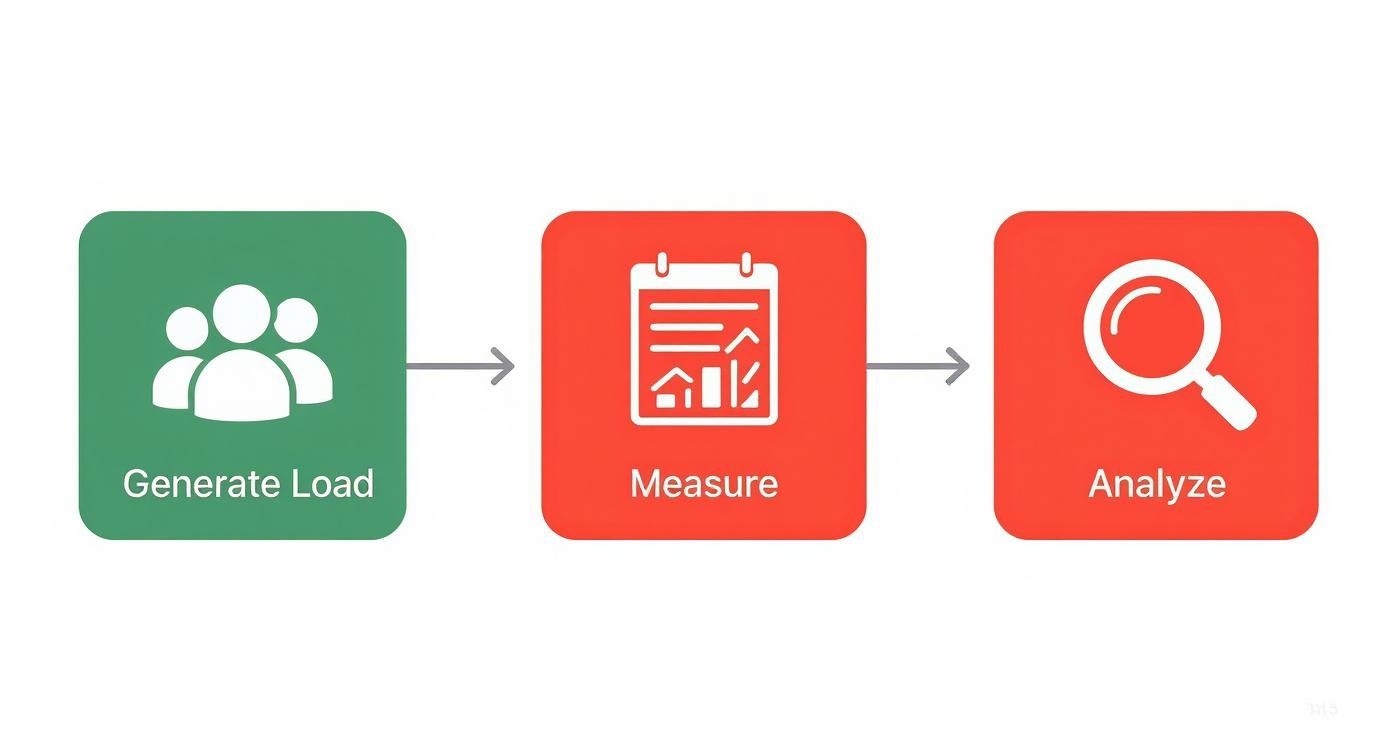
This process is a cycle. You generate load, you measure performance, and you analyze the outcomes. Each loop drives continuous improvement and gets you closer to a truly scalable system.
Define Clear Objectives and Prepare Your Environment
Before you write a single line of code, you need to know what you’re trying to prove. A vague goal like “see if the app is scalable” is completely useless. You need specific, measurable objectives.
- Establish a Baseline: What does “normal” performance actually look like? You need a solid baseline under a light load so you have something to compare against when things get heavy.
- Define Success Criteria: What’s an acceptable response time? At what CPU utilization do you call it quits? Set these thresholds before you ever hit “run.”
- Isolate the Test Environment: Your scalability tests should run in a clean, isolated environment that mirrors production as closely as possible. Running them on shared dev servers introduces unpredictable variables that will completely invalidate your results.
With your goals set and a pristine environment ready, you can start designing the test itself.
Create Realistic User Load Scenarios
One of the biggest mistakes teams make in scalability testing in software testing is generating simplistic, robotic traffic. Real users don’t just hammer a single endpoint over and over again. They log in, browse products, add items to a cart, get distracted, and then check out—with natural pauses in between.
Your test scripts absolutely must mimic this complex, messy, human behavior.
Crafting these authentic scenarios can be tough. A powerful alternative is to capture and replay real production traffic. This gives you a perfect model of user behavior without spending weeks on manual scripting. If that sounds interesting, you can learn more about how to replay production traffic for realistic load testing. It provides a level of realism that synthetic scripts can rarely match.
Don’t just test the happy path. Your scripts need to include a mix of user journeys, including those gnarly database queries and resource-heavy actions that reveal the true weak points in your system.
Execute Tests and Monitor System Health
With your test scenarios locked and loaded, it’s go-time. The key here is a gradual ramp-up of users. Don’t just throw everything at the wall at once. Start with a small load and incrementally increase it, letting the system stabilize at each new level. This controlled approach shows you exactly when and where performance starts to crack.
While the test is running, your team needs to be glued to the four core metrics we discussed earlier:
- Response Time: Is it staying flat or starting to climb?
- Throughput: Is it increasing linearly with the user load?
- Resource Utilization: Are CPU and memory levels stable, or are they redlining?
- Error Rate: Are you seeing a spike in failed requests?
This live monitoring is non-negotiable. It helps you connect the dots between performance drops and specific load levels, turning a flood of raw data into a clear story.
Analyze Results and Generate Actionable Insights
Once the test is over, the real work begins: analysis. Don’t just glance at the summary report and call it a day. Dive deep into the data to find the connections between load, performance, and resource consumption. The goal here is to produce actionable insights, not just a pile of pretty charts.
Look for patterns. Did response time spike every time the load crossed 1,000 concurrent users? Did the database server’s CPU hit 95% at that very same moment? Those correlations are your smoking guns—they point directly to your bottlenecks. Your final report should clearly identify these issues and give the development team specific, data-backed recommendations on what to fix.
Finding the Right Scalability Testing Tools

Choosing a scalability testing tool is a big deal. It’s the difference between getting sharp, actionable data versus just making educated guesses about your system’s limits. The right platform makes it far easier to simulate complex user loads and pinpoint exactly where things start to break down.
Your final choice really boils down to your team’s skills, budget, and what you’re trying to achieve. Luckily, there’s a whole spectrum of options out there, from powerful open-source workhorses to comprehensive enterprise suites. The first step is getting to know the key players and what makes each of them tick.
Popular Tools for Scalability Testing
Different tools are built to solve different problems. Some are masters at generating massive, scripted loads, while others bring a dose of reality by using actual production traffic. Let’s look at a few of the most popular choices on the market.
-
Apache JMeter: A true veteran in the performance testing world. This open-source Java app is incredibly flexible, designed to load test functional behavior and measure performance across a huge variety of protocols. It’s the go-to for many teams who need a customizable, no-cost solution.
-
LoadRunner: This is a long-standing enterprise tool from Micro Focus, built for complexity. It supports a massive array of applications and provides incredibly detailed analysis. If you’re dealing with a mix of legacy and modern systems, LoadRunner is known for being able to handle it all.
-
GoReplay: This one takes a completely different path. Instead of making you script out user behavior, GoReplay captures real HTTP traffic from your production environment and simply replays it against your test environment. This “traffic shadowing” approach gives you a level of realism that’s almost impossible to fake with scripts.
This move toward smarter, more realistic testing isn’t just a niche idea—it’s a major industry trend. In fact, a recent report on software testing statistics shows that around 42% of enterprise companies have already deployed AI in their business, with another 40% actively exploring it. You can dig deeper into these trends in this report from testgrid.io.
A Closer Look at Traffic Shadowing with GoReplay
Traditional load generation tools are great, but they all share one fundamental weakness: trying to accurately predict the chaotic, messy nature of real human users. Scripting every possible user journey takes forever, and you almost always miss the weird edge cases that bring down production systems.
This is exactly where GoReplay changes the game. By capturing and replaying live traffic, you’re not just simulating users—you are re-creating their exact digital footprints.
The core benefit of traffic shadowing is authenticity. You are testing against the genuine rhythm and complexity of your production environment, including all the unexpected user actions and API call sequences that synthetic scripts often miss.
This approach takes the guesswork out of building a load model. You can test how a new feature will handle yesterday’s peak traffic before you ship it, giving you a much higher degree of confidence that it won’t fall over. For anyone wanting to weigh their options, exploring other open-source load testing tools offers a great look at the different philosophies out there.
Comparing Your Tooling Options
Picking the right tool means weighing the pros and cons against what your project actually needs. Below is a quick comparison table to help you get a clearer picture of the landscape.
Comparison of Popular Scalability Testing Tools
This table summarizes the key features, best use cases, and pricing models for some of the leading scalability testing tools available today.
| Tool | Best For | Key Feature | Pricing Model |
|---|---|---|---|
| GoReplay | Teams seeking maximum realism and quick setup without scripting. | Captures and replays real production HTTP traffic. | Open-source with a paid Pro version. |
| Apache JMeter | Teams needing a flexible, free, and highly customizable tool. | Extensive protocol support and a large community. | Completely open-source and free. |
| LoadRunner | Enterprises with complex, multi-protocol testing needs. | Wide application support and detailed analytics. | Commercial license, often at an enterprise price point. |
Ultimately, the best tool is the one that slides right into your team’s workflow and gives you the data you need to make solid, confident decisions. Whether you opt for the script-based power of JMeter or the real-world accuracy of GoReplay, bringing a dedicated tool into your process is a critical step toward mature scalability testing.
Key Strategies for Effective Scalability Testing
Running a scalability test is about more than just throwing traffic at your application and hoping for the best. It’s a disciplined process. Without a clear strategy, you’re just making noise and generating data that doesn’t tell you anything useful.
To get real, actionable insights, you need a solid game plan. These core practices are what separate a chaotic test from one that genuinely prepares your system for growth. They help you move from simply finding bugs to proactively understanding your application’s limits.
Shift Left: Test Early, Test Often
The single most important thing you can do is integrate scalability testing early in the development cycle. This is what the industry calls “shifting left.” If you wait until the last minute to find out a core architectural choice doesn’t scale, you’re in for a world of pain, costly delays, and frantic rewrites.
When you test smaller components and services as they’re being built, teams can catch performance issues when they’re still easy and cheap to fix. It turns testing from a final, dreaded hurdle into a continuous part of building quality software.
Why it matters: Finding a scalability issue in a single microservice might take a few hours to fix. Finding that same issue after everything is integrated into the main application can take weeks.
Establish a Stable Performance Baseline
You can’t know if your performance is getting worse if you don’t know what “good” looks like. It’s that simple. Before you start hammering your system with heavy loads, you absolutely must establish a stable performance baseline.
This just means running a small, controlled test under normal conditions to see how it behaves. Measure the key metrics—response time, throughput, CPU usage—and document them. This baseline becomes your source of truth. Every test you run from that point on is compared against it, making it immediately obvious when something goes wrong.
Isolate Your Test Environment
To get clean, reliable results, your test environment has to be a sanctuary. Running scalability tests on shared dev servers or—even worse—against your production environment will introduce so many variables that your data becomes worthless.
Your test environment should be as close to a perfect copy of production as possible. This means it should:
- Mirror Production: Use the same hardware specs, network setup, and software versions.
- Be Dedicated: Nothing else should be running on it. No other developers, no other tests, no cron jobs.
This isolation is critical. It ensures that when you see a performance drop, it’s because of the load you’re applying—not because someone else decided to run a massive database query in the middle of your test.
Plan for Both Vertical and Horizontal Scaling
Finally, a good strategy has to look at both ways your application can grow. Your tests should be designed to answer two very different questions:
- Vertical Scaling: What happens if we give our current servers more power (like a bigger CPU or more RAM)?
- Horizontal Scaling: What happens if we just add more servers to the pool and spread the load?
Testing both scenarios shows you the most efficient and cost-effective way to handle more traffic. Sometimes, a more powerful machine is the answer. Other times, a distributed setup is better. This data is invaluable for long-term infrastructure planning and helps you avoid wasting money on the wrong solution.
Common Questions About Scalability Testing
As teams start to get serious about scalability testing, a few questions almost always pop up. Let’s tackle them head-on to clear up any confusion and get you moving in the right direction.
How Often Should We Run Scalability Tests?
Is scalability testing just a one-off thing you do before a big launch? Absolutely not. For the best results, you should be testing continuously.
By integrating scalability tests into your CI/CD pipeline, you can spot performance regressions early on—long before they turn into complex, expensive messes. While you don’t need to run a massive test on every single commit, it’s a great practice to schedule them at regular intervals, like nightly or weekly. And always run one before a major release.
What Is the Difference Between Scalability and Elasticity?
These two terms are often used together, but they describe very different behaviors. Nailing down the difference is crucial for building a truly resilient system.
- Scalability is your system’s ability to handle more work by adding more resources. This could mean beefing up your current servers (scaling up) or adding more servers to the pool (scaling out).
- Elasticity is when a system can automatically add or remove resources as demand changes. An already scalable system becomes elastic once you add that layer of automation.
Think of it like a highway. A scalable highway can be widened by adding more lanes to handle more cars. An elastic highway would have smart barriers that automatically open or close lanes based on live traffic, keeping things flowing smoothly without anyone needing to lift a finger.
Can We Perform Scalability Testing in Production?
Unleashing an aggressive scalability test directly on your live production environment is a huge gamble. It’s generally a bad idea. You risk slowing everything down for your actual customers or, even worse, causing a complete outage. The fallout from that can hit your reputation and your bottom line hard.
A much smarter and safer approach is traffic shadowing. This technique involves copying your live production traffic and replaying it against a staging or test environment. You get the full realism of actual user behavior without putting your live system in the line of fire. It’s truly the best of both worlds.
Ready to test your application with the realism of actual user traffic? With GoReplay, you can capture and replay your production load to uncover hidden bottlenecks before they impact your customers. Explore GoReplay today.