
Understanding Performance Testing Types
Imagine you’re in charge of building a brand-new suspension bridge. You wouldn’t just cut the ribbon and open it to the public, would you? Of course not. You’d need to know if it can handle the crushing weight of morning rush hour, a sudden holiday weekend surge, and the constant, grinding wear of vehicles over many years.
Each of those scenarios demands a completely different kind of test, and the exact same principle applies to your software.
What Is Performance Testing and Why It Matters

Performance testing isn’t just one action; it’s a whole discipline dedicated to seeing how your software holds up under pressure. It’s the practice of making sure your system is fast, stable, and ready to scale when needed. The core idea is that different kinds of traffic require different performance testing types, each designed to answer a very specific question about how your application behaves.
Without this kind of systematic check, you’re flying blind. You have no real idea if your e-commerce site will survive a Black Friday stampede or if your new API will buckle the first time it goes viral. For any modern application where users expect 24/7 access and instant responses, this kind of proactive testing is non-negotiable.
The Business Impact of Performance
Let’s be clear: performance is directly tied to user experience and, ultimately, your bottom line. Slow-loading pages cause users to bounce. Application crashes completely destroy trust. And system instability can bring your entire business grinding to a halt.
By investing in a smart testing strategy, you can:
- Prevent system failures by finding and fixing bottlenecks long before they ever affect a real user.
- Ensure a great user experience by making sure your application is as fast and responsive as people expect it to be.
- Protect your revenue and reputation by building a reliable product that your customers can count on.
This critical link between performance and business success has fueled major growth in the industry. The global performance testing market was valued at USD 6.5 billion in 2023 and is on track to hit USD 13.2 billion by 2032. You can dig into the numbers and trends in this detailed report on DataIntelo.com.
This guide will walk you through the essential types of performance testing, breaking down what each one does and, more importantly, when you should use it. By the end, you’ll have a clear framework for choosing the right tests to make sure your application is ready for anything.
2. Simulating Real-World Traffic With Load Testing

If you’ve ever found yourself wondering whether your application can actually handle its day-to-day user traffic, then load testing is for you. It’s the most fundamental of all performance testing types, and it’s laser-focused on answering one critical question: “How does our system behave under a normal, expected workload?”
Think of it as a dress rehearsal for your app’s average (or even busiest) day. For an e-commerce store, this might mean simulating the number of shoppers you expect during a Black Friday sale. For a B2B platform, it could be the typical number of employees all trying to access reports at the end of the month.
The goal here isn’t to break the system. It’s to watch it perform under realistic pressure. This lets you find and fix bottlenecks long before your real customers ever run into them, ensuring the experience stays smooth and reliable.
How to Define Your Load Test
A great load test lives and dies by how well it simulates real user behavior. It all starts with defining the user load—the number of virtual users you’ll be sending to your application. This isn’t just a number you pull out of thin air; it should be directly informed by your analytics data, business forecasts, or historical traffic patterns.
Next, you have to map out realistic user journeys. Simply bombarding your homepage with requests won’t cut it. A solid load test script will mimic the key actions real people take.
- Searching for specific products
- Adding items to a shopping cart
- Filling out complex forms
- Navigating the entire checkout process
By simulating these complete transactions, you get a much sharper picture of how different parts of your system—from the front-end to the database—hold up together. For a deeper look at this process, check out these valuable insights on boosting application performance with load testing for tips on structuring these simulations.
Load testing gives you the data-backed confidence you need before a big launch. It’s the difference between hoping your system will hold up and knowing it will, because you’ve already seen the evidence.
Analyzing the Results
Once your test is running, you need to know what to look for. The story of your application’s health is told through key performance metrics, but two stand out above the rest: response time and throughput.
Response time is exactly what it sounds like: how long it takes for the application to respond to a user’s request. Throughput tells you how many transactions the system can successfully handle per second. In a perfect world, you want lightning-fast response times and high throughput that both stay flat, even as the user load climbs.
The moment you see response times start to creep up or throughput take a nosedive, you’ve probably found a bottleneck. These are the weak links in your system—maybe it’s a slow database query or some clunky code—that need attention before they can drag down the experience for everyone.
Finding Your Application’s Breaking Point
While load testing tells you if your system can handle a normal day, what happens when things get… weird? That’s where you need to push your application to its absolute limits, and two types of tests are designed for exactly that: stress testing and spike testing.
Even though both involve extreme conditions, they’re asking very different questions and revealing unique things about your system’s resilience.
Think of stress testing like a powerlifter methodically adding more and more weight to the bar to find their true one-rep max. The goal is to gradually increase the load—usually the number of concurrent users—well beyond normal capacity until the system finally gives out. It’s a controlled demolition designed to find the exact breaking point.
This test answers some absolutely critical questions:
- At what specific user count does performance start to tank?
- What’s the absolute maximum capacity our current setup can handle?
- How does the system fail? Does it just get sluggish, or does it crash and burn completely?
- Most importantly, how quickly does it recover after we back off the pressure?
Knowing this “breaking point” isn’t just an academic exercise; it’s essential for smart capacity planning and preventing those dreaded system-wide outages.
Surviving Sudden Traffic Surges
On the other hand, spike testing simulates a sudden, massive, and often brief surge in traffic. It’s less like a powerlifter and more like a flash mob storming an online store. The goal isn’t necessarily to break the system, but to see how it handles the shock of an instantaneous, overwhelming load.
This is a must-run test for any application that expects dramatic traffic bursts. A ticketing site the moment concert tickets go live is the classic example. A news site that just published a viral story is another.
Spike testing forces you to look at your system’s elasticity. It’s not just about surviving the initial tidal wave; it’s about how gracefully your application scales up to meet the demand and, just as crucially, scales back down afterward without burning through resources.
This infographic breaks down what a spike test really looks like, showing the relationship between your normal baseline load, the sudden surge, and the all-important recovery phase.
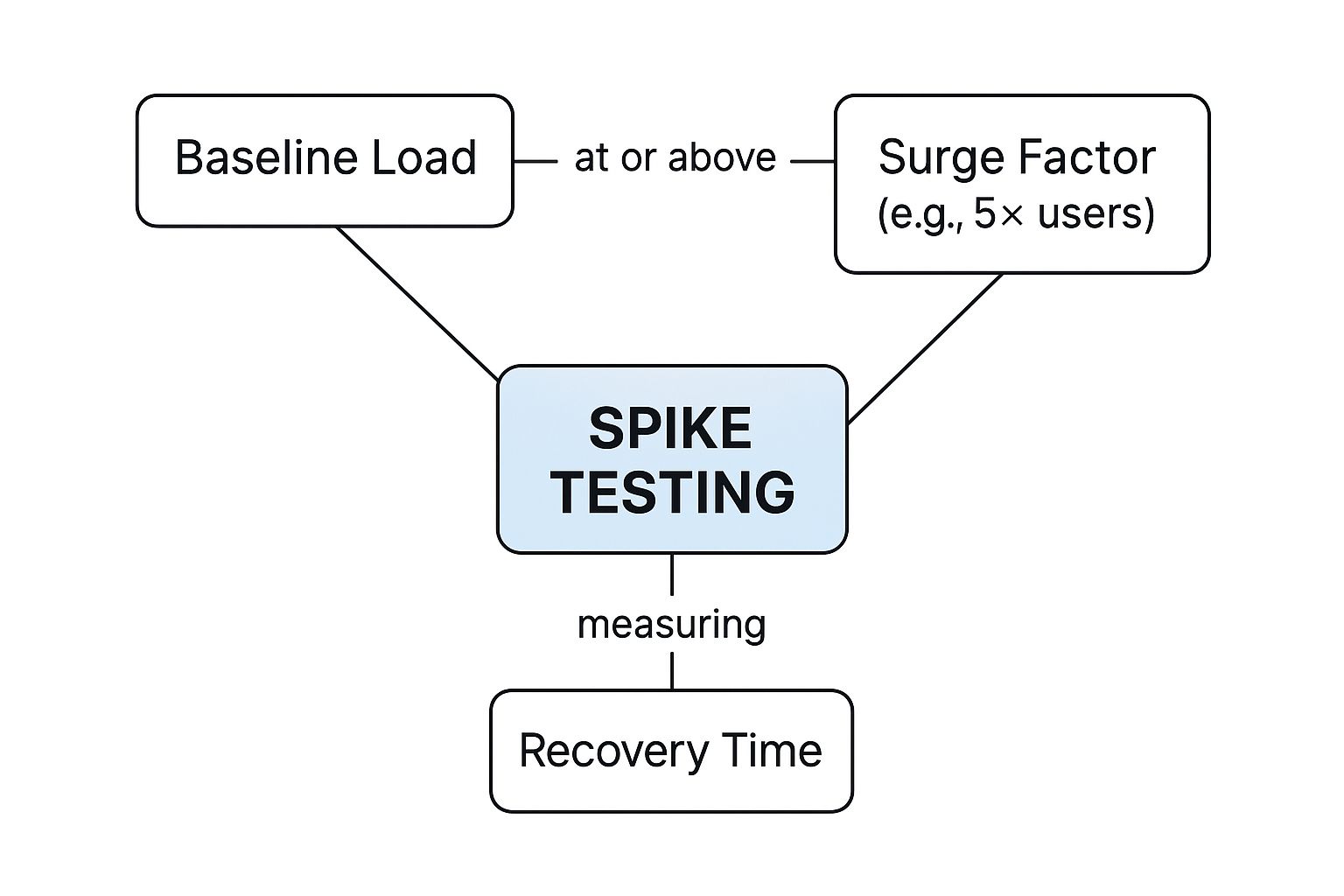
As you can see, the key insight isn’t just about weathering the storm. It’s about measuring the recovery time—how long it takes for everything to get back to normal.
Key Metrics for Extreme Condition Tests
For both stress and spike tests, the metrics you track tell the real story of your application’s durability. While things like response time and throughput still matter, the focus really shifts to resilience.
Here are the primary vitals to watch:
- Recovery Time: After you remove the extreme load, how long does it take for the system to return to its normal, stable state? A short recovery time is the hallmark of a resilient architecture.
- Failure Point: In stress testing, this is the hard number. It’s the exact user count or number of transactions per second where things break.
- Error Rate: A sudden jump in error rates during these tests can point you directly to the specific components that are buckling under pressure.
By putting your system through these brutal, real-world scenarios, you go beyond just checking boxes on a performance report. You start to truly understand its stability, and that knowledge is what separates a fragile app from one that’s genuinely robust and ready for whatever comes its way.
Testing for Long-Term Health and Future Growth

Stress and spike tests are great for handling those sudden, heart-stopping moments. But what about the slow, steady grind of daily use? A truly reliable application has to withstand that, too, and be ready to grow right alongside your business.
Great performance isn’t just about surviving a traffic surge. It’s about maintaining stability over the long haul and having a clear path to scale. This is where two other crucial performance testing types come in: endurance testing and scalability testing. They shift the focus from immediate threats to the long-term health of your system, helping you prevent slow decay and prepare for future success.
Uncovering Slow-Burning Issues with Endurance Testing
Also known as soak testing, this one’s a marathon, not a sprint. Instead of slamming your system with an overwhelming load, you apply a sustained, moderate load over a very long time—we’re talking hours, sometimes even days.
Think of it like a tiny, almost invisible leak in a pipe. You won’t notice it after a few minutes. But come back in a week, and you’ve got a flooded basement. Endurance testing is designed to find those slow-burn problems that only rear their ugly heads over time.
The real goal here is to prove your system can handle a continuous workload without its performance slowly degrading. It’s the ultimate test of stability and solid resource management.
These tests are uniquely good at uncovering sneaky issues like:
- Memory Leaks: The classic culprit. Your app grabs memory but forgets to give it back, slowly eating up resources until it finally keels over.
- Database Connection Issues: The test can reveal if your app is hoarding database connections instead of properly closing them, eventually running out.
- Performance Degradation: You can track whether response times creep up as the test runs on, which almost always points to hidden inefficiencies in your code.
Planning for Success with Scalability Testing
While endurance testing checks for long-term stability, scalability testing looks at long-term growth. It’s like city planning for your software. It answers the one question every stakeholder wants to know: “If we get more users, can our system handle it just by adding more hardware?”
This test helps you understand how your application behaves as your user base expands. It measures the system’s ability to “scale up” (adding more horsepower like CPU or RAM to a server) or “scale out” (adding more servers to the pool).
The results from scalability tests are gold for making smart, cost-effective infrastructure calls. They’ll tell you if adding another server will actually double your capacity, or if a hidden bottleneck means you’re just throwing money away.
In today’s world of Agile and DevOps, this kind of foresight isn’t optional. As continuous integration becomes the norm and applications grow more complex, you have to plan for growth. You can learn more about how market trends influence testing strategies on markwideresearch.com.
By running these forward-thinking tests, you’re not just building an application that’s reliable today. You’re building one that’s ready for whatever tomorrow throws at it.
How to Build a Modern Performance Testing Strategy
Knowing the different performance testing types is a great start, but building a proactive strategy is what turns that knowledge into a rock-solid, resilient application. Too many teams still treat performance testing as a final checkpoint before launch. The problem? By then, it’s already too late.
A modern approach flips the script entirely. It’s all about “shifting left”—making performance an integral part of your development workflow from day one. When you catch a performance issue early, it’s exponentially faster, cheaper, and easier to fix than one discovered right before a major release.
The best way to do this is by embedding automated performance tests directly into your CI/CD pipeline. Think of it as a safety net. Every single code change gets automatically checked against your performance benchmarks. This continuous feedback loop stops a sluggish feature from ever seeing the light of day, transforming testing from a one-time event into an unbreakable habit.
Choosing Your Testing Infrastructure
One of the first big decisions you’ll make is where your tests will actually run. The classic debate is between on-premise and cloud-based tools, and it’s a significant fork in the road.
On-premise solutions offer you total control over the hardware and environment. But that control comes at a cost: a hefty upfront investment and the constant headache of maintenance.
It’s no surprise that cloud-based tools have exploded in popularity. They offer incredible scalability and cost-effectiveness, letting you spin up massive tests on demand without owning a single server. This flexibility has made them the go-to for organizations looking to ditch infrastructure overhead. You can dive deeper into this market trend in this analysis of performance testing tools from businessresearchinsights.com.
A Framework for Continuous Testing
A solid strategy isn’t about running tests whenever you feel like it. You need a clear, repeatable process that ensures your efforts are always tied to what actually matters: business goals and user happiness. Forget chasing abstract metrics.
Here’s a practical roadmap to get you started:
- Define Business Objectives and SLAs: Don’t start with tools. Start with what’s most important to your users and the business. Define concrete, acceptable response times, error rates, and throughput for your most critical user journeys.
- Identify Critical User Journeys: Map out the most valuable paths people take through your application. This could be logging in, searching for a product, or, most importantly, completing a purchase.
- Select the Right Tools: Now you can think about tools. Based on your infrastructure choice (cloud vs. on-premise) and your tech stack, pick tools that fit your team’s skills and budget.
- Develop Test Scripts: Create automated scripts that genuinely simulate those critical user journeys you identified. Accuracy here is key.
- Integrate and Automate: This is where the magic happens. Weave these tests directly into your CI/CD pipeline so they run automatically with every new code commit.
- Analyze and Iterate: Performance testing is never “done.” Continuously review the results, hunt down and fix bottlenecks, and refine your benchmarks as your application grows and changes.
By following this framework, you make performance a shared responsibility. It’s no longer a task siloed in the QA department but a core principle of how you build high-quality software from the ground up. To see this in action, check out our complete guide to a modern performance testing strategy.
Still Have Questions? Let’s Clear a Few Things Up
As you get your hands dirty with performance testing, a few common questions always seem to pop up. Let’s tackle some of the most frequent points of confusion and get you the quick, practical answers you need.
What’s the Real Difference Between Performance and Load Testing?
This one trips up a lot of people. Think of performance testing as the entire discipline of making sure your system is fast, stable, and responsive. It’s the whole umbrella category.
Load testing, on the other hand, is just one specific type of performance test. It’s the one focused on simulating the typical, expected amount of user traffic. Performance testing is the big picture; load testing is a single, crucial snapshot within it.
How Often Should We Be Running These Tests?
Honestly? As often as you can. For modern teams working in a CI/CD pipeline, performance testing should be a constant, humming part of your development rhythm. Small-scale, automated tests should absolutely run with every single code commit.
Bigger, more intense tests like stress or endurance runs don’t need to happen every day. Schedule those for key moments—maybe weekly, or right before a major feature goes live. The golden rule here is to test early and test often. Catching problems small prevents them from snowballing into disasters.
Can We Actually Do Performance Testing Without Breaking the Bank on Tools?
Absolutely. You don’t need a massive budget to get started. The open-source world has given us an incredible lineup of powerful tools.
Heavy hitters like Apache JMeter, Gatling, and k6 offer everything you need to run sophisticated tests without paying for expensive licenses. While enterprise platforms come with dedicated support, these open-source options are more than enough to get most teams off the ground and testing effectively.
Ready to turn real user traffic into your most powerful testing asset? With GoReplay, you can capture and replay live production traffic to uncover issues before they impact your users. Stop guessing and start validating with real-world data. Learn more and get started for free.