
Performance Testing Load Testing: A Practical Guide
Look, everyone throws around the terms “performance testing” and “load testing,” often using them interchangeably. But they’re not the same thing, and confusing them can leave your system wide open to failure when real users show up.
Let’s clear this up with a simple analogy. Think of performance testing as a full-body physical for your application. It’s a broad, top-to-bottom evaluation of its speed, stability, and responsiveness under all sorts of conditions. Load testing, on the other hand, is a specific exercise within that physical—like checking your heart rate on a treadmill at a steady pace. It measures how the system behaves under a normal, expected amount of traffic.
What Are Performance Testing and Load Testing?
Getting this distinction right is the first step toward building a truly reliable and scalable application. If you don’t, you’re flying blind, and you’ll only discover your system’s weaknesses after your customers do.
Performance testing is the big-picture category. It’s the comprehensive check-up designed to assess the overall health of your software and answer broad questions about what your system can really do.
Load testing is a much more focused discipline. It’s not about pushing the system until it breaks or simulating a catastrophic failure. The goal is simple: confirm that the application can comfortably handle its anticipated, day-to-day user load without dragging its feet or degrading the user experience.
Distinguishing the Goals
The real difference comes down to what you’re trying to achieve. A full performance testing strategy is all about proactively hunting for weaknesses across a wide range of conditions to understand the complete performance profile of an application.
In contrast, a load test is designed specifically to validate system behavior under normal, everyday traffic. It’s not about finding the breaking point; it’s about making sure your system is ready for a typical Tuesday afternoon.
The insights you get from each are completely different, and both are vital:
- Performance Testing might tell you that your database grinds to a halt after 5,000 simultaneous connections.
- Load Testing will tell you if your app responds within two seconds when the expected 500 users are active.
The whole point is to stop making assumptions and start making data-driven decisions. When you understand how your system behaves under both expected and extreme conditions, you can fix bottlenecks before they cost you customers and cash.
To make it even clearer, here’s a quick side-by-side comparison.
Performance Testing vs Load Testing at a Glance
| Aspect | Performance Testing (The Umbrella) | Load Testing (The Subtype) |
|---|---|---|
| Primary Goal | Identify overall system bottlenecks, stability, and speed under various conditions. | Verify system behavior and stability under expected, normal user loads. |
| Key Metrics | Latency, throughput, error rates, resource utilization (CPU/memory), scalability limits. | Response time, throughput, concurrent user capacity, resource usage under normal load. |
| Question Answered | ”How fast is the system? Where are its breaking points? How does it scale?" | "Can the system handle our typical daily traffic without slowing down?” |
This table shows how load testing fits within the broader world of performance testing, each answering critical but different questions about your application’s health.
Why This Matters for Your Business
Don’t mistake this for a purely technical exercise. The business implications are massive.
The global performance testing market was valued at USD 6.5 billion in 2023 and is on track to hit USD 13.2 billion by 2032. Why the explosion? Because performance is a feature. In e-commerce, just a one-second delay in page load time can slash customer satisfaction by 16% and drop conversions by 7%.
You can dig into more of these performance testing growth trends on dataintelo.com. When you invest in a solid testing strategy, you aren’t just squashing bugs—you’re directly protecting revenue and your brand’s reputation.
Here’s the rewritten section, crafted to sound like it was written by an experienced human expert.
Why Your Business Can’t Afford to Skip These Tests
It’s one thing to know what performance and load testing are, but understanding why they matter is what separates a thriving business from one that’s constantly putting out fires. Skipping these tests isn’t just a technical shortcut—it’s a massive business risk with a direct line to your revenue, reputation, and customer loyalty.
Think about it. You’ve just launched a killer new feature or a massive holiday sale. Without proper testing, your biggest success could be your downfall. A sudden flood of traffic—the very thing you were hoping for—crashes your site. Instantly, you’re losing money and leaving a trail of frustrated customers who might never come back.
Or maybe it’s more subtle. A seemingly minor update introduces a performance bug that makes your whole app feel sluggish. That slow erosion of user experience is incredibly damaging. Patience wears thin, engagement drops, and the trust you’ve worked so hard to build starts to evaporate.
The Real Cost of Poor Performance
The financial hit from poor performance isn’t some abstract concept; it’s a real, tangible loss that shows up on the balance sheet. When a system buckles under pressure, the consequences are immediate and painful.
Here’s where it really hurts to skip performance and load testing:
- Direct Revenue Loss: Every minute your app is down or lagging during peak hours is a minute you aren’t making sales. For any e-commerce or transaction-based platform, that can easily mean thousands of dollars lost per minute.
- Damaged Brand Reputation: A public failure, like a site crashing during a Super Bowl ad or a Black Friday rush, can become a PR nightmare. It screams unreliability and can permanently tarnish your brand.
- Reduced Customer Loyalty: In a crowded market, users have zero patience for slow or broken apps. A bad experience is one of the fastest ways to send them straight to your competitors.
Proactive testing flips this dynamic on its head. It shifts your team from a reactive, firefighting mode to a proactive state of quality assurance, stopping costly outages before they ever have a chance to happen.
Building a Foundation of Reliability
Reliability doesn’t happen by accident. It’s the result of a deliberate, continuous commitment to quality. By weaving performance and load testing into your development lifecycle, you’re building a safety net that catches problems before they ever reach your users. It’s how you ensure your application stays solid and responsive when it matters most.
The entire industry is waking up to this reality. The global performance testing market is on track to hit USD 1.52 billion in 2025 and is projected to more than double to USD 3.64 billion by 2034, fueled by the rise of digital-first business and DevOps. This trend includes a staggering 60% jump in AI-driven testing adoption between 2022 and 2024 as companies hunt for smarter ways to simulate load. You can dig into these performance testing market trends on businessresearchinsights.com to see the data for yourself.
At the end of the day, investing in robust testing isn’t just an IT expense. It’s a direct investment in a superior user experience, stronger customer loyalty, and the long-term health of your business.
Exploring the Full Spectrum of Performance Tests
While load testing confirms your application can handle a typical day, it’s only one piece of a much larger puzzle. A truly resilient system needs a broader performance testing strategy, with different tests designed to answer specific, critical questions.
Think of it like a boxer’s training regimen. You wouldn’t just practice one punch, right? You need a full arsenal to be ready for anything that comes your way in the ring.
A comprehensive approach involves pushing your system in different ways to uncover unique weaknesses. This means going beyond expected traffic to simulate extreme conditions, prolonged use, and sudden, chaotic events. Each test type reveals how your application behaves when pushed to its limits, ensuring it’s not just stable for today, but ready for the future.
This infographic shows how a robust testing strategy directly protects key business outcomes, forming a shield for your entire operation.
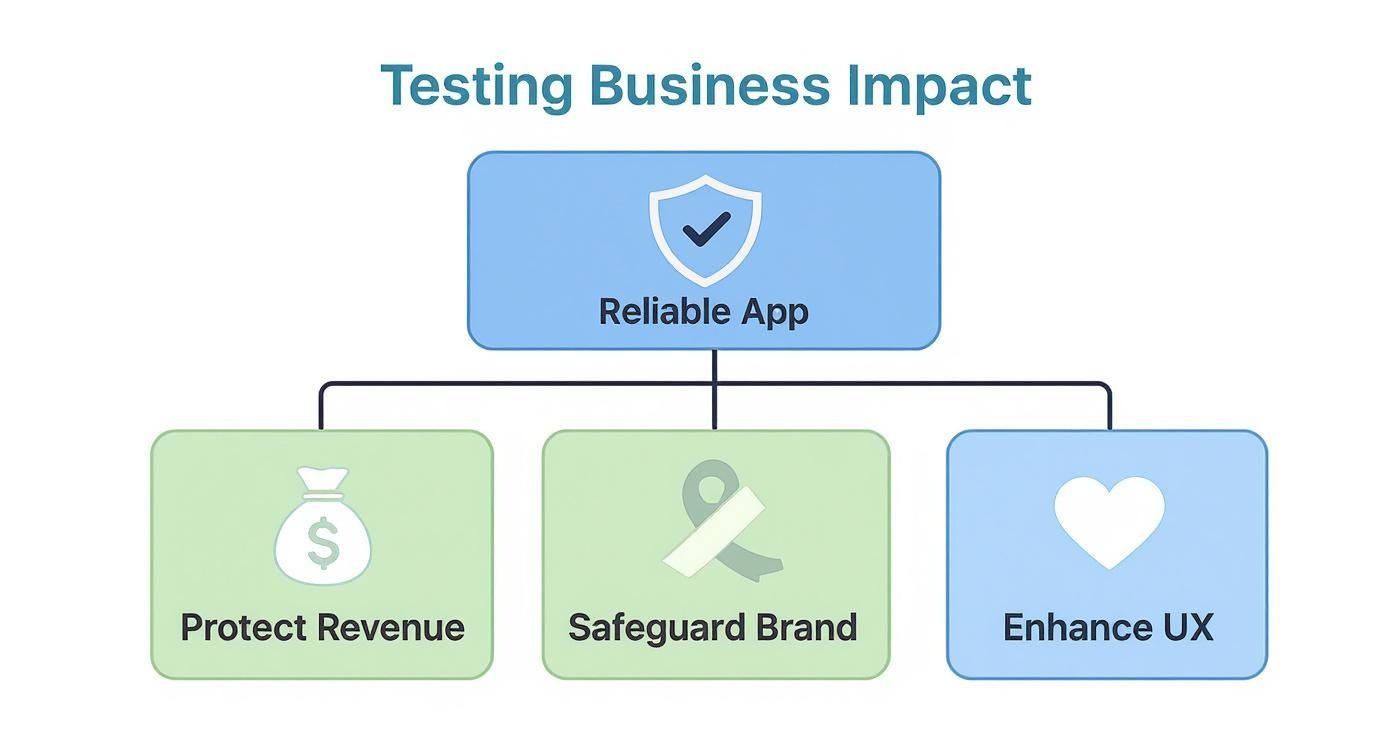
Ultimately, building a reliable app isn’t just a technical goal. It’s a business necessity that safeguards revenue, protects your brand, and creates a better user experience.
Pushing Past the Limit with Stress Testing
Stress testing is all about answering one question: “Where is the breaking point?” Unlike load testing, which stays within expected limits, stress testing intentionally overloads the system to see what fails first.
Imagine an elevator with a posted weight limit. Load testing confirms it can handle a full car of people. Stress testing is like adding more and more weight until the cables finally give way. The goal isn’t just to watch it crash, but to find out precisely how much it can take before it does. This test reveals your system’s maximum capacity and identifies the weakest link under extreme pressure—whether it’s the database, network, or application server.
You absolutely want to run stress tests before major events you know will drive massive traffic, like a Black Friday sale or a viral marketing campaign.
Going the Distance with Endurance Testing
Endurance testing, sometimes called soak testing, is the marathon of performance tests. It checks for problems that only appear over long periods of sustained use. The goal here is to answer, “Can our system run smoothly for hours or even days without degrading?”
This type of test is crucial for uncovering subtle but serious issues, such as:
- Memory Leaks: Where the application slowly eats up more and more memory over time until it eventually crashes.
- Performance Degradation: When response times gradually get worse the longer the system is running.
- Database Connection Failures: Problems that arise from connections not being properly closed after prolonged use.
For any application that needs to run 24/7, endurance testing is non-negotiable. It proves your system has the stamina to perform consistently without needing frequent restarts.
By identifying these slow-burn issues, you prevent gradual performance decay that frustrates long-term users and leads to unexpected outages. Endurance testing builds confidence in your application’s long-term stability.
Handling Sudden Surges with Spike Testing
Spike testing simulates a sudden, massive burst of traffic to see how your system reacts. Instead of a gradual ramp-up of users, a spike test throws an overwhelming number of users at the application all at once.
The key question is, “Can the system recover from an unexpected tidal wave of activity?”
This is vital for scenarios like a celebrity tweeting a link to your site or a news story breaking that features your product. A spike test evaluates two things: how well the system performs during the sudden surge and, just as importantly, how quickly it returns to normal afterward. It’s the ultimate test of your application’s elasticity and recovery mechanisms, ensuring a sudden rush of success doesn’t bring your entire operation to a halt.
Key Metrics That Reveal Your Application’s Health
Running a load test is just the beginning. The real magic happens when you start digging into the results. The data your tests spit out tells a detailed story about your app’s health, but only if you know which numbers to watch. These metrics are the vital signs that shift you from just running tests to making smart, data-driven improvements.
Think of it like a car’s dashboard. You don’t just get a single “car health” light. Instead, you monitor specific gauges—speed, RPM, engine temperature, fuel level—to get the full picture. Performance metrics work the same way, giving you a granular view of how your system behaves under pressure.
User-Facing Performance Metrics
The metrics that matter most are the ones that directly impact your users. If these numbers look bad, your users are feeling the pain, period. Slowdowns and errors are the fastest way to send them running to your competitors.
Here are the key indicators of what your users are actually experiencing:
- Response Time: This is the big one. It’s the total time from a user’s click to getting a full response back. It’s a direct measure of your app’s speed from their perspective.
- Error Rate: Calculated as the percentage of failed requests out of the total. A rising error rate is a massive red flag that your system is cracking under the load.
- Throughput: This measures how many requests your application can successfully handle, usually in requests per second (RPS). It’s a fundamental measure of your system’s raw capacity.
These three metrics are the bedrock of any solid performance analysis. To go even deeper, check out this essential performance testing metrics guide for a complete picture. A low response time, high throughput, and a near-zero error rate is the trifecta you’re aiming for.
Server-Side Health Indicators
While users feel the symptoms of poor performance, the root causes are almost always hiding on the server. These metrics help you diagnose the why behind a slowdown or a spike in errors. Without monitoring your infrastructure, you’re just guessing.
Think of it this way: a slow response time is the symptom, but high CPU utilization is the diagnosis. Without server-side metrics, you’re flying blind.
Keep a close eye on these server-side vitals:
- CPU Utilization: Shows how much of your processor’s power is being used. If the CPU is constantly pinned at 100%, your server is completely overworked and can’t process requests efficiently, leading to frustrating delays.
- Memory Usage: Tracks how much RAM your application is consuming. A steady, creeping increase in memory usage often points to a memory leak—a nasty bug that can eventually crash your entire system.
- Disk I/O: Measures how fast your server’s storage can read and write data. If your disk is the bottleneck, any part of your app that needs to access files or a database will grind to a halt.
Getting a handle on these metrics is more important than ever. The performance testing market, valued at USD 926.6 million in 2024, is growing fast, with the IT and telecom sector making up about 30% of that demand. But here’s a shocker: despite clear benefits, a staggering 47% of small businesses are still stuck with manual testing, struggling with the costs and expertise required. By mastering these key metrics, you can make sure your testing efforts actually deliver results and keep your application humming along smoothly.
Simulating Real User Behavior with GoReplay
Let’s be honest: traditional load tests have a huge blind spot. They’re just too clean. Most of them run on synthetic scripts that follow neat, predictable paths, which is nothing like the beautifully chaotic way real people use an application. This is where modern tools like GoReplay completely change the game for anyone who’s serious about getting their performance testing right.
Instead of guessing what your users might do, why not just use what they’ve already done? GoReplay introduces a powerful method called traffic shadowing, or traffic replay. The idea is brilliantly simple: capture your live production traffic and replay it in a safe, isolated test environment. This gives you a hyper-realistic load test that’s guaranteed to find issues synthetic scripts would miss.
This screenshot from the GoReplay homepage gets right to the point—testing with real traffic gives you confidence.

It’s all about moving from simulated loads to the real deal, which is a massive step up in authenticity.
The Power of Authentic User Traffic
Think about stress-testing a new bridge. A classic load test is like sending a perfectly spaced convoy of identical trucks across it one by one. It’s orderly, but it’s not real.
Traffic shadowing, on the other hand, is like recreating an actual rush hour—complete with sports cars weaving through traffic, delivery vans making sudden stops, and everything in between. That’s the messy, unpredictable flow you actually need to test for.
This approach delivers a level of authenticity that scripted tests just can’t touch. You aren’t just testing a handful of user journeys you came up with; you’re testing all of them. That includes the weird edge cases and unexpected sequences that only happen out in the wild. This is how you stop guessing what your user load looks like and start knowing.
By replaying actual production requests, you validate your system’s performance against the truest possible measure of its workload. This method exposes bottlenecks that only emerge from the complex interplay of diverse, concurrent user actions.
Key Benefits of Traffic Shadowing
Using a traffic replay strategy with a tool like GoReplay brings immediate, tangible advantages over writing scripts by hand. It closes the gap between your test environment and reality, which means you can actually trust your results.
Three major benefits stand out:
- Unmatched Realism: Your test load is a perfect mirror of your production traffic. It has the exact same mix of requests, headers, and user session patterns, which helps uncover performance issues tied to specific data combinations or user flows.
- Drastically Faster Setup: Writing and maintaining complex load testing scripts is a huge time sink. With traffic shadowing, you skip the scripting entirely. Your team can set up robust, realistic tests in a fraction of the time.
- True Production-Scale Testing: You can test with a genuine production-level load without putting your live environment at risk. This lets you accurately see how your infrastructure will handle peak traffic and find scaling issues before they hit real customers.
This method completely transforms your testing. To dig deeper, check out our guide on how traffic replay improves load testing accuracy for more detail.
How GoReplay Works in Practice
GoReplay works by listening to network traffic on your production server. A tiny, lightweight agent captures HTTP requests and their responses, saving them to be replayed later. The best part? It does this without affecting the performance of your live application at all.
Once you’ve captured the traffic, you can replay it against a staging or test environment at any scale you want. You can run it at the original speed (1x), or you can crank it up to 10x or even 100x to simulate a massive traffic spike. It’s a smarter, faster, and far more reliable way to make sure your application is ready for anything.
Getting Testing Right: Best Practices from the Field
Having the right tools is half the battle, but your strategy is what really wins the war. True success in performance and load testing comes from how you plan, execute, and analyze your tests. Adopting a few key habits can turn testing from a reactive bug hunt into a proactive way to build genuinely tough systems.
These aren’t just about finding problems; they’re about preventing them from happening in the first place. When you make testing a core part of your development culture, you build quality into your application from day one, rather than trying to bolt it on at the end.
Shift Left: Test Early and Often
One of the biggest game-changers is to “shift left”—which is really just a fancy way of saying you should test much earlier in the development process. Don’t wait until a feature is supposedly “done” to see how it performs under pressure. Why? Because the later you find a bottleneck, the more tangled and expensive it is to fix.
By running performance checks with every single code change, you catch issues when they’re small and easy to squash. This turns testing into a continuous feedback loop, not a last-minute gatekeeper that everyone dreads.
Define What “Good” Looks Like
Before you run a single test, you need to know what you’re aiming for. What does success actually look like for your application? Without clear, measurable goals, you’re just collecting data in a vacuum. Your goals have to be specific and tied directly to the user experience and business outcomes.
A useless goal is “the app should be fast.” A great goal is “the checkout page must load in under 2 seconds with 500 concurrent users.” Clear targets like this remove all the guesswork and give you a simple pass/fail for your tests.
Start by nailing down your key success metrics:
- Target Response Times: How quickly must key user actions complete?
- Throughput Requirements: How many requests per second does the system need to handle?
- Acceptable Error Rate: What percentage of errors can you live with under peak load?
Set Your Performance Baseline
You can’t know if you’re getting better or worse if you don’t know where you started. Establishing a performance baseline is a non-negotiable first step. This just means running a set of tests against a stable version of your app to get a snapshot of its current performance.
This baseline becomes your yardstick. Every test result that comes after can be measured against it, making it painfully obvious if a new feature has slowed things down. Without a baseline, you’re flying blind and just guessing at the impact of your changes.
Make Testing a Habit, Not an Event
Performance testing isn’t something you do once right before a big launch. It’s a continuous process. Your application, your users, and your infrastructure are always in flux. A system that ran smoothly last quarter might buckle under the weight of new features or a surge in traffic.
The best teams treat performance and load testing as an ongoing discipline. They bake it right into their CI/CD pipelines, automating tests so they run constantly. This approach keeps performance top-of-mind throughout the entire development cycle, protecting the user experience with every single release. It builds a culture where performance is everyone’s job, and that’s how you build software that lasts.
Got Questions? We’ve Got Answers
Let’s tackle some of the common questions that pop up when teams first dive into performance and load testing. These are the practical, real-world concerns we see all the time.
How Often Should We Run Performance Tests?
Honestly? As often as you possibly can.
The best-case scenario is to weave performance testing directly into your CI/CD pipeline, making it an automated check for every single commit. This “continuous testing” approach helps you catch performance hiccups early, right when they’re easiest to fix.
Of course, for major releases or before big events like a Black Friday sale, you’ll want to run more intensive load, stress, and endurance tests. The goal is to make performance testing a regular, predictable habit instead of a last-minute fire drill.
What Is the Biggest Mistake in Load Testing?
The single most common (and most damaging) mistake is testing with fake, unrealistic user traffic. So many teams fall into the trap of writing simple, repetitive scripts that don’t come close to capturing the messy, unpredictable nature of a real user base.
This creates a dangerous false sense of security. Your system might pass the test with flying colors, but it’s completely unprepared for the chaos of the real world.
A system that passes a predictable, scripted test can still easily fail under the messy, unpredictable patterns of actual users. This is precisely why traffic shadowing with tools like GoReplay is so valuable—it replaces guesswork with reality.
Using real traffic patterns means you’re testing against what your system will actually face, not just an idealized simulation. It’s the difference between being truly prepared and just crossing your fingers.
Can I Run Load Tests on a Live Environment?
That’s a hard “no.” Running heavy load tests directly on your live production environment is a recipe for disaster. It’s a high-risk gamble that can cripple the experience for your actual users or, even worse, cause a complete outage.
The best practice is to use a dedicated staging environment that’s a mirror image of your production setup—same hardware, same software, same configuration. This gives you a safe sandbox to run tests accurately without putting your customers at risk. Traffic shadowing is what bridges the gap, bringing the realism of production traffic to this safe staging environment.
When Should We Start Performance Testing?
The sooner, the better. You should start thinking about performance from the very first line of code. This “shift-left” approach means making performance a core part of the development process, not just something you check right before launch.
When you integrate performance checks early, your team can spot and fix bottlenecks when they’re still cheap and simple problems to solve. Finding a major architectural flaw a week before launch is a catastrophe; finding it in the early coding phase is just a routine fix. By making performance testing a continuous part of development, you build quality in from the ground up.
Ready to stop guessing and start knowing how your application performs under real-world pressure? GoReplay empowers you to capture and replay real production traffic for the most accurate load tests possible. Get started with GoReplay today and test with confidence.