
Manual Test vs Automated Test: Key Differences Explained
The whole manual vs automated test debate really boils down to one thing: human intuition versus machine efficiency. On one hand, you have manual testing, which lets a real person explore an application, finding those weird usability flaws and unpredictable bugs that only a human would notice. On the other, you have automated testing, which uses code to hammer out thousands of repetitive checks with incredible speed and precision.
The right answer is never just one or the other. It’s always about finding the right mix for what your project actually needs.
Understanding Core Testing Philosophies
To make the right call, you have to stop thinking of manual and automated testing as competitors. They’re completely different philosophies, built for different jobs.
Manual testing is all about the human element. It’s an exploratory process that shines when you need creativity, deep domain knowledge, and a real feel for the user experience. A human tester can spot a visual glitch that’s just a little off, judge the intuitive flow of a new feature, or go completely “off-script” to find bugs a rigid automated check would never catch.
Automated testing, in contrast, is a code-driven discipline. It’s built for validation and repetition. Its power is in running thousands of tests flawlessly every single time you push a code change, making sure core features don’t break. This makes it a non-negotiable for regression testing, performance validation, or anything that involves checking tons of data.
The real difference isn’t just human vs. machine; it’s exploration vs. verification. Manual testing asks, “What happens if I do this?” while automated testing confirms, “Does this still work like it’s supposed to?”
Breaking Down the Fundamentals
The value of each approach gets a lot clearer when you put their core attributes side-by-side. While manual testing offers flexibility and deep insights, automation brings the scale and reliability you need to move fast.
The business case for automation is also getting stronger. Companies are seeing a real return on investment (ROI) from adopting test automation—around 25% report seeing an immediate ROI, mostly from cutting down the huge costs of manual regression testing. If you want to dig deeper, check out some software testing statistics; the market is on track to hit $29.29 billion by 2025.
This infographic breaks down the key differences in focus, speed, and what each is best used for.
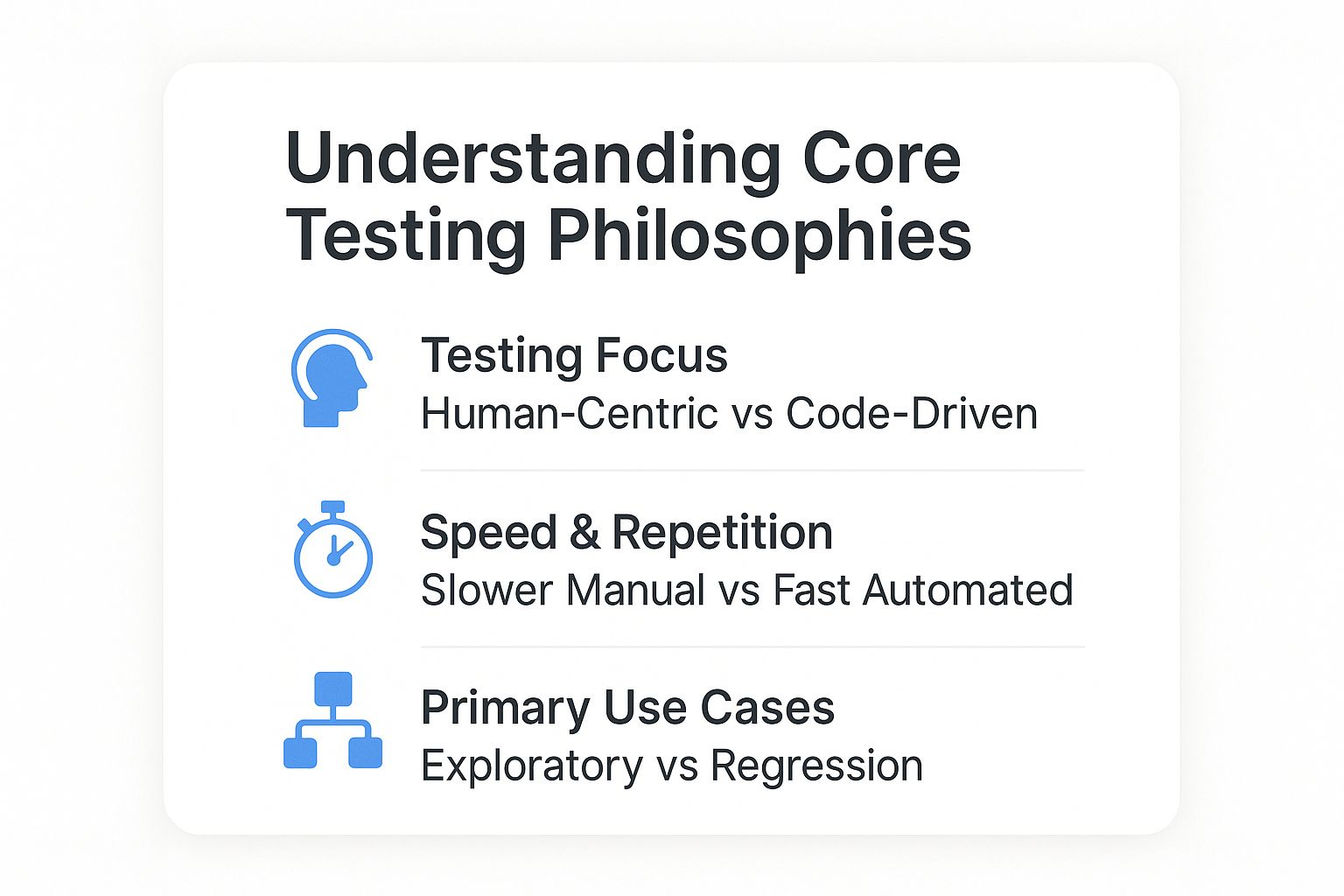
As you can see, manual testing is fundamentally about human-centric exploration. Automation, on the other hand, is code-driven, prioritizing speed for repetitive tasks like regression checks.
For a quick summary, the table below lays out the foundational differences. It’s a good starting point before we dive into the specific strengths and ideal situations for each method.
Quick Comparison: Manual vs Automated Testing
| Attribute | Manual Testing | Automated Testing |
|---|---|---|
| Execution | Human-driven, step-by-step | Script-driven, machine-executed |
| Best For | Usability, exploratory, ad-hoc | Regression, performance, load tests |
| Speed | Slower, limited by human pace | Extremely fast, highly scalable |
| Initial Cost | Lower (primarily labor) | Higher (tools, setup, skills) |
| Long-Term Cost | High for repetitive tests | Lower for repetitive tests |
| Accuracy | Prone to human error | Highly consistent and precise |
This table gives you a high-level view, but the real magic happens when you understand when and why to choose one over the other.
A Nuanced Look at What Really Separates Manual and Automated Testing
To really get to the bottom of the manual vs. automated testing debate, you have to go beyond the surface. The real differences that shape your project aren’t just about speed—they’re about long-term cost, the scope of what you can test, and the distinctly human skills involved.

It’s easy to get tripped up by the initial numbers. Manual testing looks cheaper at first glance because you’re just paying for labor. But as your application scales and regression testing becomes a constant grind, those operational costs start to balloon, eating up valuable engineering time on tasks a machine could do.
Automated testing flips that script. It requires a hefty upfront investment in tools, infrastructure, and skilled engineers who can write solid test code. The payoff comes later. Once those scripts are built, you can run them thousands of times for practically nothing, slashing the cost and time of every single release cycle.
Scope and Depth of Coverage
This is where the two approaches really diverge. Manual testing is the king of depth and qualitative feedback. A human tester can spot a clunky user journey, an awkward UI element, or an illogical workflow in a way no script ever could. This is how you catch the bugs that aren’t technically failures but are absolute user experience disasters.
On the other hand, automation is the champion of breadth. It can blast through thousands of test cases across countless environments and configurations at once, giving you a level of coverage that’s physically impossible for a manual team. This is your safety net, ensuring a new feature doesn’t secretly break something on the other side of the application.
The real trade-off isn’t just about what you test, but how you test it. Manual testing provides deep, narrow insights, while automated testing offers broad, consistent validation. A mature testing strategy needs both.
The relationship here is collaborative, not competitive. Great automation scripts are often born from insights gained during manual exploratory testing. In turn, automation frees up your human testers to do what they do best: think creatively and use their intuition. If you want to dive deeper into this synergy, you can discover insights on how manual and automated testing win together.
Skill Requirements and Human Involvement
The talent you need for each discipline is fundamentally different. Great manual testing isn’t just about following a checklist; it takes deep domain knowledge, a curious mind, and the ability to think like your most confused user. The best manual testers are creative problem-solvers who have a sixth sense for finding weak spots.
Automation is a pure software development discipline. An automation engineer needs to be a proficient programmer, understand testing frameworks inside and out, and know how to build a scalable, maintainable test suite. They are developers whose product is quality assurance.
Think of it like this:
- Manual QA Tester: Their focus is on user empathy, exploratory testing, and finding usability flaws. Their primary tool is their own critical thinking.
- Automation Engineer: Their focus is on writing clean, efficient, and resilient test code. Their primary tools are programming languages and automation frameworks.
The True Cost of Human Error
One of the biggest factors that often gets overlooked is plain old human error. Manual testing is inherently vulnerable to mistakes, especially during those long, mind-numbing regression cycles. A tester might skip a step, miss a tiny visual glitch, or just have an off day. The result? Inconsistent test outcomes.
Automation completely removes that variable. A script performs the exact same steps, with the same precision, every single time it runs. This repeatability is automation’s superpower. It guarantees that if a bug slips in, the test will catch it, providing a reliable safety net that manual processes just can’t match. This is precisely why automation is the backbone of any modern CI/CD pipeline, where speed and accuracy are non-negotiable.
When to Prioritize Manual Testing
While automation’s speed gets all the attention, the real art in the manual vs. automated testing debate is knowing when a human’s judgment is simply irreplaceable. Some scenarios don’t just benefit from manual testing—they absolutely demand it. This isn’t about slowing things down; it’s about adding a layer of qualitative insight that scripts can’t even begin to touch.

Manual testing is the only real way to measure the actual user experience. Sure, a script can tell you if a button works. But it can’t tell you if its placement is awkward, if the color is jarring, or if the entire workflow just feels clunky. Human testers bring context and empathy to the table, sizing up an application’s flow, aesthetics, and overall usability with a critical eye.
This is especially true for apps with complex or dynamic user interfaces. Think about a graphic design tool with drag-and-drop features or a busy data visualization dashboard. A person can instantly spot rendering glitches, weird animations, or layout problems that an automated test—just looking for specific element IDs—would fly right past.
Championing Exploratory and Ad-Hoc Testing
Where manual testing truly shines is in exploratory testing. This is where a tester puts on their “curious user” hat and intentionally veers off the happy path to see what breaks. The goal isn’t just to validate known requirements. It’s to uncover unknown bugs and see how the system behaves under unpredictable conditions.
For example, a tester might try:
- Pasting strange characters into form fields.
- Performing actions in a completely illogical order.
- Clicking multiple elements in rapid succession just to see what happens.
These unscripted, intuitive actions are the heart of ad-hoc testing, and they do a great job of simulating how real people often chaotically interact with software. No automated script can be programmed to have a “hunch” or follow a whim, yet these are the very actions that often expose the most critical, show-stopping defects. For a deeper dive into structuring these tests, check out our comprehensive guide on how to write test cases for quality assurance.
Manual testing isn’t about following a script; it’s about writing the story of what could go wrong. It thrives in ambiguity and is designed to answer the question, “What haven’t we thought of yet?”
Scenarios Demanding Human Intuition
Automation is a beast at repetitive tasks, but it falls flat where interpretation and subjective feedback are needed. In these moments, manual testing isn’t just a preference—it’s essential for shipping a high-quality product that people will actually enjoy using.
Think about these specific use cases where manual oversight is completely non-negotiable:
- Initial Feature Validation: When a feature is brand new, it’s often unstable and its requirements are still in flux. Manual testing gives developers quick, flexible feedback so they can iterate fast, without the headache of writing and maintaining brittle automation scripts.
- Usability and Accessibility Testing: Judging whether an app is intuitive, easy to navigate, and accessible to users with disabilities requires a human touch. A person can evaluate screen reader compatibility, color contrast, and logical navigation in ways automation simply can’t.
- Complex Installation and Configuration: Verifying that a product installs correctly across different environments often involves tricky, one-off steps. Human observation is critical here to spot setup failures or confusing instructions.
When to Prioritize Automated Testing
While manual testing gives you irreplaceable human insight, some scenarios just scream for the speed, scale, and rigid consistency only automation can offer. In the endless debate of manual vs. automated testing, knowing when to unleash your scripts is just as vital as knowing when to trust a human’s intuition. Automation isn’t just about going faster; it’s about building a rock-solid, scalable safety net for your application.
The industry is clearly leaning into automation. Recent data shows 46% of teams have already automated half or more of their manual testing, and a full 20% have replaced 75% or more. This isn’t just a trend; it’s a strategic shift driven by the need to shrink test cycles and boost reliability. After all, a good script can rip through thousands of tests in minutes. You can see how the landscape is changing with recent test automation statistics.
The Backbone of Modern Development: Regression Testing
If there’s one killer use case for automated testing, it’s regression testing. Every single time a developer pushes new code, there’s a nagging risk that it broke something totally unrelated. Manually re-testing every core function after every tiny update isn’t just painfully slow—it’s a one-way ticket to team burnout and missed bugs.
This is where automation completely changes the game. A well-oiled regression suite can fire off hundreds or even thousands of checks automatically, confirming that all your core features still work as expected. It ensures new features don’t accidentally wreck existing stability, giving you a consistent quality baseline for every single release.
Automation excels where human attention fails. It turns monotonous, error-prone tasks like regression testing into a fast, reliable, and fully automated process, freeing up QA engineers for more complex challenges.
A solid automation framework is non-negotiable for any modern CI/CD pipeline. It lets teams deploy changes with real confidence, knowing their application’s core is protected. If you’re just starting to formalize your process, creating a clear test automation strategy is a crucial first step.
Simulating Reality: Performance and Load Testing
Need to know how your app will hold up under a stampede of users? Manual testing won’t even get you to the starting line. Performance and load testing is a domain where automation is the only game in town. It’s simply impossible for a team of humans to simulate the traffic of thousands of concurrent users hammering your servers.
Automated scripts, on the other hand, can generate that kind of load without breaking a sweat. They can simulate everything from a sudden traffic spike to sustained, high-volume usage, letting you pinpoint bottlenecks, measure response times, and find your system’s breaking point. This is absolutely essential for making sure your application stays stable and responsive for everyone, even when traffic goes through the roof.
Conquering Scale with Data-Driven Testing
Another area where automation is the clear winner is data-driven testing. This is all about running the same test over and over with a massive set of different inputs. Think of testing a loan calculation feature with thousands of different interest rates, loan amounts, and term lengths.
Trying to enter each combination by hand would be an incredible waste of time and a breeding ground for typos and errors. An automated script can just pull data from a spreadsheet or database, run the test against every single entry, and validate the results in a tiny fraction of the time. This gives you bulletproof coverage for your most critical, data-sensitive workflows.
Building an Effective Hybrid Testing Strategy
The whole debate over manual vs automated testing is built on a false choice. Pitting them against each other completely misses the point. The real goal is to build a hybrid model that uses the unique strengths of both to create a system far more powerful than either approach could be on its own.
This isn’t about compromise; it’s about creating a symbiotic relationship. A smart hybrid strategy weaves manual and automated testing into a single, seamless workflow inside a modern agile or DevOps pipeline, where each makes the other more effective.
Creating a Powerful Feedback Loop
At the heart of any strong hybrid strategy is a continuous feedback loop. It usually starts with manual exploratory testing, where a QA engineer’s creativity and intuition can uncover the kind of nuanced bugs, usability quirks, and confusing workflows that a script would never find. These discoveries do more than just flag one-off problems; they provide critical intelligence.
That human-driven insight is then used to pinpoint the most valuable and high-impact test cases to automate next. Instead of trying to automate everything, you focus your efforts where manual testing has already proven something is complex, critical, or a frequent source of regressions.
This creates a powerful, self-improving cycle:
- Manual Exploration: Human testers dive into new features, finding those unique bugs and usability flaws that scripts just can’t see.
- Strategic Automation: The most critical and repetitive checks discovered during exploration get turned into robust, automated regression tests.
- Increased Capacity: With the regression burden lifted by automation, manual testers get their time back to focus their creative energy on the next set of new features.
A hybrid model transforms your QA process from a simple checklist into an intelligent system. Manual testing guides the automation strategy, and automation creates the bandwidth for deeper manual discovery.
Defining Roles in an Integrated System
In a solid hybrid model, each testing type has a clear, distinct job. This division of labor makes sure you’re always using the right tool for the task at hand, which maximizes both your efficiency and the quality of the final product.
Think of it as a practical breakdown of responsibilities. Manual testing becomes the home of creativity and user-centric evaluation, while automation handles the repetitive, systematic checks needed to maintain stability at speed.
To put this into practice, here is a breakdown of how the responsibilities are typically split in a high-functioning hybrid model.
Hybrid Testing Model Responsibilities
| Testing Activity | Primary Approach | Rationale |
|---|---|---|
| New Feature Validation | Manual | Essential for providing quick, flexible feedback on unstable features where requirements are still changing. |
| Regression Testing | Automated | Ensures that new code changes do not break existing functionality, a task too repetitive and error-prone for humans. |
| Usability & UX Testing | Manual | Requires human empathy and subjective judgment to assess the look, feel, and intuitive flow of the application. |
| Performance & Load Testing | Automated | The only feasible method to simulate thousands of concurrent users to test system stability and response times. |
| Exploratory & Ad-Hoc Testing | Manual | Relies on human curiosity and intuition to discover unpredictable edge cases and “unknown unknown” bugs. |
By strategically assigning these roles, you build a comprehensive quality net that catches almost everything. This approach doesn’t just find more bugs; it helps you build a more resilient and user-friendly product. The argument of manual vs automated testing simply disappears, replaced by a collaborative strategy that drives both development velocity and deep product quality.
Beyond Scripts: Testing with Real User Traffic
So, we’ve talked about the hybrid model, which cleverly mixes the strengths of manual and automated testing. But here’s the catch: both approaches share a fundamental weakness. They test what you think users will do, not what they actually do.
This gap between your neat, tidy test scripts and the chaotic reality of production is where the most dangerous bugs love to hide.
That’s where traffic shadowing (or replay testing) comes in. Instead of inventing hypothetical scenarios, you capture actual user traffic from your production environment and replay it against a test or staging server. It’s like having a perfect mirror of real user behavior, offering a level of validation that scripted methods just can’t touch.
GoReplay: Your Window into Real-World Chaos
Tools like GoReplay are built specifically for this. It’s an open-source tool that listens to your production traffic, records every request, and then faithfully replays it all in a safe, controlled environment. This lets you test new code against the messy, unpredictable, and downright weird ways people interact with your application.
This approach is fantastic for uncovering edge cases you’d never dream of scripting. For instance, you can finally see how your system handles:
- Unexpected API call sequences from that old version of your mobile app a few users are still running.
- Malformed requests coming from third-party integrations or aggressive web scrapers.
- Complex concurrent user actions that create subtle race conditions or database deadlocks.
The GoReplay dashboard gives you a clear visual of how traffic flows from production to your test environment without ever putting your live system at risk.
As you can see, GoReplay acts as a safe middleman, capturing live traffic and redirecting it for analysis so your production environment remains completely untouched.
Building Genuinely Resilient Systems
Adding a tool like GoReplay on top of a hybrid strategy gives you a powerful layer of real-world validation. It becomes the ultimate regression test, confirming that new code isn’t just functionally correct but also fully backward-compatible with how your current users behave. It’s also a far more effective way to load test, since you’re simulating your actual traffic patterns, not just a generic load profile.
By replaying real production traffic, you stop verifying code against requirements and start validating it against reality. That shift is what separates a correct system from a truly resilient one.
This technique helps you answer the most critical questions before you hit deploy: “Will this change break anything for our existing users?” or “Can our infrastructure handle our typical peak traffic with this new code?” By making real user traffic a core part of your testing loop, you finally bridge the gap in the manual vs automated test debate and build an application that’s ready for anything.
Common Questions About Testing Strategies
When you’re trying to figure out the right mix of manual and automated testing, a few questions always come up. Getting these answers right helps you build a strategy that actually works.
Can Automated Testing Completely Replace Manual Testing?
The short answer is no. Automation is a beast for repetitive, high-volume tasks like regression tests, but it has zero human intuition. It can’t tell you if a user experience feels right, creatively explore an application for weird edge cases, or judge visual design.
The best QA strategies don’t replace humans; they free them up. Automation grinds through the monotonous, rule-based work, letting your skilled testers focus on the high-impact stuff that requires a human brain—like exploratory testing and real usability validation.
What Is the True Cost Difference?
At first glance, manual testing looks cheaper. The initial costs are almost all labor. Automated testing, on the other hand, requires a real upfront investment in tools, infrastructure, and the salaries of skilled automation engineers.
But the real cost shows up over the long term. If you have frequent release cycles, automation delivers a massive return on investment. It slashes the manual hours needed for every single regression run, making it far more cost-effective over time.
That initial expense for automation starts paying for itself with every release, thanks to faster feedback loops and lower operational drag.
Which Test Cases Should We Automate First?
A smart automation plan starts with smart priorities. Don’t try to automate everything at once—you’ll get bogged down. Instead, target the areas that give you the biggest and fastest return on your effort.
The best candidates for your first wave of automation usually have a few things in common.
Start with test cases that are:
- High-Impact: These are your core business workflows. Think user logins, checkout processes, or critical data submissions. If they break, you’re in trouble.
- High-Frequency: Any tests you have to run over and over again are perfect for automation. This is especially true for regression tests on stable features that don’t change much.
- Tedious or Error-Prone: Let the robots handle the boring stuff. Validating huge datasets or filling out the same complex form dozens of times is a recipe for human error.
By hitting these areas first, you immediately cut down on manual work, make your tests more reliable, and show the whole team why automation was worth it. This builds momentum and helps you expand your test coverage intelligently.
Ready to validate your updates against real user behavior? GoReplay allows you to capture and replay production traffic, ensuring your application is tested against reality, not just scripts. Learn more at GoReplay.org.