
A Practical GoReplay Guide to Manage Test Data
If you’ve ever seen a bug slip into production that never showed up in staging, you know the pain of bad test data. The old ways of managing it—manually creating datasets or cloning production databases—are slow, risky, and just can’t keep up anymore. They create a huge gap between your test environment and the real world.
This is where a modern approach comes in. Instead of faking it, you can capture real user traffic to build realistic, privacy-compliant datasets. This isn’t just a minor improvement; it’s a fundamental shift that helps you find bugs faster and deploy with confidence.
The Modern Challenge to Manage Test Data
Struggling to manage test data is a familiar story. Your CI/CD pipeline is humming along, but testing is stuck in the slow lane, bottlenecked by outdated data practices. This friction doesn’t just slow down development; it opens the door to compliance headaches with rules like GDPR and lets expensive bugs slip through the cracks.
We’re going to walk through a better way using GoReplay, a tool designed to safely capture real user traffic. It lets you create test data that truly mirrors how people use your application, finally closing the gap between your test environments and production reality.
The GoReplay dashboard is your command center for turning raw, chaotic traffic into a structured, reusable testing asset.
As you can see, you can organize, replay, and analyze captured sessions, making it easy to see what’s going on.
Why Traditional Methods Fall Short
Let’s be honest, traditional methods for managing test data are broken. Manually created data is almost always too simple. It misses the weird, complex edge cases that only pop up in a live environment. On the other hand, cloning your production database is a massive headache—it’s slow, expensive to maintain, and a huge security risk if you don’t anonymize the data perfectly.
“You’ve probably been in this situation before—a test passes in one environment and fails in another—just because the data isn’t the same. You’ll get inconsistent results if your development, staging, or QA environments use slightly different test data.”
This inconsistency kills confidence. Engineers end up wasting hours debugging environment-specific problems instead of focusing on what really matters: the application logic. The whole process becomes slow, inefficient, and risky.
The Growing Importance of Test Data Management
This isn’t just a minor inconvenience; solving the test data puzzle has become a top priority for businesses everywhere. The global Test Data Management (TDM) market was valued at over USD 1.12 billion in 2023 and is on track to more than double by 2032.
So, what’s driving this massive growth? A few key things:
- Regulatory Pressure: Privacy laws are getting stricter, demanding rock-solid security and data anonymization.
- DevOps Adoption: Fast-paced CI/CD pipelines need realistic, on-demand test data to function effectively.
- Cloud Migration: Moving to the cloud requires scalable and efficient data practices that old methods can’t provide.
This consistent, double-digit growth sends a clear signal: getting test data right is critical for shipping high-quality software safely and quickly. You can dive deeper into these market trends over at Custom Market Insights.
Safely Capturing Production Traffic with GoReplay
So, how do we start building a test data strategy around real user interactions? The first step is capturing traffic from your live application. I know, that sentence can make network admins a little jumpy, but GoReplay was built from the ground up to do this safely. It listens passively, acting like a network tap to copy packets without ever blocking or altering the actual requests your users are making.
The process is surprisingly lightweight. GoReplay’s listener, gor, is a small, super-efficient binary that adds almost no overhead. Unlike bulky monitoring agents that hook into your application’s runtime, gor just watches network traffic at the packet level. Your production services stay stable and performant, which is exactly what you want.
Setting Up the Listener
Getting started is refreshingly simple. On your production server, you just run the gor command, telling it where to listen for traffic (--input-raw) and where to send it (--output-file).
For a basic setup, let’s say your application is running on port 8080. You can start capturing all the traffic hitting that port and save it to a local file with one command:
gor —input-raw :8080 —output-file requests.gor
What does this do?
--input-raw :8080: This tellsgorto listen for raw TCP traffic on port 8080.--output-file requests.gor: This saves every captured request into a file namedrequests.gor.
And just like that, you have a serialized, replayable copy of your live traffic. This file is the raw material for building a truly realistic test dataset. It’s a world away from the old way of manually creating data, which, as we know, is a recipe for slow development and compliance headaches.
The old, manual methods just create bottlenecks that slow everyone down.
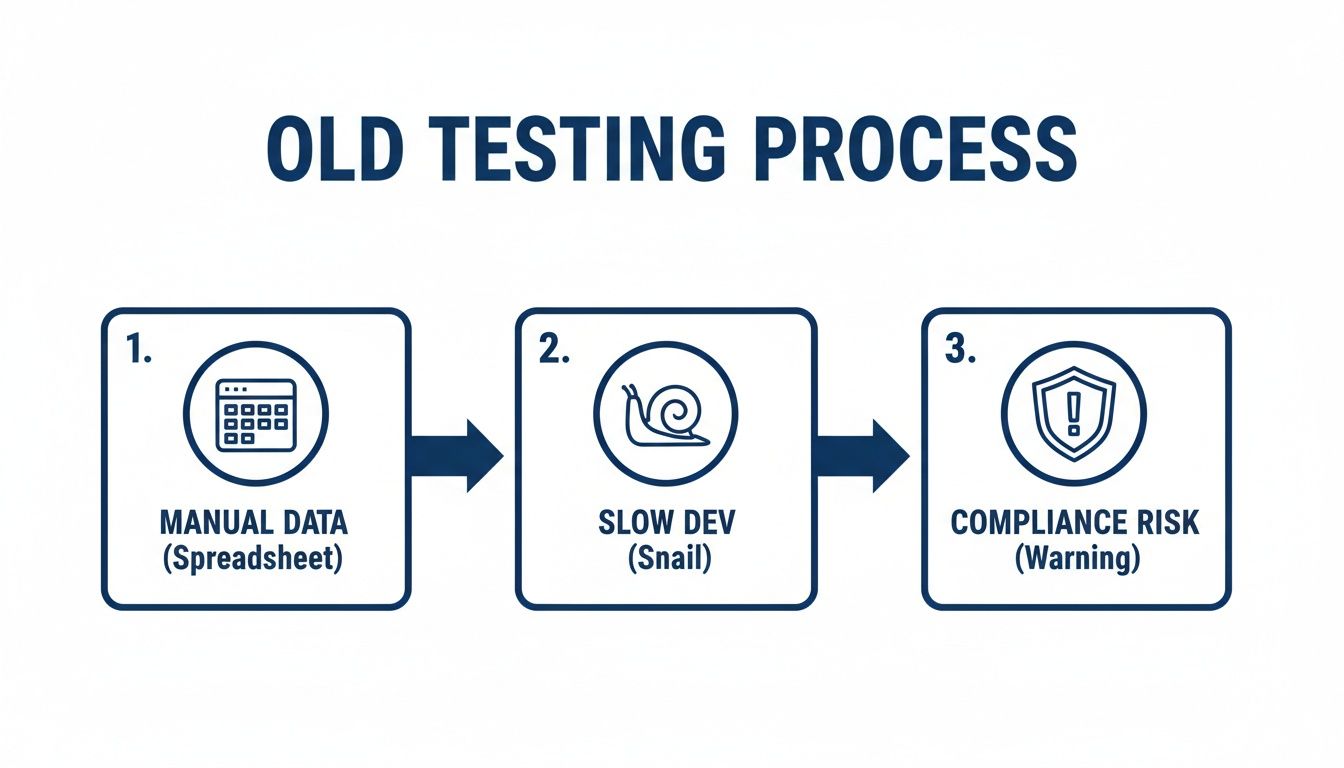
Capturing real traffic directly solves these problems, turning a risky, sluggish workflow into an efficient one.
Filtering and Targeting Traffic
Let’s be real—your production environment is noisy. It’s buzzing with health checks, monitoring pings, and traffic from services you couldn’t care less about testing. If you capture everything, you’ll end up with a massive, unwieldy dataset that’s more trouble than it’s worth.
To manage test data effectively, you have to be selective. GoReplay gives you some powerful filtering options to capture only what you actually need.
You can use flags to include or exclude requests based on their URL, headers, or HTTP methods. For example, imagine you only want to capture the user signup and login flows to build a regression test suite.
A simple command gets it done:
gor —input-raw :8080
—http-allow-path “/api/v1/signup”
—http-allow-path “/api/v1/login”
—output-file auth-flow.gor
Here, the --http-allow-path flag acts as a whitelist. It tells gor to only record requests that hit those two specific API endpoints. Everything else—especially those noisy health checks to /healthz—gets ignored.
Pro Tip: You can get even more granular with regular expressions. For instance,
--http-allow-path "/api/users/.*"would capture every request under the/api/users/path, giving you surgical control over what ends up in your dataset.
This level of targeting is what makes the whole approach work. It keeps your traffic files small, focused, and directly tied to the test scenarios you care about. Instead of drowning in a data swamp, you get clean, actionable datasets that represent genuine user workflows. And that is the difference between a chaotic data dump and a well-managed library of test scenarios.
Now that we have this powerful data, the next step is making sure it’s safe and compliant to use.
Anonymizing and Transforming Your Captured Data
Capturing raw production traffic is a massive win, but it comes with a huge responsibility. That raw data is packed with personally identifiable information (PII)—names, emails, phone numbers—you name it. Using that data as-is for testing isn’t just a compliance risk; it’s a disaster waiting to happen.
This is where the real craft of how you manage test data comes into play: transforming that raw feed into a secure, anonymized, yet structurally identical asset.
GoReplay’s secret sauce is its middleware. It lets you process every single request in-flight, before it gets saved. Think of it as an assembly line for your traffic. As each request passes through, you can find, replace, hash, or totally rewrite parts of it on the fly. This makes sure the data hitting your .gor file is sanitized from the very start.
Finding and Replacing PII with Regex
The most direct way to scrub PII is with good old regular expressions. It’s a precise and powerful way to handle common data patterns you find in your traffic, like email addresses or user IDs buried in request bodies and URLs.
Let’s say you’ve captured a POST request to /api/users with a JSON payload full of sensitive details. You can fire up GoReplay’s --middleware flag to run a script that cleans this data before it ever gets written to a file.
A command might look something like this:
gor --input-raw :8080 --middleware "go run ./scripts/anonymize.go" --output-file users-sanitized.gor
Inside that anonymize.go script, you can write simple logic to spot an email field and swap out its value. The script intercepts the payload, applies your rules, and then passes the cleaned-up request along. The result? A traffic file where every email is now a generic placeholder like [email protected], solving a major compliance headache without breaking the request’s structure.
If you want to go deeper on this, we’ve got a whole guide on data anonymization techniques.
Hashing Sensitive Fields for Structural Integrity
Sometimes, just replacing data isn’t enough. You might need to preserve the uniqueness of a value without exposing the original. This is common with things like user IDs, where your application logic depends on them being distinct. Simple find-and-replace won’t cut it here.
This is where hashing shines. By hashing a sensitive field like a userId or orderId, you create a unique, irreversible string that maintains the data’s one-to-one relationship.
- Original Data:
"userId": "123-abc-456" - Hashed Data:
"userId": "a1b2c3d4e5f6..."
This technique is perfect for scenarios where you need to test user-specific behavior without ever knowing who the real user was. Each unique ID from production maps to a unique hashed ID in your test data, keeping user sessions and workflows perfectly intact.
By combining regex for common PII and hashing for unique identifiers, you get a dataset that is both fully compliant and functionally realistic. This dual approach is fundamental to a mature strategy to manage test data.
Beyond Simple Find-and-Replace
Your anonymization needs will almost certainly get more complex. You might need to rewrite authentication headers with test-specific tokens, adjust timestamps to be relative, or even inject new data to hit specific edge cases. GoReplay’s scripting middleware gives you the flexibility to build whatever custom logic you need.
This isn’t just a “nice-to-have” anymore. The compliance landscape is getting stricter by the day, yet the reality is that most organizations are behind. A 2025 survey found that only 7% of companies reported being fully compliant with data privacy regulations in their testing processes. This gap is a huge risk, especially in markets like North America and Europe.
By building a solid anonymization pipeline with GoReplay, you’re doing more than just ticking a compliance box. You’re creating a reliable, reusable testing asset that you can confidently share with your dev and QA teams, knowing you’ve killed the risk of data exposure while keeping all the value of real user behavior.
Storing and Versioning Your Test Data Sets
After you’ve captured and scrubbed your traffic, you’re holding onto some seriously valuable assets: your .gor files. It’s easy to treat these as temporary logs, but that’s a huge missed opportunity. Think of them as reusable, high-fidelity test scenarios that should be the foundation of your entire testing strategy.
By giving these files the same respect you give your source code, you transform transient network data into a durable, sharable library of test cases. This simple shift in mindset helps your team reliably squash bugs, run rock-solid regression tests, and validate performance against real-world traffic patterns.
Choosing the Right Storage Solution
For tiny traffic files, you might be tempted to just check them into Git. And while that works for a while, those files can get big, fast. Before you know it, your repo is bloated and every git clone takes forever. A much smarter move is to use a storage solution built for large binary files.
Here are a couple of solid options we see people use all the time:
- Object Storage: Services like Amazon S3, Google Cloud Storage, or the self-hosted MinIO are perfect for this job. They’re cheap, always available, and designed to handle massive files without breaking a sweat. Your CI/CD pipeline can easily pull down the exact traffic set it needs from a bucket for any test run.
- Git LFS (Large File Storage): If you’re a Git purist and want to keep everything in one workflow, Git LFS is your best bet. It cleverly replaces large files in your repository with tiny text pointers, while the actual file content lives on a remote server. This keeps your repository lean and mean.
No matter what tool you pick, the goal is the same: get your test data into a central, accessible spot. This stops
.gorfiles from getting lost on individual developer machines and guarantees everyone is testing against the same, consistent data.
A Naming Convention That Actually Works
Let’s be honest, a folder full of files like test1.gor or traffic-dump-final.gor is a nightmare waiting to happen. To build a library that people will actually use, you need a clear and consistent naming convention. A good name tells you exactly what’s inside at a glance.
Try a format that gives you context, something like this:
[feature-or-flow]-[version]-[date].gor
For example, a file named user-signup-flow-v1.2-20241026.gor is immediately useful. You know it’s traffic for the user signup process, it relates to application version 1.2, and it was captured on October 26th, 2024. This small bit of discipline makes it incredibly easy to link a specific recording to a software release, a bug report, or a performance benchmark. It’s a simple system that pays off big time.
Replaying Traffic into Your Test Environments
So, you’ve done the hard work—capturing, cleaning, and versioning your traffic files. Now for the payoff. It’s time to put that curated data to work by replaying it against your staging, QA, or even local development environments. This is where you really start to see the value, simulating real user behavior to find bugs, validate performance, and deploy with confidence.
The basic idea is pretty straightforward. Instead of telling gor to listen to a live input, you point it to one of your saved .gor files and direct that traffic to a test server.
Here’s what a foundational replay command looks like:
gor --input-file "user-signup-flow-v1.2.gor" --output-http "http://staging.yourapp.com"
This command reads all the requests from user-signup-flow-v1.2.gor and fires them off, one by one, at your staging app. It’s the simplest way to get going, but the real power comes from the flags that let you control how the replay happens.
Controlling Replay Speed and Load
By default, GoReplay unleashes requests as fast as it possibly can. This is great for a quick smoke test, but it doesn’t really mirror real-world user pacing. A much better approach to manage test data is to control the replay speed, letting you simulate everything from a slow trickle to a massive traffic spike.
To perfectly mimic the original traffic speed, you can use a simple multiplier syntax with your input file.
gor --input-file "requests.gor|100%"
This tells gor to replay the traffic at the exact same rate it was captured, preserving the natural timing between requests. From here, you can dial it up or down. For instance, requests.gor|200% replays at double the speed, which is an easy way to simulate a peak load scenario. On the flip side, requests.gor|50% slows things down, which can be a lifesaver for debugging tricky sequences.
This ability to amplify traffic is a game-changer for performance testing. You can take a 30-minute recording of normal traffic and compress it into a 5-minute stress test to see just how your infrastructure holds up under pressure.
For a deeper look at this, our guide on how to replay HTTP traffic covers more advanced configurations and scenarios.
Maintaining User Context with Session Awareness
Let’s face it, modern applications are stateful. A user logs in, browses a few products, and adds something to their cart. These actions happen in a specific sequence, and the context of that session is absolutely critical. If you just blast requests randomly at a multi-instance backend, you lose that context entirely, leading to a cascade of failed tests and misleading results.
This is where GoReplay’s session awareness becomes so important. By tracking a specific header or parameter across multiple requests, you can ensure that all traffic from a single user session is routed to the same application instance.
You can enable this using the --http-original-host and --split-output flags:
gor --input-file requests.gor --split-output "http://test-instance-1|http://test-instance-2" --http-original-host
This setup tells gor to preserve the original Host header, which helps your load balancer route requests consistently. It’s a small detail that makes a massive difference when testing stateful applications, ensuring user A’s requests always hit the same server and their session integrity is preserved.
Optimizing Replay Performance
When you’re running a large-scale load test, the performance of the replay tool itself can become a bottleneck. GoReplay was built for this, and it includes several flags designed to optimize the process, making sure you can generate huge amounts of load without overwhelming the machine doing the replaying.
Here are a few key flags to keep in mind for performance:
--output-http-workers: Increases the number of concurrent workers sending requests. The default is often fine, but for high-throughput tests, you might need to bump this up.--output-http-pooling: Enables HTTP connection pooling. This is a big one. It reuses existing TCP connections instead of creating a new one for every single request, which dramatically reduces overhead and improves throughput.--output-http-timeout: Sets a timeout for requests. This prevents the entire replay from grinding to a halt because of a few slow or unresponsive endpoints in your test environment.
To make this clearer, here’s a quick breakdown of some common GoReplay output flags and where they shine.
GoReplay Replay Flags and Their Use Cases
This table breaks down the most common output flags, explaining what they do and when you’d reach for them in different testing scenarios.
| Flag | Description | Primary Use Case |
|---|---|---|
--output-http | The target URL to send replayed HTTP traffic to. | Basic functional and regression testing. |
--output-file | Saves the (potentially modified) traffic to a new .gor file. | Filtering, transforming, or chaining replays together. |
--output-tcp | Forwards traffic to a TCP endpoint without interpreting it as HTTP. | Testing non-HTTP services like databases or caches. |
--output-stdout | Prints the request and response data directly to the console. | Debugging middleware scripts and transformations in real-time. |
--split-output | Distributes traffic across multiple backend endpoints. | Load balancing and session-aware testing. |
--output-http-redirect-limit | Limits the number of redirects GoReplay will follow for each request. | Testing services with complex redirect logic. |
By thoughtfully combining these flags, you can elevate your testing far beyond simple request-response validation. You can craft sophisticated scenarios that accurately simulate everything from a single user’s journey to a full-blown production-level load test, all from a single, sanitized traffic file. This approach turns your captured data from a simple log into a powerful, reusable asset for ensuring your application is truly production-ready.
Integrating GoReplay into Your CI/CD Pipeline
Capturing and replaying traffic on your own is a great way to get started, but the real magic happens when you bake it right into your automation. By integrating GoReplay into your CI/CD pipeline, you stop treating test data management as a one-off task. Instead, it becomes a continuous, automated quality gate that runs with every single commit.
This approach makes realistic testing a natural part of your development lifecycle. Forget waiting for a QA phase to discover bugs. You can catch them automatically, just moments after the code is pushed, making regression and performance testing a seamless background process.
An Automated Test Data Workflow
Picture a pipeline where every new build is instantly validated against real-world user behavior. That’s exactly what you get when you hook GoReplay into tools like GitHub Actions or Jenkins. The pipeline takes over the entire workflow, from grabbing the latest traffic data to reporting back on the results.
A typical automated job looks something like this:
- Fetch the Latest Data: The pipeline kicks off by pulling the most recent version of a sanitized
.gortraffic file from your central storage, like an Amazon S3 bucket. - Deploy the New Build: Next, it spins up a dynamic, short-lived test environment and deploys the latest version of your application.
- Replay and Test: GoReplay gets to work, replaying the captured traffic against the new deployment to simulate real user interactions and load.
- Analyze and Report: All the while, the pipeline is watching. It monitors your app’s responses, logs, and performance metrics. If it spots any unexpected errors or performance dips, it can automatically fail the build, slamming the brakes on a bad deployment.
This tight, automated feedback loop ensures that no regression ever sneaks into production.
From Regression Checks to Automated Load Tests
This CI/CD setup is incredibly versatile. It’s not just for functional regression tests. With a few quick tweaks to GoReplay’s flags, you can transform that same pipeline into an automated load testing powerhouse.
Want to simulate peak traffic conditions? Just amplify the replay speed.
By setting the replay speed to
200%or even500%, you can instantly stress-test every new build to make sure it can handle the pressure. This is how you find scalability bottlenecks long before your users do.
Integrating this kind of workflow pays off big time. Adopting formal test data management practices can slash software testing costs by 5–10% simply through better data quality and faster test cycles. And with 34.7% of testing teams citing realistic test data generation as a key benefit of AI, it’s clear that automation fueled by quality data is a winning strategy. You can find more insights on the benefits of TDM adoption from Fortune Business Insights.
This shift makes performance validation a routine part of every build, not a massive, manual effort you only undertake once in a while.
When you embed GoReplay into your CI/CD pipeline, you create a powerful system that constantly defends your application’s quality. It turns your captured traffic into an active shield, making sure every single commit is validated against the only source of truth that matters: real user behavior.
Frequently Asked Questions
Is It Truly Safe to Capture Traffic from a Production Environment?
Yes, provided you do it right. GoReplay is designed to be a passive listener, essentially making a copy of network packets without getting in the way of your application’s live request-and-response cycle. It’s completely transparent to your users.
The most critical safety measure is to immediately anonymize this captured traffic in an isolated process. This step is non-negotiable—you should never, ever replay raw, unmasked production traffic into any non-production environment. This separation of capture and anonymization is the bedrock of a secure strategy to manage test data.
How Does GoReplay Handle Dynamic Data Like Session Tokens?
This is where GoReplay’s powerful middleware comes into play. As traffic is replayed, you can run a custom script that intercepts each request, pulls out an expired token, and then calls your test environment’s auth service to get a fresh one. The script then rewrites the request with the valid token before sending it on.
It’s this kind of dynamic transformation that lets you maintain real user sessions for incredibly realistic testing workflows.
This capability is what separates a simple replay from a true simulation. It’s about maintaining the integrity of user interactions, not just repeating network calls.
Can This Method Be Used for Testing Stateful Applications?
Absolutely. GoReplay includes a session-aware replay feature that’s built for this exact purpose. It guarantees that all requests from a single user’s session are directed to the same application instance in your test environment.
This is essential for any stateful application where user context has to be preserved across multiple requests. You get a far more accurate test than just blasting disconnected requests at your system, which almost always leads to misleading failures and hours of wasted debugging time. For testing complex, real-world application logic, it’s a game-changer.
Ready to stop faking it and start testing with real, anonymized production traffic? With GoReplay, you can build a robust, automated workflow to find bugs faster and deploy with confidence. Learn more and get started at https://goreplay.org.