
Load Test vs Performance Test What You Need to Know
Let’s be clear about one thing right away: performance testing is the entire field, while load testing is just one specific type of performance test.
Think of it like a full physical for an athlete. Performance testing is the whole check-up—it assesses their overall speed, endurance, stability, and even what happens when they hit their absolute limit. Load testing, on the other hand, is just one specific drill within that physical, like checking if they can hold a target race pace for five miles without faltering.
Unpacking The Core Difference
To really get the distinction between load testing vs. performance testing, you have to look at their scope and what they’re trying to achieve. Performance testing is the big umbrella. It covers any test that measures an application’s speed, stability, and how it scales. The goal here is to get a complete picture of the system’s health under all sorts of conditions.
Load testing has a much tighter focus. It’s a specific subset of performance testing built to answer one simple question: “Can our system handle a normal or expected amount of user traffic?” You can dive deeper into the basics in our guide on what is load testing. It’s all about making sure your app doesn’t slow to a crawl during typical daily use.
Scope and Primary Goals
Another key difference comes down to their objectives. Load testing is all about validation—you have a predefined performance benchmark, and you’re just confirming the system can meet it under the traffic you expect.
Performance testing is more about exploration. You’re actively trying to discover the system’s limits, find hidden bottlenecks, and see how it recovers from a failure. This includes a whole range of tests like stress, spike, and endurance tests.
The real separation is one of intent. Load testing confirms expected behavior, while the broader field of performance testing seeks to uncover unexpected weaknesses before your users do.
This visual gives a great breakdown of how each approach measures key indicators like user capacity, response times, and throughput.
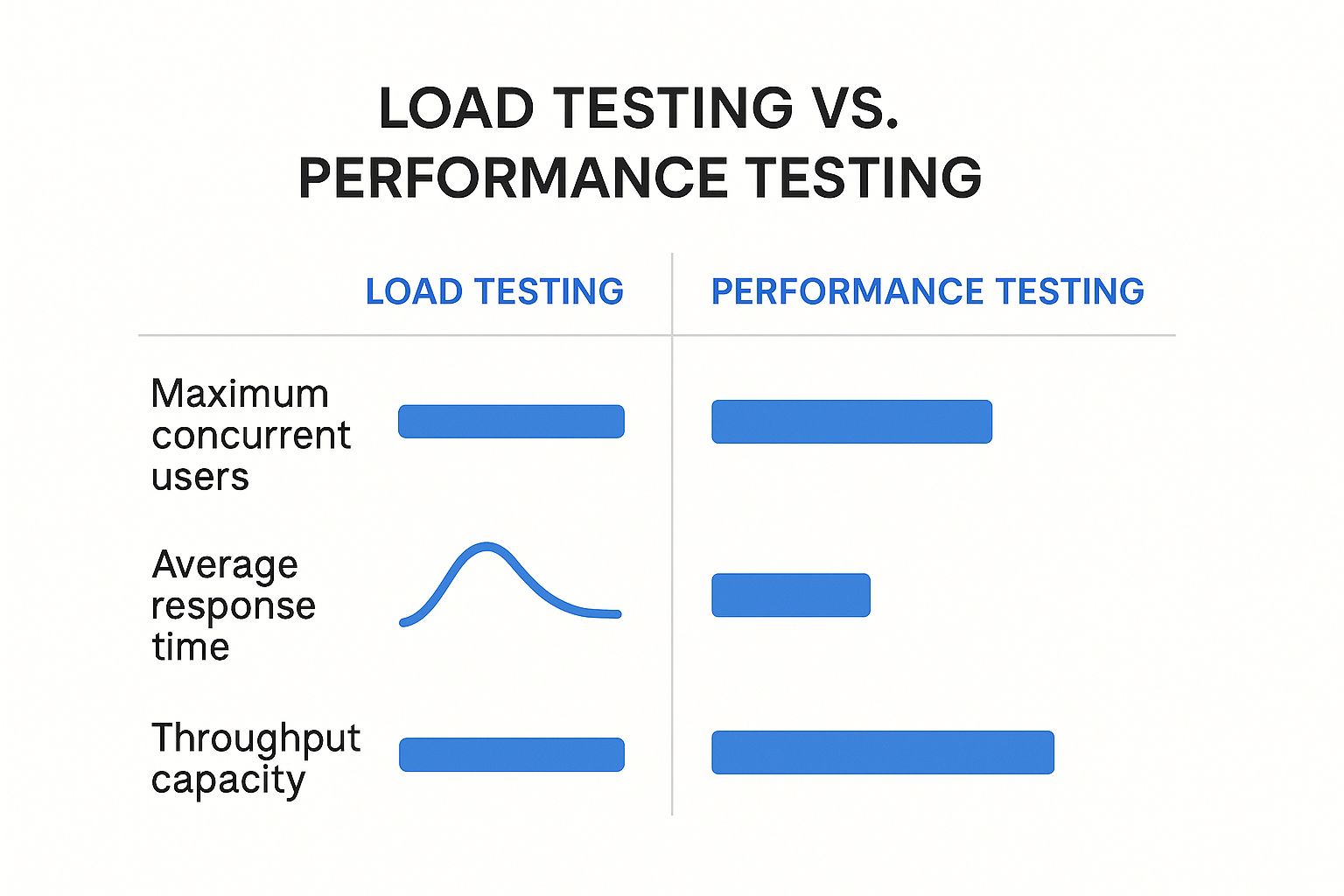
As you can see, performance testing is about pushing boundaries to find the maximums. Load testing is about validating performance within a known, expected range.
Quick Comparison Load Testing vs Performance Testing
For a quick reference, the table below boils down the fundamental differences between the two. It’s a simple way to see where each testing type fits into your overall quality assurance strategy.
| Aspect | Load Testing | Performance Testing |
|---|---|---|
| Primary Goal | To validate if the system can handle an expected user load. | To evaluate the system’s overall speed, stability, and scalability under various conditions. |
| Scope | A specific subset focused on anticipated traffic levels. | A broad category including load, stress, spike, and endurance testing. |
| Key Question | ”Does the system perform well under normal conditions?" | "How does the system behave at its limits and beyond?” |
| Typical Use Case | Preparing for a new product launch with known user estimates. | Identifying system breaking points before a major event like Black Friday. |
This high-level comparison sets the stage, highlighting the core purpose and scope of each before we dive into a more detailed analysis.
Exploring The Full Scope Of Performance Testing
While load testing answers a specific, vital question about expected traffic, performance testing casts a much wider net. Its whole purpose is to make sure an application delivers a reliable, stable, and responsive user experience under all conceivable conditions, not just the predictable ones.
Think of it as a comprehensive health check for your entire system, designed to uncover hidden weaknesses before they ever affect a real user.
Performance testing is really an umbrella term that covers several distinct disciplines. Each one simulates a different kind of pressure, letting teams evaluate how various parts of the system behave. Without this holistic view, you might confirm your app can handle daily traffic but remain completely blind to what happens during a sudden viral event or a slow, creeping system degradation.

The image breaks down how tests like stress, soak, and spike testing are all distinct yet complementary parts of a complete performance strategy.
The Different Flavors Of Performance Testing
To really get the difference in the load test vs. performance test discussion, you have to look at the other tests under the performance umbrella. Each one serves a unique strategic purpose.
-
Stress Testing: This is all about finding the breaking point. The goal here is to intentionally smash the system with traffic far beyond its expected capacity to see how and when it fails. An e-commerce site might use a stress test to figure out its absolute maximum user capacity before a huge sales event like Black Friday, just so they know where the ceiling is.
-
Spike Testing: This test simulates a sudden, massive surge in user traffic. Picture a breaking news alert driving millions of users to a media site all at once. A spike test shows how the system handles those abrupt bursts and, just as importantly, how quickly it recovers to a stable state.
-
Endurance (or Soak) Testing: This one is a marathon, not a sprint. It involves running a sustained, moderate load against the system for a long time—often hours or even days. The main goal is to spot subtle problems like memory leaks or performance degradation that only show up after the system has been running continuously for a while.
A Strategic Approach To System Resilience
The way these methodologies have evolved reflects the growing scale of modern software. In the past, simple load simulations were usually good enough. By the late 2010s, however, automated frameworks appeared that could simulate millions of virtual users from all over the globe, making it possible to mimic complex, real-world traffic patterns with much better accuracy.
This shift allowed performance testing to expand into the specialized disciplines we have today, each built to analyze system limits and recovery under extreme conditions. You can find more insights on the history of performance testing on blazemeter.com.
This broader approach gives you a real strategic advantage. It moves the focus from just validating a known capacity to proactively hunting for unknown risks.
Performance testing isn’t just about confirming that your application works under normal conditions. It’s about building confidence that your system is resilient enough to handle the unexpected, ensuring it remains scalable and reliable as your user base grows.
Ultimately, a comprehensive performance testing suite is your early warning system. It flags potential bottlenecks, resource limitations, and recovery failures long before they can cause a production outage. By combining load tests with stress, spike, and endurance tests, you build a robust quality process that protects the user experience and your business from a whole range of potential threats. It ensures your system is ready not just for today’s traffic, but for whatever tomorrow brings.
When To Deploy Load Testing For Your Application
While performance testing prepares your application for every possibility, load testing zeroes in on the most probable one: handling your expected, everyday user traffic. Its job isn’t to find the breaking point. It’s to confirm that your system can deliver a stable, responsive experience to its intended audience under normal conditions.
Think of it as a dress rehearsal before a big show. You run the full performance with the expected cast and crew to make sure everything works exactly as designed. Load testing does the same for your application, simulating a realistic number of users to verify that your infrastructure, code, and databases hold up.

This focused approach makes load testing an absolute necessity before any event that will predictably increase traffic.
Critical Scenarios For Load Testing
Knowing when to run a load test is just as important as knowing how. Doing it at the right time can be the difference between a smooth launch and a costly outage. It gives you the hard data needed to stop performance issues before they ever reach your users.
Here are a few classic situations where load testing is non-negotiable:
- Preparing for a Major Launch: Releasing a new app, a huge feature, or entering a new market? You’ll have traffic forecasts. Load testing is how you prove the system can handle that projected user base from day one.
- Anticipating Marketing Campaigns: A great marketing campaign is supposed to drive a ton of visitors to your site. You need to run a load test based on those campaign goals to make sure the site stays fast and available, turning all that new interest into actual sales.
- Handling Seasonal Peaks: For any e-commerce business, events like Black Friday are make-or-break. Load testing for these predictable spikes is mandatory if you want to avoid system crashes during your most profitable days. For example, a retailer might simulate 20,000 concurrent users to guarantee the checkout process stays under a 2-second response time.
Key Metrics To Watch In Load Testing
When you run a load test, you’re not just looking for a simple pass or fail. You’re collecting specific data that paints a clear picture of your system’s health under real pressure. These metrics answer the fundamental question: ‘Can our system handle our own success?’
Keep a close eye on these three core metrics:
- Response Time: How long does it take for the application to answer a user’s request? A consistently low response time under load is the clearest sign of a good user experience.
- Throughput: This is the number of requests your system can process per second. It’s the raw measure of how much traffic your application can actually handle.
- Resource Utilization: This tracks how hard your servers are working—CPU, memory, and network I/O. If you see sustained 90% CPU usage, you’ve likely found a bottleneck that will cause slowdowns.
By analyzing these metrics together, you move from hoping your system will work to knowing it will. Load testing provides the empirical evidence needed to deploy with confidence, ensuring your application is truly ready for its audience.
Comparing Key Metrics and Toolsets
You can really start to see the difference between load testing and performance testing when you look at the data you’re measuring and the tools you’re using. Although both aim to improve your application’s quality, their distinct focus calls for a different set of metrics and a specialized toolkit.
Think of it this way: load testing is about validating what you think you know, while performance testing is about discovering what you don’t.
Defining Success With The Right Metrics
In a load test, the main goal is to make sure the system can handle its expected daily traffic without breaking a sweat. So, the key performance indicators (KPIs) you track are direct measures of speed and capacity under a controlled, predictable load. You’re basically asking, “Is our system fast and stable enough for our actual users?”
For that, you’ll focus on metrics like:
- Average Response Time: This is the most direct measure of user-perceived speed—how long does a request take to get a response?
- Throughput (Requests Per Second): This shows how many transactions your system can handle in a given period, which is a great indicator of its capacity.
- Concurrent Users: How many virtual users can the system support at the same time before performance starts to tank?
- Error Rate: The percentage of requests that fail. A low error rate under peak load is a huge sign of a stable application.
On the other hand, the wider world of performance testing demands a more diverse set of metrics. You need to understand how the system behaves under extreme stress or over long periods, which is crucial for finding those nasty hidden weaknesses.
When you run a stress test, a high error rate isn’t a failure—it’s a discovery. The key metric isn’t just the breaking point itself, but how gracefully the system recovers after the overwhelming load is removed.
This is where a different set of metrics becomes absolutely essential:
- Peak Response Time: The longest response time you see during a test. This can shine a light on intermittent, hard-to-find bottlenecks.
- System Recovery Time: How long does it take for the application to return to normal after a stress or spike test?
- Resource Utilization Trends: Tracking CPU, memory, and I/O over an extended endurance test can uncover subtle memory leaks or resource issues that only appear over time.
- Saturation Point: The absolute maximum load the system can handle before it either slows to a crawl or fails completely.
To really get the full picture, many teams consult an essential performance testing metrics guide to make sure they’re tracking the most impactful data points for their specific goals.
Selecting The Right Tool For The Job
The different goals of load and performance testing naturally lead to different toolsets, though there’s certainly some overlap. Some tools are masters of generating traffic, while others are built for deep-dive diagnostics and monitoring.
When your primary task is generating traffic—the heart of load testing—tools like Apache JMeter and Gatling are the industry standard. They are designed to simulate thousands of users and hammer an application with requests, making them perfect for validating performance against a known load.
But what happens when a load test uncovers a problem, or when you’re stress testing to find breaking points? That’s when you need a completely different class of tool. This is where Application Performance Monitoring (APM) platforms shine.
The table below breaks down some popular tools and where they fit into the testing ecosystem.
Testing Tools and Their Primary Use Cases
| Tool | Primary Use | Best For |
|---|---|---|
| Apache JMeter / Gatling | Load Generation | Simulating heavy, predictable user traffic to validate system capacity and response times. |
| GoReplay | Traffic Replay | Replicating real production user traffic in a test environment for highly realistic load testing scenarios. |
| Dynatrace / New Relic | Performance Monitoring & Diagnostics | Identifying the root cause of bottlenecks by analyzing code-level performance, database queries, and infrastructure health during a test. |
| Prometheus & Grafana | Infrastructure Monitoring | Visualizing and alerting on server-level metrics like CPU, memory, and disk I/O to correlate application slowdowns with resource constraints. |
APM tools like Dynatrace or New Relic don’t generate traffic. Instead, they give you deep visibility into your application’s guts while it’s under load. They can pinpoint the exact line of code or slow database query causing a bottleneck—something a load generator simply can’t do.
Similarly, a tool like GoReplay specializes in capturing and replaying real production traffic, offering a level of realism that synthetic load generators often struggle to match. This makes it invaluable for creating authentic load and stress test scenarios based on actual user behavior.
How to Choose The Right Testing Strategy
Let’s be clear: the whole “load test vs. performance test” debate isn’t about picking a winner. These aren’t competing approaches. They’re complementary tools in your quality assurance toolkit, and knowing when to use which is what separates the pros from the amateurs.
The choice boils down to one thing: what question are you trying to answer? Are you getting ready for a predictable, known amount of traffic? Or are you hunting for unknown weak spots in a new, critical system? Your answer points you down the right path.
Context Is The Deciding Factor
The context of your project is everything. A startup pushing its first MVP has entirely different needs than a massive e-commerce platform bracing for Black Friday. The trick is to match your testing investment to the potential business risk.
For instance, if you’re rolling out a new feature behind a flag to just 5% of your users, a targeted load test that simulates that exact traffic is probably all you need. It’s a focused check for a known situation. But if you’re moving your entire payment system to a new microservice architecture? A comprehensive performance testing suite is non-negotiable. The cost of failure is just too high.
Your testing strategy should be a direct reflection of your business goals. Don’t run a stress test just for the sake of it; run it because you need to know the real financial and reputational cost of an outage during a peak sales event.
Answering a few key questions can bring a ton of clarity to your decision-making.
Guiding Questions For Your Strategy
Before you start dedicating time and resources, run through these points with your team to figure out the right mix of testing.
- What’s the main goal here? Are you validating performance against a specific SLA, or are you trying to find the system’s breaking point to understand how it fails? Validation points you toward load testing. Exploration demands a broader performance testing approach.
- What do you expect traffic to look like? If you’re anticipating a steady, predictable flow of users, load testing is your go-to. If you’re worried about sudden, massive spikes—like a post going viral—then spike and stress testing are crucial.
- How mature is the system? For a brand-new app, a full suite of performance tests is essential to catch architectural flaws early. For a stable, mature system, regular load testing before releases might be all that’s needed to make sure nothing has regressed.
The diagram below shows how different tests fit into various stages of a project, highlighting their unique roles.
This visual does a great job of showing that performance testing is a continuous, multifaceted discipline, while load testing is often a specific, event-driven task inside that bigger loop.
The Business Impact Of Your Choice
Ultimately, the decision to invest in proper testing has a direct, measurable impact on the bottom line. The stakes couldn’t be higher. We know that 40% of users will ditch a website if it takes more than three seconds to load. And just a one-second delay in page response can tank conversions by 7%.
These aren’t just vanity metrics; they show why a solid testing strategy is a core business function, not just a tech chore. By putting comprehensive testing in place, businesses can slash system failures and outages by up to 70%. You can dig deeper into these numbers and their business implications in this detailed testing comparison on testgrid.io.
Choosing the right strategy means understanding that load testing confirms your system is ready for its expected success. A full performance testing suite, on the other hand, ensures your system is resilient enough to handle whatever comes its way—protecting your revenue and your reputation in the process.
Got Questions About Performance and Load Testing? We’ve Got Answers.
Even after you’ve grasped the core concepts of load testing vs. performance testing, practical questions always pop up when it’s time to build a real-world strategy. How do these pieces actually fit together in a solid QA process? Let’s clear up some of the most common questions teams run into.
We’ll tackle the frequent challenges and provide some straightforward advice for your own projects.

Can I Just Do Load Testing And Skip Other Performance Tests?
You could, but it’s a big gamble. Load testing is fantastic for one thing: confirming your system can handle the traffic you expect. It’s about validating performance against a known benchmark to ensure a good experience for your typical user base.
But what about the unexpected? A sudden traffic surge from a marketing campaign or a bug that causes a slow memory leak over several days—load testing won’t catch those. If you only run load tests, you’re flying blind to the very failure points that stress and endurance tests are built to find.
What Is The Key Difference Between Stress And Load Testing?
It all comes down to their primary goal. Load testing stays within the guardrails of your system’s expected limits. It answers the question, “Can our app handle a normal Tuesday afternoon?” Its job is to confirm your known capacity and make sure everything runs smoothly under everyday conditions.
Stress testing, on the other hand, is designed to break things. It intentionally shoves your system past its limits to answer a different question: “Where’s the breaking point, and how ugly is the recovery?” Stress testing is about discovering the unknown thresholds and vulnerabilities, not just validating what you already expect.
Performance testing isn’t just about speed. It’s a holistic checkup on your system’s health—evaluating stability, scalability, and reliability to keep users happy under all conditions, not just the ideal ones.
How Often Should My Team Run These Tests?
There’s no single right answer—it really hinges on your development cycle.
- For CI/CD Teams: You should be running smaller, automated performance tests with every single build. This is how you catch performance regressions the moment they’re introduced, before they snowball into a nightmare.
- Before Major Events: Always run comprehensive load tests before big releases, new feature rollouts, or high-stakes events like a Black Friday sale.
- On a Regular Cadence: Plan to run the full suite, including stress and endurance tests, on a set schedule—maybe quarterly. This gives you a clear picture of your system’s overall health and how it’s scaling over time.
This layered approach is your best defense, preparing your application for both the predictable and the completely unexpected.
Ready to run more realistic load tests? GoReplay lets you capture and replay real user traffic from your production environment, so your tests reflect actual user behavior. Stop guessing and start validating. Discover a better way to test by visiting https://goreplay.org.