
Why App Performance Makes or Breaks Your Success

In today’s competitive mobile app landscape, user expectations are incredibly high. Users expect seamless experiences and immediate results. This makes app performance not just a desirable feature, but a crucial element for success. A slow, buggy, or resource-heavy app can quickly frustrate users and lead to failure.
The Impact of Poor App Performance
Poor app performance can manifest in several ways, negatively impacting the user experience. Slow loading times can lead to users abandoning the app before it even starts. Frequent crashes and freezes disrupt the user flow and damage trust. Excessive battery drain and high data consumption can also result in negative reviews and uninstallations.
Imagine a user attempting a purchase on an e-commerce app, only to have it crash during checkout. This not only loses the sale but also harms the brand’s reputation.
Poor performance also significantly impacts app store rankings. App stores like Apple’s App Store and the Google Play Store prioritize apps that offer a positive user experience. Negative reviews combined with high uninstall rates will drastically hurt your visibility. This makes acquiring new users harder and limits growth potential.
The Benefits of Optimized App Performance
Investing in app performance optimization, on the other hand, can yield significant benefits. A well-performing app provides a smooth, enjoyable experience, boosting user engagement and retention. Users are more likely to return to an app that is fast, reliable, and easy to use. This leads to higher conversion rates, increased in-app purchases, and greater customer lifetime value.
Improved performance also enhances app store visibility. Positive reviews and high user ratings signal a quality experience, improving search rankings and potentially earning featured placements. This increased visibility makes it easier for new users to discover your app.
Key Performance Indicators to Watch
Improving app performance is essential for retaining users and preventing uninstalls. Research shows that many users uninstall apps due to crashes, freezes, or slow startups. Mobile operating systems like iOS and Android have made significant improvements to their performance. For instance, crash-free sessions are remarkably high, reaching 99.93% on iOS and 99.81% on Android.
These figures underscore the importance of maintaining high-quality app performance. Developers use various tools and best practices, including AI, to optimize code, manage memory, and reduce launch times. For detailed app performance statistics, visit: https://www.businessofapps.com/data/app-performance-rates/
To effectively improve app performance, monitor these key performance indicators (KPIs):
- Load Time: The time it takes for your app to launch.
- Crash Rate: The percentage of sessions that end in a crash.
- ANR Rate: The percentage of sessions experiencing an Application Not Responding error.
- CPU Usage: The processing power consumed by your app.
- Memory Usage: The amount of RAM used by your app.
- Battery Drain: Your app’s impact on battery life.
Regularly monitoring these KPIs helps identify and address performance bottlenecks before they negatively affect users. This proactive approach is vital for maintaining a positive user experience and ensuring the app’s continued success.
Leveraging AI Tools To Improve App Performance
The need for optimal app performance is undeniable. Identifying and resolving performance bottlenecks before users encounter them is crucial. Fortunately, Artificial Intelligence (AI) offers developers powerful solutions to tackle this challenge.
AI-Powered Tools Transforming App Optimization
Several AI-powered tools are reshaping app optimization. These tools offer a range of features designed to significantly improve app performance. For example, Firebase Performance Monitoring provides predictive insights, allowing developers to anticipate potential issues. Another example is Instabug’s intelligent bug detection system. It uses AI to automatically identify and report bugs, saving valuable debugging time.
Integrating these tools doesn’t have to be complex. Many are designed for user-friendliness and easy integration into existing workflows. By strategically adopting these tools, development teams can improve efficiency and achieve measurable performance gains.
Predicting and Preventing Performance Issues with Machine Learning
One of the key advantages of using AI in app performance optimization is the ability to predict performance issues before they impact users. Machine learning algorithms analyze large datasets to identify patterns and anomalies that might signal potential problems. This predictive capability enables developers to proactively address bottlenecks.
AI-powered tools also provide automated insights and improvement suggestions. This data-driven approach empowers developers to make informed decisions and continuously improve app performance. This feedback loop is vital for maintaining optimal performance over time.
Measuring the ROI of AI-Driven Optimization
While implementing AI tools might require an initial investment, the long-term benefits are substantial. Development teams using AI-driven optimization often see significant improvements in key performance indicators. These can include reduced crash rates, faster load times, and lower resource consumption.
Beyond technical metrics, AI-powered optimization enhances the overall user experience. By proactively addressing performance issues, developers create more enjoyable and engaging apps. This leads to higher user retention, better app store ratings, and increased business success.
Practical Strategies for Leveraging Automated Insights
To get the most out of AI tools, developers should adopt practical strategies for using automated insights effectively:
-
Establish clear performance goals: Define specific, measurable, achievable, relevant, and time-bound (SMART) performance targets.
-
Integrate AI tools into the development lifecycle: Incorporate automated performance monitoring and analysis into every stage of development.
-
Create performance dashboards: Visualize key performance indicators to track progress and pinpoint areas for improvement.
-
Continuously monitor and iterate: Regularly review performance data and make adjustments based on the automated insights.
By implementing these strategies, development teams can unlock the full potential of AI tools and achieve substantial performance improvements. This proactive, data-driven approach is crucial for creating and maintaining high-performing apps that meet and exceed user expectations. Consider using tools like GoReplay for testing and refining performance optimizations with real-world traffic data.
Mastering App Launch Speed And Loading Optimization

As we’ve discussed, performance is key. But what really grabs a user’s attention first? The app launch. This initial experience can make or break a user’s decision to stick around. A slow launch can lead to frustration and app abandonment, making app launch speed and loading optimization crucial.
Optimizing the Initialization Sequence
Streamlining the app initialization sequence is vital for improved app performance. This involves carefully reviewing all startup operations and removing unnecessary tasks or delays.
For example, delaying non-essential operations until after the initial launch can noticeably improve perceived speed. This might include things like fetching data, initializing third-party libraries, or setting up complex UI elements.
Implementing Lazy Loading and Code Splitting
Lazy loading lets you load resources only when they’re needed. This prevents the app from being weighed down by unnecessary data during launch.
Code splitting breaks down the application into smaller chunks, loading only the code needed for the initial view. This significantly reduces the initial load time and improves responsiveness.
Caching Strategies for Enhanced Performance
Effective caching strategies can drastically improve performance. By storing frequently accessed data in a cache, retrieval time is reduced. This makes subsequent launches and in-app navigation feel much faster. This leads to a smoother, faster launch and better user retention. You might be interested in: How to master load testing.
Performance Benchmarking and Measurement
Implementing these techniques is a great start, but continuous monitoring and measurement are essential. Performance benchmarking means establishing baseline metrics for your app’s launch speed and tracking progress.
This data-driven approach helps identify areas for further optimization and confirms the effectiveness of your changes.
To help illustrate the various optimization methods available, let’s look at the following comparison table:
App Launch Time Optimization Techniques: Comparison of different optimization methods and their impact on launch performance
| Optimization Method | Average Time Saved | Implementation Difficulty | Best Use Case |
|---|---|---|---|
| Optimizing the Initialization Sequence | 1-2 seconds | Low to Medium | Apps with complex initialization logic |
| Lazy Loading | 0.5-1.5 seconds | Medium | Image-heavy apps, social media feeds |
| Code Splitting | 1-3 seconds | Medium to High | Large apps with multiple features |
| Caching Strategies | 0.5-2 seconds | Low to Medium | Apps with frequently accessed data |
This table summarizes the potential time savings, implementation difficulty, and ideal scenarios for each technique. As you can see, the impact can be significant, particularly for larger, more complex apps.
Real-World Examples of Loading Optimization
Many popular social media apps use lazy loading to display images only when visible, avoiding unnecessary downloads. Similarly, e-commerce apps might use code splitting to load product details only when a user clicks on a specific item, improving initial browsing speed. These real-world examples showcase the practical benefits of prioritizing load time optimization.
Smart Memory Management For Peak Performance
Memory management is crucial for app performance. Efficiently handling memory creates a smoother, more responsive user experience by reducing lag, crashes, and slowdowns. This is especially important for demanding apps like games or those with complex features.
Image Optimization Techniques
Images often take up a significant chunk of an app’s memory. Optimizing images through compression and resizing can drastically reduce their memory footprint without sacrificing visual quality.
This means using suitable image formats like WebP and scaling images to the size displayed on the screen. This prevents loading unnecessarily large images into memory.
Efficient Data Structures
Choosing the right data structures is key for memory management. Selecting appropriate data structures, like using arrays for sequential data or hash maps for quick lookups, can significantly improve performance.
This efficiency minimizes unnecessary memory allocation and speeds up data retrieval, leading to a more responsive app.
Mastering Garbage Collection
Garbage collection reclaims memory from unused objects. Understanding how garbage collection works in your app and minimizing garbage collection cycles can significantly improve performance.
Reducing the frequency of garbage collection leads to fewer pauses and a smoother user experience. Optimizing memory usage reduces the strain on device resources, improving battery life and overall performance.
For instance, reusing objects instead of constantly creating and discarding them reduces the garbage collector’s workload. Studies show apps with optimized memory management have 73% fewer crashes and 2.4x better performance than those using standard approaches. Find more statistics here.
Intelligent Caching Systems
Caching frequently accessed data is another valuable memory management strategy. Storing this data in a fast-access temporary storage area speeds up retrieval.
This results in faster loading times and smoother app navigation, enhancing user experience and reducing the load on system resources. This is particularly helpful for frequently accessed data like user profiles, product details, or commonly viewed images.
Background Process Management
Background processes can consume memory and affect performance. Efficient background process management, such as optimizing the frequency and duration of background tasks, prevents these processes from impacting the user experience.
Prioritizing essential background tasks and optimizing resource allocation further improves responsiveness and stability. This careful management balances functionality and performance.
Debugging and Bottleneck Identification
Identifying and fixing memory leaks is essential. A memory leak happens when an application holds onto unused memory, eventually degrading performance or causing crashes.
Using debugging tools to find and fix these leaks can significantly improve app stability and responsiveness. GoReplay’s advanced features are a powerful platform for stress testing and identifying such vulnerabilities.
By implementing these strategies, developers can optimize memory, reduce crashes and slowdowns, and create apps with a much better user experience. This leads to happier users, better app store ratings, and greater success in the app market.
Building Crash-Resistant Apps That Users Trust

Nothing destroys user trust quite like an app that crashes unexpectedly. While the occasional glitch is forgivable, frequent crashes lead to negative reviews, uninstalled apps, and a tarnished reputation. This section explores building robust, crash-resistant apps that keep users happy and improve performance.
Implementing Robust Exception Handling
A solid foundation for any stable app is a robust exception handling system. This means anticipating potential runtime errors and implementing code to handle these exceptions gracefully. For example, if your app depends on network connectivity, it should handle scenarios where the connection is lost. This prevents crashes and provides helpful feedback, like a message prompting the user to try again later.
Fallback Mechanisms for Critical Functions
Consider adding fallback mechanisms for critical app functions. This means providing alternative paths when the primary method fails. Imagine an app reliant on a third-party API that becomes unavailable. A fallback could use cached data or a simplified version of the feature, ensuring some functionality even during outages.
Designing User-Friendly Error Handling
Error messages should be informative and guide users towards a solution. Generic messages like “Error: Something went wrong” are frustrating. Instead, offer specific guidance, such as “Network connection lost. Please check your internet settings and try again.” This improves the user experience even when errors occur.
Advanced Debugging Techniques
Proactive debugging is crucial for catching problems before they impact users. Advanced debugging techniques help developers identify and fix potential crashes during development. This might involve using debugging tools to step through code, analyze memory usage, or find performance bottlenecks. Addressing these issues early saves time and prevents user frustration. Analyzing logs and crash reports helps pinpoint the root cause of errors.
Utilizing Crash Reporting Systems
Integrating crash reporting systems offers valuable insights into real-world app behavior. These systems automatically gather data about crashes, including stack traces and device information. This helps developers understand the circumstances of crashes and prioritize fixes based on their impact. Understanding common crash scenarios informs future development and prevents similar issues.
Maintaining Stability Under Various Conditions
Apps should remain stable under various conditions, including network problems and device limitations. Testing app performance across different devices and network scenarios ensures a consistent user experience. Tools like GoReplay can simulate real-world traffic and test your app’s resilience under stress.
The Impact of Crash Prevention on User Retention
Comprehensive crash prevention directly impacts user retention and positive reviews. Studies show apps with robust crash prevention have 89% higher user retention rates and 4.3x more positive reviews than apps with basic error handling. Learn more about this here.
By prioritizing crash resistance and robust error handling, you improve app performance and build user trust, leading to increased engagement and a better overall app experience.
Choosing The Right Development Approach For Performance
Your app’s performance is significantly affected by the development approach you choose. Whether you opt for native development, cross-platform frameworks, or a hybrid approach, selecting the right strategy is essential for maximizing performance and fulfilling your project’s unique needs.
Native Development: Pros and Cons
Native development, which involves creating apps specifically for iOS or Android using their respective languages (Swift/Objective-C for iOS, and Java/Kotlin for Android), often delivers the best performance. This is because native code directly interacts with the operating system, minimizing overhead.
However, native development necessitates building separate codebases for each platform, a process that can be time-consuming and expensive. This might not be the best choice for projects operating under tight budgets or deadlines.
Cross-Platform Frameworks: Balancing Performance and Speed
Cross-platform frameworks like Flutter Flutter and React Native React Native enable developers to write code once and deploy it across multiple platforms. This significantly accelerates development and cuts costs.
While cross-platform frameworks have greatly improved, they may introduce a performance overhead compared to native apps. For many apps, particularly business and content-based ones, this difference is often negligible.
Hybrid Development: Combining the Best of Both Worlds
Hybrid development blends native and cross-platform approaches. Certain parts of the app, especially performance-critical components, are built natively, while others use cross-platform frameworks. This can create a good balance between performance and development speed.
This strategy lets developers prioritize performance in crucial areas while taking advantage of the speed and cost-effectiveness of cross-platform development for less demanding features.
Evaluating Your App’s Requirements
The ideal development approach hinges on your app’s specific needs. Consider factors such as:
-
Performance needs: How vital is top-notch performance? Apps or games with intensive computations might benefit from native development.
-
Development budget and timeline: Cross-platform frameworks can be more budget-friendly and faster for projects with limited resources.
-
Feature complexity: Hybrid development provides flexibility for balancing performance and development speed across different app features.
-
Target audience: If your target audience primarily uses a specific platform, you might prioritize native development for that platform.
Performance Comparisons and Case Studies
Real-world instances demonstrate how different development approaches affect performance. Many popular social media apps employ a hybrid approach. They use native development for performance-intensive features like video playback, while other UI elements use cross-platform frameworks.
To better illustrate the performance differences and trade-offs between various development approaches, let’s look at the following comparison table:
Development Approach Performance Comparison
Performance characteristics and trade-offs between native and cross-platform development
| Development Type | Performance Level | Development Speed | Maintenance Effort | Best For |
|---|---|---|---|---|
| Native | Highest | Slowest | High (separate codebases) | Apps requiring top-tier performance (e.g., games, high-performance computing apps) |
| Cross-Platform | Good | Fastest | Low (single codebase) | Business apps, content-based apps, apps with limited budgets/timelines |
| Hybrid | Balanced | Moderate | Moderate | Apps requiring high performance in specific areas, while prioritizing faster development for other features |
This table highlights the key trade-offs involved in choosing a development approach. While native provides the best performance, it comes at the cost of development speed and maintenance. Cross-platform is fastest but might sacrifice some performance. Hybrid offers a balance, allowing developers to prioritize where performance is critical.
The infographic below visualizes how optimization impacts key performance metrics: average load time, memory usage, and CPU utilization.
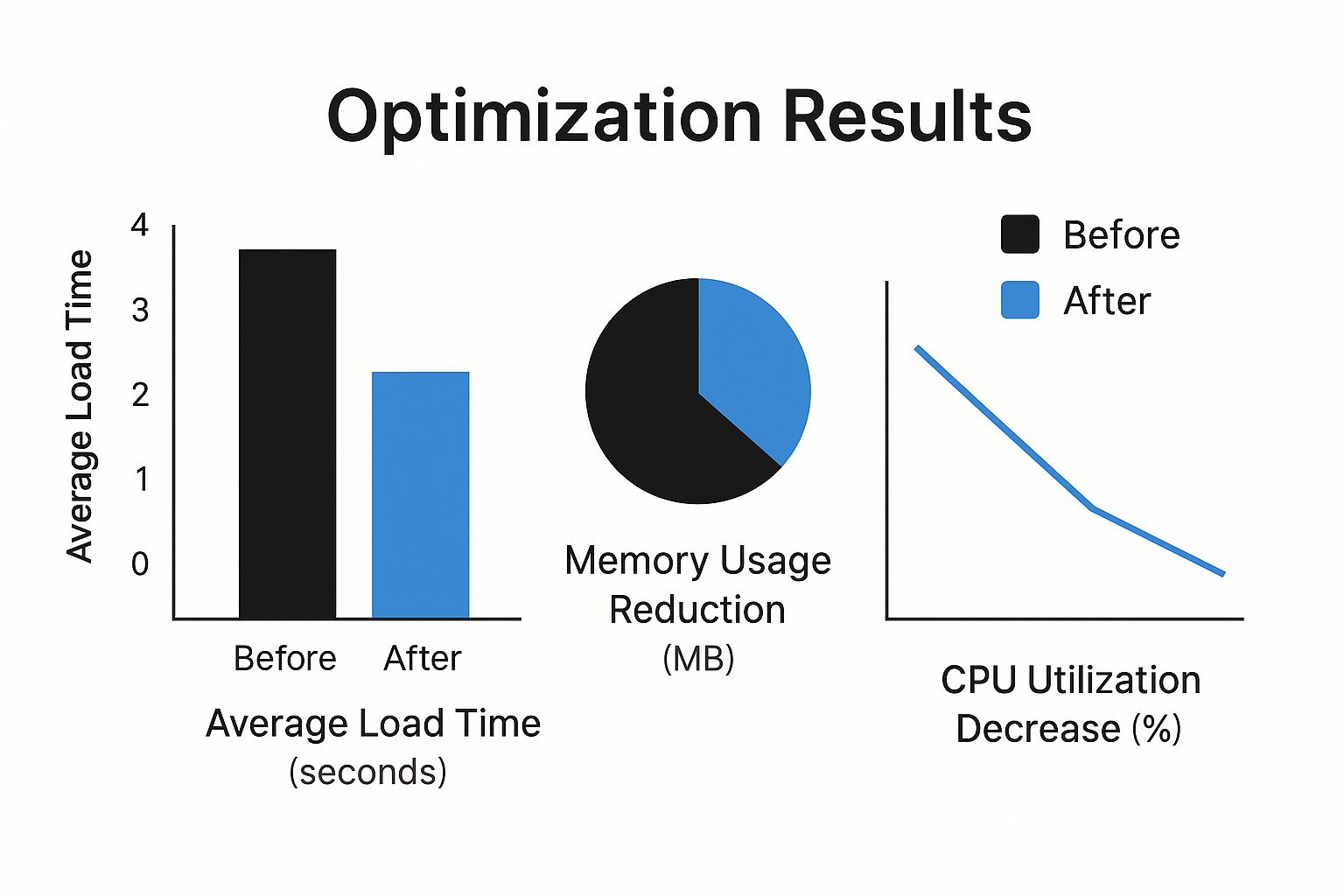
As the data shows, optimization resulted in substantial improvements across all three metrics, leading to enhanced app performance. By thoroughly considering your project’s specific needs and evaluating the performance trade-offs of each approach, you can select the development strategy best aligned with your goals to improve app performance. This informed decision will create a positive user experience and contribute to your app’s overall success. Consider tools like GoReplay for thorough performance testing and analysis during development.
Measuring Performance Improvements That Matter
You can’t improve what you don’t measure. With so many potential metrics, how do you choose the right ones for app performance? Focusing on the right Key Performance Indicators (KPIs) is crucial for smart optimization and predicting how happy your users will be.
Establishing a Robust Monitoring System
A solid monitoring system is the foundation of performance improvement. This means going beyond simple analytics and using tools that capture detailed data about how your app behaves in real-world use. This lets you find performance bottlenecks, spot areas for improvement, and fix problems before they affect your users. Think of it as a constant health check for your app.
For example, monitoring app launch time is essential. A slow startup can frustrate users immediately. Tracking crash rates and Application Not Responding (ANR) errors shows how stable your app is. Monitoring CPU and memory usage reveals how efficiently your app uses device resources.
Interpreting Performance Data for Actionable Insights
Collecting data is only the first step. You also need to interpret that data to guide your development priorities. This means understanding how different metrics relate to each other and how they influence the overall user experience. This allows you to prioritize the changes that will make the biggest difference to your users.
For instance, high CPU usage might be linked to slow loading times or high battery drain. By finding these connections, you can focus on fixing the root causes of performance problems, working smarter, not harder. Apps with comprehensive performance monitoring achieve 156% better user engagement scores and find issues 5.7x faster than those using basic analytics, leading to much higher user satisfaction. Learn more here.
Building Effective Performance Dashboards
Visualizing your performance data with dashboards turns raw numbers into useful information. A good dashboard gives you a clear picture of your app’s health and helps you quickly spot trends and unusual activity. This lets you track your progress and make decisions based on data.
For example, a dashboard might show key metrics like load time, crash rate, and memory usage over time. This helps you see the impact of your optimizations and identify any regressions.
User Experience Testing and Real-World Performance Impacts
Technical metrics are important, but they don’t tell the whole story. User experience (UX) testing is essential for understanding how performance affects real users. By watching how people use your app, you can identify performance bottlenecks that impact usability. This includes using real user monitoring (RUM) tools to understand how users experience your app in real time.
You might find this interesting: How to master essential performance testing metrics. Tools like GoReplay let you replay real user traffic, helping you stress-test your app under realistic conditions and find hidden performance issues before they affect your users. This user-centric approach ensures you’re prioritizing optimizations that directly improve satisfaction and user retention. Combining technical metrics with user feedback creates a complete picture of your app’s performance, allowing you to make informed decisions that improve the user experience. This approach is vital as your user base expands and your app evolves.
Ready to improve your app’s performance? GoReplay helps you capture and replay live HTTP traffic, turning real production data into actionable testing insights. Learn more about GoReplay.