
A Developer’s Guide to HTTP Digest Auth

HTTP Digest Authentication is a classic challenge-response protocol built to confirm a user’s identity without ever sending their password in the clear. Unlike its much simpler predecessor, HTTP Basic auth, it relies on a cryptographic hash to prove the client knows the secret, making it a major leap forward in security over unencrypted channels.
Why HTTP Digest Auth Still Matters for Developers
While modern APIs have largely moved on to protocols like OAuth 2.0, understanding HTTP Digest is anything but a history lesson. As a developer, you’ll still run into this mechanism in established enterprise systems, older hardware APIs, and a surprising number of IoT devices. It’s a foundational piece of web security history, and its concepts are still relevant today.
The whole idea is pretty clever: instead of the client just handing over a password, the server throws down a “challenge.” This challenge contains a unique, one-time-use value called a nonce. The client takes this nonce and mixes it with the username, password, and other request details to create a secure hash, which it sends back as its proof of identity.
Its Enduring Relevance
So, why bother with a protocol from the late 90s? Because it’s a practical reality for many development and testing jobs you’ll encounter in the wild.
- Legacy System Integration: Plenty of organizations still depend on internal services or third-party tools locked into using Digest auth.
- Hardware and IoT Devices: Network cameras, routers, and other embedded systems frequently use Digest auth for their admin web panels.
- Traffic Replay and Testing: This is a big one. Tools like GoReplay need to intelligently handle the challenge-response flow to test applications protected this way. A simple replay will fail every time because the original nonce from the captured traffic is stale and invalid.
The entire point of HTTP Digest Authentication was to offer a more secure alternative to Basic auth without forcing the complexity of client-side SSL certificates. It solved the immediate problem of passwords being snatched right out of the air on HTTP networks.
HTTP Digest Authentication was officially specified in RFC 2617 back in June 1999, directly addressing the glaring security holes in Basic auth. This challenge-response design was a huge step up for the web at the time, drastically cutting down the risk of password exposure. You can dig deeper into the history of Digest access authentication on Wikipedia to see how it all came together.
The Digest Authentication Handshake Explained
The real cleverness of HTTP Digest Authentication is in its back-and-forth conversation—the “handshake”—between the client and server. Think of it like a secret knock sequence that proves you know the password without ever shouting it across the room.
This challenge-response process ensures credentials are never sent in a way that’s easy for an attacker to grab. Let’s break down this four-step dance.
Step 1: The Initial Request
It all starts innocently. The client, whether it’s a browser or an API script, makes a standard request for a protected resource.
At this point, the client has no idea the resource requires authentication, so it sends a plain request with zero credentials. It’s essentially just trying the doorknob to see if it’s unlocked.
Step 2: The Server’s Challenge
Because the resource is protected, the server immediately denies the initial request. But instead of a simple rejection, it fires back a 401 Unauthorized status code.
Crucially, this response includes a WWW-Authenticate header that contains the “challenge.” This header is packed with information the client needs to prove its identity, including a few key directives.
Key Fields in the WWW-Authenticate and Authorization Headers
To understand the handshake, it helps to know the specific directives being exchanged. This table breaks down the most important components you’ll see in the WWW-Authenticate (server challenge) and Authorization (client response) headers.
| Directive | Header | Purpose and Description |
|---|---|---|
realm | Both | A string defining the protection space, like “Admin Section.” It tells the user which credentials to use. |
nonce | Both | A unique, server-generated string that must be used in the client’s response. This is the secret ingredient that prevents replay attacks. |
qop | Both | The “quality of protection.” Indicates the protection level the server supports, typically auth (authentication only) or auth-int (authentication with integrity protection). |
username | Authorization | The user’s ID. |
uri | Authorization | The URI of the requested resource. This is included in the hash calculation. |
response | Authorization | The final calculated hash that proves the client knows the password without ever sending it. |
cnonce | Authorization | A “client nonce,” a unique string generated by the client to add another layer of protection against certain attacks. |
nc | Authorization | The “nonce count,” a hex counter that increments with each request using the same nonce. This also helps prevent replay attacks. |
These fields work together to create a secure, one-time-use credential based on information shared during the challenge.
Step 3: The Client’s Calculated Response
Now the client has everything it needs. It takes the user’s password (which it knows locally) and combines it with the nonce, realm, and other details from the challenge.
Using this information, it calculates a complex MD5 or SHA hash, known as the response.
The client then re-sends its original request, but this time it includes an Authorization header containing this calculated response hash, along with the username and the nonce it just received. It has successfully answered the server’s challenge.
This visual flow shows how the process moves beyond Basic Auth to a far more secure challenge-response model.
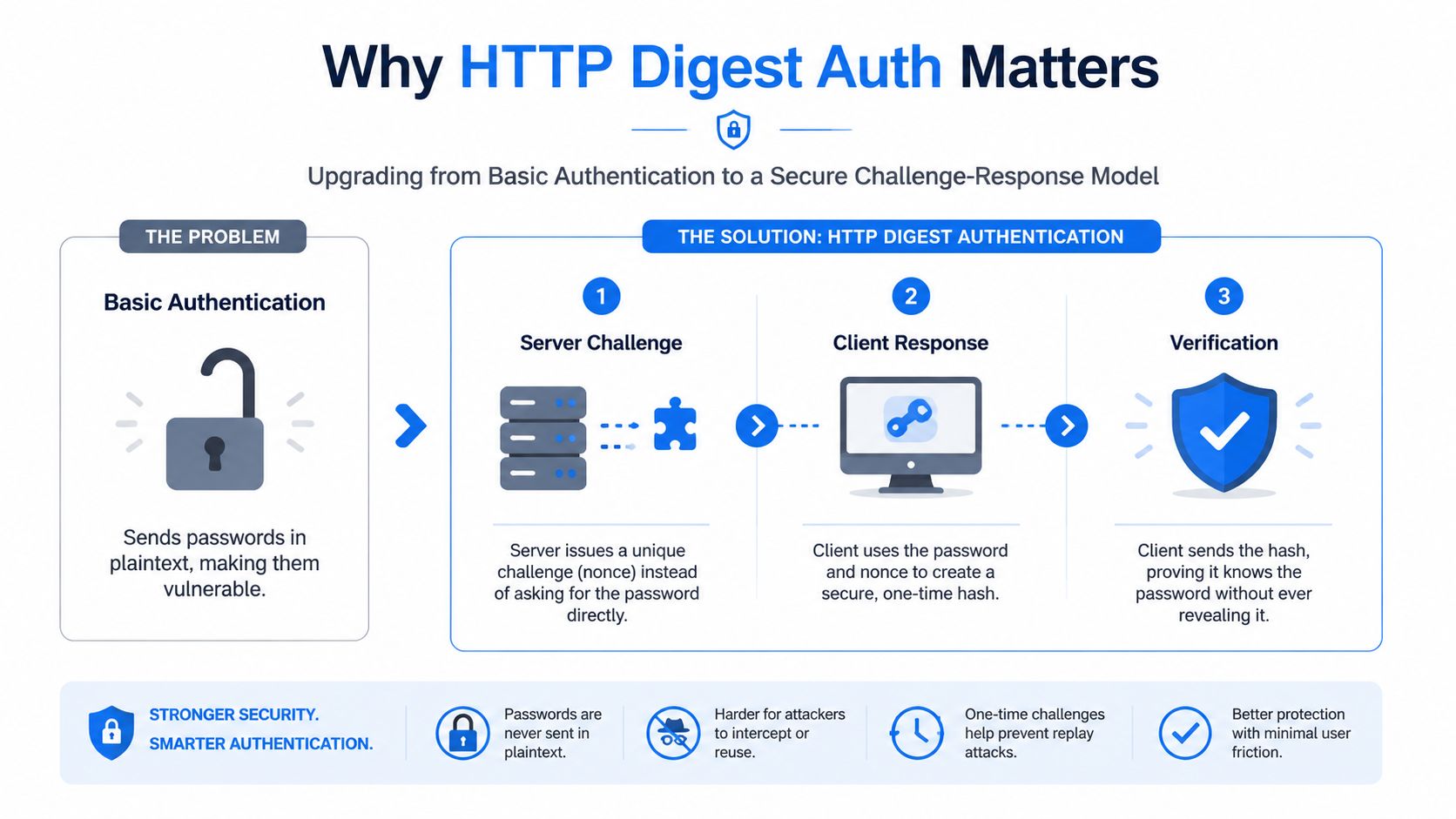
The key takeaway is that the password itself is never transmitted, only a hash that proves the client possesses it.
Step 4: The Server’s Verification
Finally, the server receives the client’s second request with the Authorization header. To verify the client, the server performs the exact same hash calculation on its end, using the original nonce it sent out and the user’s password hash stored in its database.
If the hash calculated by the server matches the
responsehash sent by the client, access is granted! The server returns a200 OKstatus, and the client gets the protected resource.
If the hashes don’t match, or if the nonce is invalid (maybe it’s expired or has been used before), the server again responds with 401 Unauthorized. This final verification step completes the secure HTTP Digest Auth handshake.
How the Client Calculates the Response Hash
The real magic of HTTP Digest Auth happens on the client side. Instead of just sending a password over the wire, the client performs a cryptographic calculation to prove it knows the password without ever revealing it.
The result is a unique, one-time-use hash called the response. This process cleverly combines several pieces of information into a single signature that’s unique to each request. It’s a bit like a bank asking for your mother’s maiden name, the city you were born in, and a special code they just sent you—all at once. An imposter might have one piece of the puzzle, but it’s nearly impossible for them to have all of them.
Breaking Down the Hash Formula
To generate the final response hash, the client first has to create two intermediate hashes: HA1 and HA2.
-
HA1 (Hash of Credentials): This hash acts as a stand-in for the user’s identity. It’s a simple combination of the username, the protection realm, and the password itself. Since these values don’t change often, HA1 can usually be calculated once and then cached for the entire session.
HA1 = MD5(username:realm:password)
-
HA2 (Hash of Request Details): This hash is all about the specific request being made. It combines the HTTP method (like GET or POST) with the URI being requested. This is crucial because it ensures the final signature is only valid for that exact action.
HA2 = MD5(method:uri)
Once these two pieces are ready, the client can move on to the final step, where everything gets combined with the unique challenge sent by the server.

This final step is what guarantees that even if an attacker intercepts one request, they can’t simply reuse the response hash to make a different one.
The Final Response Calculation
The last step ties it all together. The client takes the two hashes it just created and mixes them with the unique values from the server’s challenge. This includes the server nonce, the nonce count (nc), the client nonce (cnonce), and the quality of protection (qop) value.
The final formula looks like this:
response = MD5(HA1:nonce:nc:cnonce:qop:HA2)
This final MD5 hash is the value that gets sent back to the server in the Authorization header. Because it incorporates the single-use server nonce, the resulting hash is only valid for a single request, which is what stops basic replay attacks in their tracks. If an attacker tried to reuse it, the server would immediately know the nonce was stale or the nonce count was wrong and reject the request.
A Modern Security Analysis of Digest Auth
While HTTP Digest Auth was a huge improvement over sending passwords in the clear, it really starts to show its age under a modern security lens. By today’s standards, the protocol has some serious weaknesses that make it a poor choice for any new application. Its entire design was focused on protecting the password itself, but it does almost nothing to protect the actual data being sent back and forth.
The most glaring problem is its total vulnerability to man-in-the-middle (MITM) attacks. Digest auth only proves who you are; it doesn’t encrypt a single byte of your communication. If an attacker can get between the user and the server—which is trivial on an unencrypted HTTP connection—they can read, copy, and even change all the data sent after authentication. They might not get the password, but they get everything else.
The Problem with Weak Passwords and Hashing
Another critical flaw comes down to its reliance on the old MD5 hashing algorithm and how easily it can be cracked offline. If an attacker captures the server’s WWW-Authenticate header and the client’s Authorization response, they have everything they need to start guessing the user’s password on their own machine.
Because the server nonce and other details are out in the open, an attacker can just hammer away, hashing millions of potential passwords until one of them generates the exact same response hash. A weak or common password can be cracked in minutes, making the whole protocol pointless.
From a historical perspective, HTTP Digest Authentication is a classic example of a protocol that looks much stronger on paper than it is in reality. The official specification even admits that it offers no real confidentiality beyond that initial challenge-response. This is especially true when you remember that most passwords people choose are nowhere near random enough to resist dictionary and brute-force attacks, even with a nonce in the mix.
Modern and More Secure Alternatives
Thankfully, the industry has long since moved on to far more robust and flexible authentication frameworks. These modern standards don’t just handle identity—they also secure the data in transit and allow for much more granular control over what a user can access.
- OAuth 2.0: This is the current industry standard for authorization, not just authentication. It lets applications get limited, temporary access to user accounts without ever handling the user’s password directly.
- JWT (JSON Web Tokens): Often used with OAuth 2.0, JWTs are compact, self-contained tokens that securely carry user information. They are digitally signed, so you can trust that the data inside hasn’t been tampered with.
- Bearer Tokens: This is a simpler approach where access is granted to whoever holds the token (the “bearer”). It’s almost always used exclusively over HTTPS to keep the token from being stolen.
To get a better sense of where Digest Auth fits in the bigger picture, it’s helpful to review broader Cleffex web application security insights. For any new project you’re starting, one of these modern alternatives should be your go-to. Digest auth should only be on the table if you absolutely have to interact with a legacy system that requires it.
Working with Digest Auth Using Common Tools
Theory is great, but how do you actually work with a server that’s using HTTP Digest Authentication? Thankfully, you don’t have to manually craft every header and hash. Most common developer tools have built-in support for the challenge-response flow, which simplifies things considerably.
The quickest way to test a protected endpoint from the command line is with curl. All you need is the --digest flag and your credentials.
curl —digest —user “myuser:mypassword” https://api.example.com/protected/resource
Behind the scenes, curl handles the entire two-step dance for you. It makes an initial request, gets the 401 Unauthorized challenge from the server, then uses the nonce to calculate the correct response hash and sends the second, fully authorized request. It’s a seamless way to interact with a Digest-protected API right from your terminal.

A Simple Go Example
When you need to handle Digest Auth in your code, you’ll want a library that can manage the handshake automatically. Here’s a quick example in Go that uses a popular digest transport library to do just that.
package main
import ( “fmt” “io/ioutil” “net/http” “github.com/icholy/digest” )
func main() { transport := &digest.Transport{ Username: “myuser”, Password: “mypassword”, } client := &http.Client{Transport: transport}
resp, err := client.Get("https://api.example.com/protected/resource")
if err != nil {
	panic(err)
}
defer resp.Body.Close()

body, _ := ioutil.ReadAll(resp.Body)
fmt.Printf("Status: %s\nBody: %s\n", resp.Status, string(body))
}
This code abstracts away all the low-level complexity. The digest.Transport layer does the heavy lifting by intercepting the server’s 401 challenge, computing the response hash, and resubmitting the request with the correct Authorization header—just like curl.
Debugging Common Issues
Nine times out of ten, a failed authentication comes down to a small mistake in the hash calculation.
The most common points of failure are an incorrect password, a mismatched realm value between the client and server, or mishandling the server nonce. A stale nonce or an incorrect nonce count (nc) will always result in a rejection.
To figure out what’s going wrong, you need to get your hands dirty and inspect the headers. Check the WWW-Authenticate header from the server’s 401 response and compare it with the Authorization header in your client’s next request. This lets you confirm that every component—the URI, nonce, and realm—is being used correctly to build the final response hash.
API testing tools are perfect for this kind of inspection. If you’re new to this, learning how to use Postman to test an API is a great way to see these headers in action and debug your implementation.
Replaying Digest Auth Traffic with GoReplay
Capturing and replaying production traffic is a fantastic way to test your applications, but what happens when that traffic is locked down with HTTP Digest Auth? A simple replay will fail. Every single time.
This isn’t a bug; it’s the protocol doing its job. The original server nonce captured in your traffic is a single-use token that expires almost immediately. When you try to replay that request, the server sees the old, stale nonce and instantly rejects it with another 401 Unauthorized error.
This stateful, challenge-response dance makes testing with recorded traffic a real headache. You can’t just resend the old Authorization header because its core component—the nonce—is invalid. This is exactly where a session-aware tool like GoReplay shines, moving beyond simple traffic duplication to intelligently handle these complex authentication flows.
The Dynamic Replay Strategy
Instead of just blindly resending captured packets, GoReplay uses middleware to intercept and modify traffic on the fly. When it comes to HTTP Digest Auth, the strategy is to treat every single replayed request as a brand-new authentication attempt. This dynamic process makes sure every request is valid the moment it’s replayed.
Here’s how it works:
- Initial Replay: GoReplay sends the original request from your captured traffic. As expected, your test server fires back a
401challenge containing a fresh nonce. - Middleware Intervention: This is where the magic happens. A custom middleware script intercepts that
401response. It immediately parses theWWW-Authenticateheader to pull out the new nonce and other challenge details. - On-the-Fly Recalculation: The middleware then dynamically recalculates the
responsehash using the original credentials (which you provide securely), the new nonce, and the original request’s method and URI. - Authorized Re-request: Finally, GoReplay sends the request again, but this time with a newly generated
Authorizationheader containing the valid hash. The server accepts it, and your test can proceed.
This session-aware approach effectively completes the HTTP Digest Auth handshake for every single replayed request. It transforms a static recording into a live, interactive test session that can successfully navigate stateful security protocols.
HTTP Digest Authentication has a long history in enterprise software, especially in older server and proxy environments where backward compatibility was a huge deal. Because it was an application-layer challenge-response mechanism, it became deeply embedded in infrastructure tools and legacy APIs. You can explore detailed descriptions of its application on Springer to get a feel for its history. For teams using GoReplay, this legacy matters because these endpoints still pop up, and testing them requires tooling that can preserve the entire challenge-response behavior accurately.
This method also allows for much safer handling of credentials. The original password doesn’t need to be stored in the captured traffic file; it can be injected by the middleware during the replay process, keeping sensitive data out of your recordings. For a deeper look into what GoReplay can do, check out our guide on how to replay HTTP traffic for robust testing.
Common Questions About HTTP Digest Auth
Even though it’s been around for ages, HTTP Digest Authentication still trips up plenty of developers. Let’s clear up a few of the most common questions to help you navigate this classic protocol.
Is It Secure Enough for New Projects?
For any new application you’re building today, the answer is a hard no.
Modern standards like OAuth 2.0 and JWTs offer far better security, flexibility, and overall data protection. Digest Auth’s reliance on the now-outdated MD5 hashing algorithm and its complete lack of data encryption just don’t hold up in today’s security landscape.
That said, it is a major improvement over HTTP Basic authentication. If you’re stuck working with a legacy system that requires it, your absolute top priority should be to enforce its use exclusively over a secure HTTPS connection. This is non-negotiable, as it’s your main defense against man-in-the-middle attacks.
Nonce vs. Cnonce: What Is the Difference?
These two values are both critical for preventing attacks, but they play very different roles in the authentication dance.
- Nonce (Number Used Once): This is a unique, random string generated by the server for each
401 Unauthorizedchallenge. Its whole job is to stop basic replay attacks, making sure an old authorization response can’t just be copied and reused. - Cnonce (Client Nonce): This is a unique string generated by the client for every single request. It injects another layer of randomness into the final hash, which helps protect against chosen-plaintext attacks and guarantees that every request from the client is distinct.
Together, the nonce and cnonce ensure that every single request has a unique cryptographic signature, even if a user sends multiple requests within the same session using the same server challenge.
When you’re trying to get a Digest implementation working on a web server, knowing your way around common errors is key. While Digest uses the 401 status code, simple misconfigurations can easily lead to other issues. This guide on Apify Hub troubleshooting NGINX 403 can be a great resource for tracking those down. Remember, the original spec was built around MD5, and even though newer RFCs added support for SHA-256, server adoption is still pretty inconsistent.
At GoReplay, we know that testing complex authentication isn’t easy. Our tool is designed to handle stateful protocols like Digest Auth by dynamically recalculating credentials on the fly, so you can transform real production traffic into powerful, realistic tests. Learn more at GoReplay.