
Functional vs Unit Testing A Practical Comparison
The real difference between functional testing and unit testing boils down to scope. Unit testing is about making sure a single, isolated piece of your code—like one specific function—works exactly as it should. On the other hand, functional testing checks if the whole application hangs together and actually delivers what the business and users need.
Think of it this way: a unit test makes sure a single gear is perfectly machined. A functional test ensures the entire clock tells the correct time.
Understanding The Core Testing Differences
While both are non-negotiable for shipping quality software, they play their parts at completely different stages and for different reasons. Unit testing is a developer’s game—it’s a granular, white-box approach. The whole point is to confirm the internal logic of a tiny code snippet is solid. It’s your first line of defense against bugs creeping in.
Functional testing is the opposite. It’s a black-box method, usually owned by the QA team. They don’t care about the code underneath; they care about what the application does. This is where you answer the big question: “Does the software work the way a user expects it to?”
This infographic breaks down how their scope, timing, and goals differ in practice.
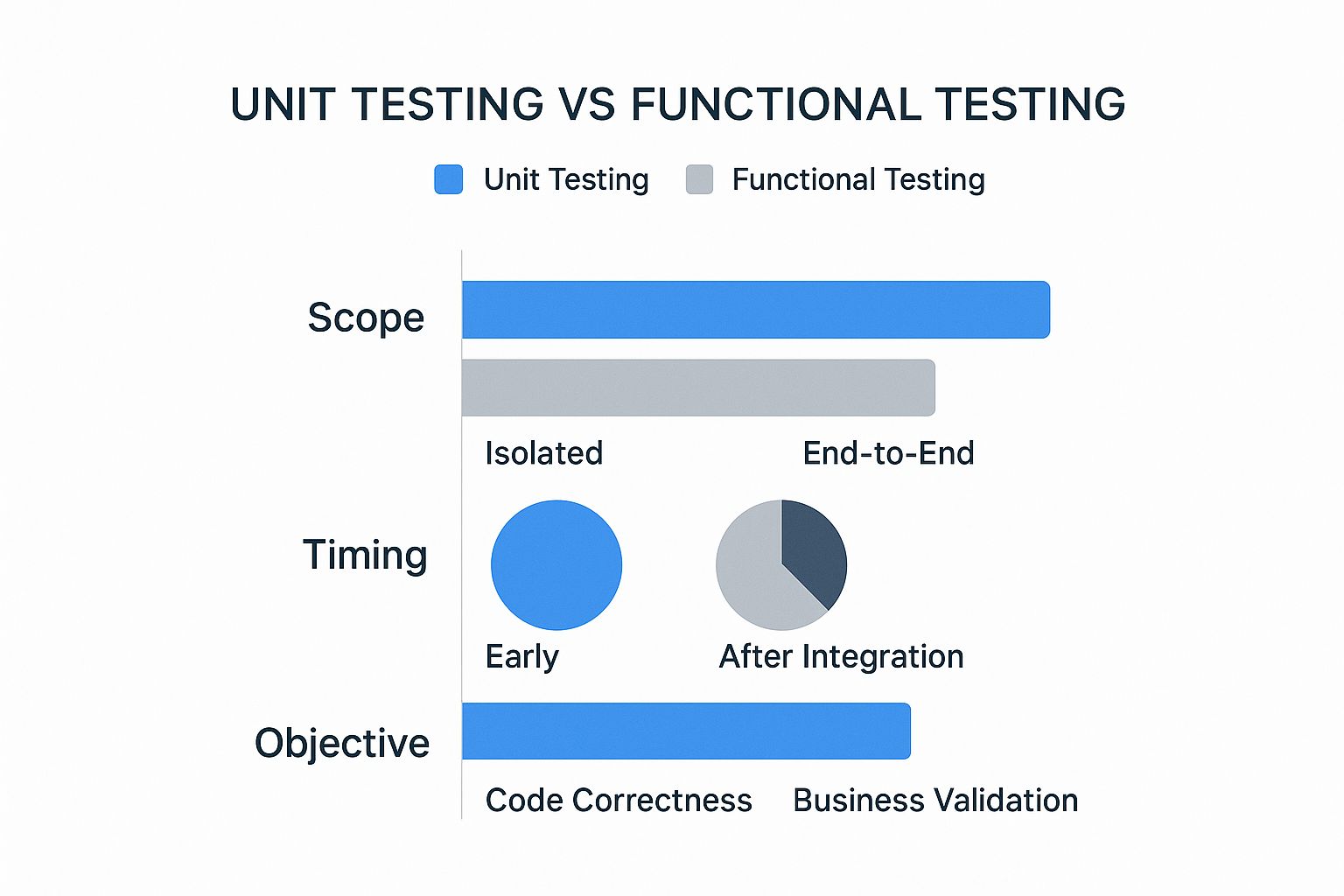
As you can see, unit tests are all about isolated code snippets early in the game. Functional tests come later, after everything has been put together, to validate the system against real-world business requirements.
Unit vs Functional Testing At a Glance
The different roles these tests play have a real, measurable impact. One 2021 survey found that 85% of teams using unit testing caught bugs earlier in the development cycle. That discipline translated to a 30-50% reduction in defects found after release. Those numbers really drive home how essential a solid foundation of unit tests is. You can discover more insights about functional and unit testing to get the full picture.
To make the comparison crystal clear, here’s a quick summary of their core differences.
| Criterion | Unit Testing | Functional Testing |
|---|---|---|
| Primary Goal | Verify a single code component works correctly in isolation. | Validate that the end-to-end system meets business requirements. |
| Scope | Narrow—just one function, method, or class. | Broad—covers entire features, user workflows, and system behavior. |
| Performed By | Developers. | QA Engineers or dedicated testers. |
| When It’s Done | Early in the dev cycle, often before code is even merged. | After individual components are integrated into a complete system. |
| Testing Type | White-box testing (you need to know the internal code). | Black-box testing (you don’t need to know the internal code). |
Ultimately, this table shows two complementary philosophies at work. Unit tests build a strong foundation by ensuring the individual bricks are solid, while functional tests make sure the entire wall stands up to scrutiny.
Diving Deep Into Unit Testing
Unit testing zooms in on the smallest, most granular pieces of an application. Forget the big picture for a moment; we’re talking about individual functions, methods, or classes. The whole point is to verify their logic in complete isolation, ensuring each building block works exactly as it should before you start connecting it to everything else.
This is almost always an automated process, driven by frameworks built for specific languages. You’ll see developers reaching for tools like JUnit for Java, NUnit for the .NET world, or PyTest for Python. These tools make it easy to write, run, and manage a suite of tests that fire off continuously, giving you instant feedback the moment something breaks.
The Core Mechanics Of Unit Tests
At its heart, unit testing is a classic white-box technique. This just means the developer writing the test knows the code’s internal structure inside and out. The primary goal is simple: prove that for a specific input, a unit of code produces the exact output you expect.
To keep tests pure and isolated, any dependencies—like a database connection or a call to an external API—are swapped out with test doubles. If you’re curious about the nuances between these, we’ve got a detailed guide on stubbing vs mocking. This is a non-negotiable part of the process; it ensures a test fails only because the unit itself has a bug, not because a third-party service is down.
A well-written unit test is your safety net. It gives developers the confidence to refactor and improve code, knowing that any regression will be caught immediately.
This diagram shows the basic idea: isolated components are tested against a set of predefined conditions.

As you can see, individual units are walled off from their dependencies using mocks. This is what allows for such focused and reliable tests.
Benefits And Strategic Limitations
The payoff for this meticulous approach is huge. By catching bugs at the earliest possible stage, unit tests slash the cost and complexity of fixing them later. In fact, projects with strong unit test coverage often see a 30-50% reduction in bugs found after release. Plus, these tests act as living documentation, showing precisely what a piece of code is designed to do.
But the laser focus of unit testing is also its biggest weakness. It’s fantastic at verifying internal logic, but it’s completely blind to integration issues. A common snag in the functional vs unit testing debate is realizing that even perfectly functioning individual components can fail spectacularly when they have to work together. This is where functional testing steps in to save the day, validating the whole system from a user’s point of view.
Exploring The Scope Of Functional Testing
If unit testing is about checking the bricks, functional testing is about making sure the whole house stands up to code. It takes a huge step back from the tiny, isolated components and looks at the fully integrated system from a completely different angle.
The core question it answers is simple but critical: does the application actually do what it’s supposed to from a user’s point of view? This is a black-box strategy. Testers don’t care how the code works internally; they only care about inputs and outputs.
The whole point is to validate the software against real business requirements and user workflows. Instead of testing a single function that calculates a price, a functional test simulates an entire user journey—logging in, adding an item to their cart, applying a discount, and checking out. It’s this end-to-end confirmation that proves all the individual, unit-tested parts are working together as they should.
Layers Of Functional Validation
Functional testing isn’t just one thing. It’s a whole category of validation, with different layers designed to build confidence before an application ever sees the light of day.
- Smoke Testing: Think of this as a quick sanity check. It makes sure the most basic, critical features are working. If a user can’t even log in, there’s no point in testing anything else. A failed smoke test often means the build is rejected on the spot, saving everyone a lot of time.
- Regression Testing: Every time you add a new feature or fix a bug, you run the risk of breaking something that used to work perfectly. Regression tests are the safety net, re-running old tests to ensure existing functionality remains stable and untouched.
- User Acceptance Testing (UAT): This is the final boss of testing. Real end-users or client reps get their hands on the software to see if it meets their needs in a practical, real-world setting. A successful UAT is usually the final green light for deployment.
Functional testing is the ultimate reality check. It closes the gap between what developers built and what the customer actually needs, making sure the end product isn’t just technically sound—it’s genuinely useful.
This diagram shows exactly how functional tests measure the system’s behavior against the requirements that were laid out from the start.

As the graphic shows, the focus is squarely on the “Functions to be tested.” It’s all about confirming that the system delivers on its promises, which is what makes it a non-negotiable part of any solid quality assurance process.
The Role Of Modern Tooling
Executing these complex, multi-step user simulations manually just isn’t feasible. That’s where powerful automation tools come in. Frameworks like Selenium and Cypress are the industry workhorses, letting engineers write scripts that mimic user actions like clicking buttons, filling out forms, and navigating through pages. They’re essential for building a functional testing process that can scale.
Want to go deeper? Check out our practical guide for the functional testing of an API for a look at modern strategies.
At the end of the day, the functional vs unit testing debate isn’t really a debate at all. They’re two essential, complementary quality gates. Unit tests ensure your building blocks are solid. Functional tests make sure the entire structure stands strong and actually does what it was built for.
Unit vs. Functional Testing: Different Goals, Different Lifecycles
While both unit and functional testing share the ultimate goal of improving software quality, they couldn’t be more different in their approach. They operate with fundamentally different objectives and occupy distinct stages within the Software Development Life Cycle (SDLC). Getting this distinction right is the key to building a truly robust quality assurance strategy.
Unit testing is the developer’s first line of defense. It’s an activity done early and often, focused squarely on code correctness. When a developer writes a unit test, they are asking a simple question: “Does this specific function or method behave exactly as I designed it to, in complete isolation?” This happens continuously during the coding phase, often before the code is even checked into a shared repository.
Functional testing, on the other hand, comes into play much later, after all the individual pieces have been assembled. Its goal is behavioral validation. Here, QA engineers step in to confirm the software meets its business requirements from a real user’s perspective. They’re not just checking code; they’re ensuring entire workflows—like a customer completing a purchase or submitting a support ticket—function correctly from start to finish.
This video gives a great visual breakdown of how these two testing types differ in the real world.
Strategic Placement in the SDLC
Where each test type fits into the development workflow has huge implications for speed, cost, and the kinds of bugs they’re designed to catch. Unit tests are fast, cheap, and there are a lot of them. They form the wide base of the “Testing Pyramid,” giving developers immediate feedback to find and fix logical errors on the spot.
Functional tests are inherently slower and more resource-intensive. Because they need a fully integrated and deployed environment to run, they’re executed less frequently, typically after a new build is ready for the QA team. This later placement is by design—it’s meant to catch the integration issues and workflow failures that unit tests, by their very nature, are blind to.
Unit testing asks, “Did I build the code right?” while functional testing asks, “Did I build the right product?” This simple distinction highlights their complementary roles in delivering software that is both technically sound and functionally valuable.
This isn’t just a theoretical debate. The evolution of software development over the past 20 years tells a clear story. Back in the early 2000s, manual functional testing was the standard, leading to painfully long release cycles and bugs discovered way too late. The rise of Agile, along with frameworks like JUnit and NUnit, pushed automated unit testing into the mainstream by 2010, allowing teams to catch defects much earlier. For a deeper dive, you can explore research on how testing practices have evolved on browserstack.com.
Detailed Feature Comparison Unit vs Functional Testing
To really hammer home the differences, let’s break down how each approach stacks up across several key aspects of the testing process. The table below provides a granular look at their distinct roles and characteristics.
| Aspect | Unit Testing | Functional Testing |
|---|---|---|
| Primary Objective | Validate the internal logic of a single, isolated code component. | Verify that end-to-end user workflows meet business requirements. |
| Execution Speed | Extremely fast, running in milliseconds. | Slower, as it involves UI interactions and multiple system components. |
| Environment | Local developer machine with dependencies mocked or stubbed. | A fully integrated, staging-like environment is required. |
| Defect Type | Catches logical errors, boundary condition failures, and incorrect calculations. | Catches integration errors, UI/UX issues, and business logic failures. |
| Cost to Fix | Low. Bugs are found and fixed immediately by the developer. | Higher. Defects are found later and require more coordination to resolve. |
This comparison makes one thing crystal clear: you need both. Relying only on unit tests leaves you totally blind to system-level failures. But skipping unit tests and leaning only on functional testing turns debugging into a nightmare, where a single failed workflow could have dozens of potential root causes. A balanced strategy uses their unique strengths at the right time.
When To Use Each Testing Method
Choosing between functional and unit testing isn’t about picking one over the other. It’s a strategic call you make at different points in your development cycle. The real trick is knowing which tool to grab for which job, and letting the context of what you’re building guide your testing strategy.
Think of a complex data processing algorithm that needs to get edge cases right—like null values or massive numbers. Here, unit testing is non-negotiable. You’d write a bunch of small, lightning-fast tests, with each one hitting a specific piece of logic. This is how you guarantee the core calculations are spot-on, completely isolated from everything else.
Now, picture a multi-step e-commerce checkout. A user has to add an item to their cart, pop in a discount code, enter shipping details, and then pay. Sure, each function like calculateDiscount() needs its own unit test, but the real risk is how all these steps hang together. This is a perfect job for functional testing.
The Testing Pyramid As Your Guide
The “Testing Pyramid” is a classic model for a reason—it works. It helps teams find the right testing balance by showing an ideal portfolio: a huge base of fast, simple unit tests, a smaller middle layer of integration tests, and a tiny top layer of slower, end-to-end functional tests.

This whole structure is built for efficiency. If you lean too heavily on slow functional tests, you create a massive bottleneck. Your test suite becomes brittle, slow, and a nightmare to maintain. A strong foundation of unit tests, on the other hand, gives developers instant feedback, catching most bugs cheaply and quickly.
Your goal should always be to push testing as far down the pyramid as you can. If a bug can be caught with a unit test, it absolutely should be. Save the functional tests for validating entire user workflows that are impossible to check at a lower level.
Practical Decision-Making Scenarios
Let’s break this down with a few more real-world examples to make the decision process crystal clear.
When to Prioritize Unit Testing:
- Complex Business Logic: Got a function that spits out insurance premiums based on a dozen variables? Unit tests are perfect for hammering every single logical branch.
- Utility Functions: A helper function that formats dates or parses strings needs to be bulletproof. Unit tests ensure it’s reliable every time it’s called, anywhere in the app.
- Algorithmic Components: Any code doing critical calculations—like a custom sorting algorithm or a data transformation pipeline—demands extensive unit test coverage. No exceptions.
When to Prioritize Functional Testing:
- User Authentication Flows: The entire dance of signing up, logging in, resetting a password, and logging out involves multiple services working together. You have to validate this with a functional test.
- Third-Party Integrations: When your app depends on an external payment gateway or shipping API, functional tests are the only way to prove the integration points actually work.
- Critical User Journeys: Any core workflow, like creating a new project in a SaaS tool or publishing a blog post, needs an end-to-end functional test. This is how you guarantee the feature delivers on its promise to the user.
In the end, the best strategy is a balanced one. Unit tests give you the confidence that your building blocks are solid, while functional tests make sure the whole system delivers the value your users actually came for.
Frequently Asked Questions
Even with a detailed breakdown, practical questions always come up when you’re in the trenches. Getting the answers right is key to building a testing strategy that actually works for your team and your product. Here are some of the most common ones we hear.
Is Functional Testing The Same As Black-Box Testing?
Yes, for the most part. Functional testing is a type of black-box testing. The name comes from the idea that the tester can’t see inside the “box”—they don’t need to know anything about the internal code or architecture.
Their only job is to provide inputs and check if the outputs match the business requirements. It’s all about simulating a real user’s experience, and your users have no idea what your code looks like. They just care if it works.
Can Unit Testing Replace Functional Testing?
Absolutely not. This is a common but dangerous misconception that leaves huge gaps in quality. Unit tests are fantastic for proving individual components are logically correct, but they are completely blind to how those components interact.
You can have a suite of thousands of passing unit tests, yet the application can still fall apart spectacularly when all those “perfect” components are assembled.
Functional testing is the only way to verify that the entire system works together as a cohesive whole. Think of it like this: unit tests check the ingredients, but functional tests taste the final dish. You can’t skip tasting the dish just because you know the flour and sugar are high quality.
Which Type of Testing is More Important?
That’s like asking if a car’s engine is more important than its wheels—you need both to get anywhere. The real question isn’t about importance, but about purpose and timing.
Unit testing is crucial for developers. It lets them build a stable, maintainable codebase with confidence. On the other hand, functional testing is critical for making sure the final product actually delivers value to the user and meets business goals. A bug-free app that doesn’t solve a user’s problem is still a failure. They are partners in delivering quality, not competitors.
What Does Mocking Mean in Unit Testing?
Mocking is a technique for isolating the code you’re testing from its external dependencies, like a database or a third-party API. You don’t want your test to fail just because an external API is down or the network is flaky.
Instead, you create a “mock” object that pretends to be the real dependency. This mock is programmed to return a predictable response, letting you test your function’s logic in a completely controlled environment. It ensures your unit test only fails when there’s a problem with the code itself, not something outside it.
Ready to bridge the gap between unit and functional testing with real-world data? GoReplay captures your production traffic, allowing you to create realistic, high-fidelity functional and load tests that find bugs before your users do. See how it works at https://goreplay.org.