
Your Guide to the Forward Proxy Server

A forward proxy server is basically a middleman for a group of users inside a private network, sending all their requests out to the wider internet. Think of it as a single, guarded gateway that all outbound traffic has to pass through. This setup is all about protecting clients, giving them a layer of anonymity, and controlling what goes in and out.
What Is a Forward Proxy Server and Why It Matters
Imagine your company has a dedicated mailroom clerk for all outgoing mail. Instead of every employee running to the post office, they just hand their letters to the clerk. That clerk logs who sent what, maybe checks the address for compliance, and then sends everything out together from one central point.
That’s pretty much what a forward proxy server does for internet requests. It’s the single, trusted intermediary for every connection started by a user inside a private network. When you try to visit a website, your request doesn’t go straight to the internet. First, it hits the forward proxy.
The proxy then takes that request and sends it to the destination server on your behalf. To the outside world—the website you’re visiting—the request looks like it came from the proxy server, not from your individual machine. This simple but powerful idea is a cornerstone of modern IT.
The Core Function of a Forward Proxy
At its heart, a forward proxy is both a protective barrier and a control point. It shields the identity of internal users and gives administrators a central hub to manage and monitor web access. This has huge implications for developers, DevOps engineers, and QA teams who need controlled, secure network environments to do their jobs.
Here’s what it really does:
- Anonymizing User Identity: The proxy masks the internal IP addresses of clients. This makes it much harder for external servers to track what a specific user is doing back to their actual device.
- Enforcing Access Policies: Admins can set up the proxy to block access to certain websites or types of content, helping enforce company policies or just keep everyone focused.
- Enhancing Security: The proxy can inspect traffic flowing in both directions, filtering out nasty stuff like malware or phishing scams before they ever get to an end user’s computer.
- Improving Performance: By caching frequently accessed content, a forward proxy can speed things up. If you request a popular webpage that someone else just viewed, the proxy can serve it instantly from its local cache, saving bandwidth and cutting down load times.
A forward proxy is fundamentally about representing and protecting the client. It’s the client’s agent on the internet, making sure all outbound requests are handled securely and efficiently according to a predefined set of rules.
This centralized control is what makes the forward proxy so essential. It gives you a single point for traffic inspection, which is critical for security audits and for workflows like traffic capture and replay. When you need authentic user data for realistic testing, a forward proxy ensures you can get it cleanly and safely. It brings order and oversight to what would otherwise be a chaotic mess of direct-to-internet traffic.
How a Forward Proxy Server Actually Works
So, how does a forward proxy really do its job? Let’s trace the path of a simple web request to see what’s happening behind the scenes.
Normally, when you visit a website, your computer makes a direct connection to that site’s server. It’s a straight line from you to the content. But when you put a forward proxy in the mix, the route changes completely.
Your request first hits the forward proxy, which basically becomes your network’s official representative on the internet. The proxy then takes your request and sends it to the website’s server on your behalf. To the website, it looks like the proxy is the one asking for the page—it only sees the proxy’s IP address, not yours. When the website responds, it sends the data back to the proxy, which then passes it along to you.
This simple redirection turns the proxy into a powerful checkpoint for every single piece of traffic leaving your network.
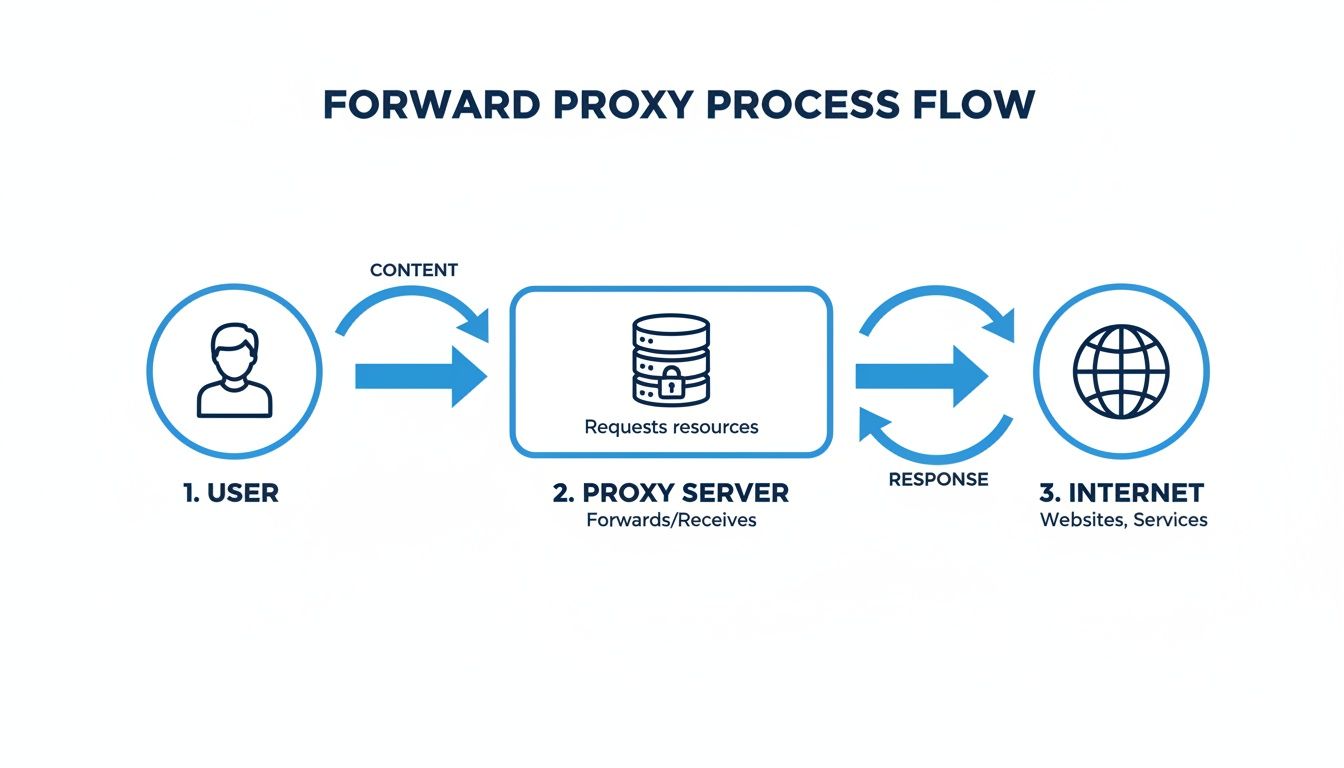
As you can see, by centralizing all outgoing requests, the proxy becomes the perfect spot to inspect traffic, log activity, and enforce security rules before anything leaves the safety of your internal network.
Your Personal Shopper on the Internet
A great way to think about a forward proxy is to imagine it as a personal shopper. You give the shopper your list, they head to the store, buy everything for you, and bring it all back. The store staff only ever deals with the shopper; they have no idea who the items are really for. Your identity stays completely private.
That’s precisely what a forward proxy server does for the clients inside a network.
This is fundamentally different from a reverse proxy, which is more like a store’s front-desk concierge—its job is to represent the store’s services to every customer who walks in.
The core distinction is simple: a forward proxy works on behalf of the client (the user), while a reverse proxy works on behalf of the server (the website or application).
This difference in purpose shapes everything. Forward proxies are built for client-side needs like privacy and access control. Reverse proxies, on the other hand, solve server-side problems like load balancing and security.
Forward Proxy vs Reverse Proxy At a Glance
The terms get mixed up all the time, so laying them out side-by-side makes the distinction crystal clear. Getting this right is fundamental to good network design, as they solve completely different problems.
| Attribute | Forward Proxy | Reverse Proxy |
|---|---|---|
| Protects | The client/user | The web server/application |
| Sits In Front Of | The client’s network | The web server farm |
| Main Use Cases | Anonymity, content filtering, caching, bypassing geo-restrictions. | Load balancing, SSL termination, security, caching. |
| Visibility | Hides the client’s IP from the server. | Hides the server’s IP from the client. |
| Typical User | An end-user or a group of users on a private network. | A website or web application service. |
This table really nails down the specific role each proxy plays. One protects you, the user; the other protects the servers you’re trying to reach.
Key Architectural Components
A forward proxy is more than just a simple request forwarder. It relies on a few key internal parts to work its magic. Understanding how a TCP/IP port works is also a good foundation for grasping how these network connections are managed.
Here are two of the most critical components you’ll find inside a proxy:
- Caching Engine: Think of this as the proxy’s short-term memory. When someone on the network requests a webpage or a file, the proxy can save a copy. The next time someone asks for that same content, the proxy can serve it up instantly from its cache instead of going all the way out to the internet again. This can be a huge win, saving bandwidth and making things feel much faster for users.
- Logging System: Since a forward proxy sees every request heading out the door, its logging system can create an incredibly detailed audit trail. Admins can see who is trying to access what, when they’re doing it, and for how long. This information is gold for troubleshooting network issues, analyzing security threats, and making sure everyone is following company policy.
Where Forward Proxy Servers Really Shine
Now that we have the mechanics down, let’s talk about where a forward proxy goes from a neat concept to an essential tool. This isn’t just theory—a forward proxy solves real, everyday business problems with security, privacy, performance, and testing. By funneling all your outbound traffic through a single checkpoint, you gain a powerful control point for a handful of critical jobs.
These use cases show how a forward proxy becomes a strategic piece of your network, protecting users and saving resources in ways you can actually measure. Let’s dig into the four main scenarios where they make a huge difference.
Enforcing Security and Access Policies
One of the most common jobs for a forward proxy is to act as a security gatekeeper. Since every outbound request has to go through it, the proxy is the perfect spot to lay down the law about what users can and can’t access online.
Admins can set up the proxy to filter traffic based on all sorts of rules. This means you can:
- Block Malicious Websites: Stop users from ever reaching known phishing sites, malware hosts, or command-and-control servers. The threat gets neutralized before it even hits the user’s machine.
- Restrict Content Categories: Keep everyone focused by blocking access to social media, streaming sites, or other non-work-related content during business hours.
- Prevent Data Exfiltration: You can even inspect outgoing traffic to spot and block sensitive data—like credit card numbers or confidential documents—from leaving your network.
This centralized setup makes security management so much simpler. Instead of wrestling with rules on hundreds of different computers, you manage them all in one place. It’s a surefire way to get consistent policy enforcement across the board.
Enhancing User Privacy and Anonymity
In a world where everything you do online is tracked, a forward proxy adds a much-needed layer of privacy. When a user sends a request through the proxy, the website on the other end only sees the proxy’s IP address.
This effectively hides the user’s real internal IP, making it incredibly difficult for websites and third-party services to trace activity back to a specific person or device. This isn’t just about hiding—it’s about shielding your internal network and your users from the prying eyes of the public internet.
By acting as the single point of contact for all outbound traffic, the forward proxy presents a unified, anonymous front to the outside world, shielding individual users from direct exposure and tracking.
This is a huge deal for any organization that needs to protect user identities or conduct sensitive research without broadcasting who they are.
Boosting Performance with Intelligent Caching
A forward proxy can seriously speed up your network and slash bandwidth costs by using a clever trick: caching. The idea is simple. The proxy stores copies of things people access all the time, like images, CSS files, or even whole web pages.
When the first user asks for a popular file, the proxy grabs it from the internet and saves a copy. The next time someone on the network wants that exact same file, the proxy serves it directly from its local cache. No need to go all the way out to the internet and back. This results in:
- Faster Load Times: Users get what they want almost instantly because the data is coming from just down the hall, not from a server halfway across the world.
- Reduced Bandwidth Usage: Serving content from the cache keeps traffic off your main internet connection, freeing up precious bandwidth for more important stuff.
This is a game-changer in places like offices or schools, where you have dozens of people all hitting the same sites and using the same online tools all day long.
Bypassing Geo-Restrictions and Filters for Testing
Finally, a forward proxy is a secret weapon for developers and QA teams. A lot of apps and websites change their content or behavior based on where the user is located. A forward proxy lets you pretend to be anywhere in the world.
For example, a developer in the United States can route their traffic through a proxy in Germany to see exactly what German users see. Does the app show the right language? The correct currency? This is how you accurately test localization, geo-targeted ads, and regional compliance rules without ever leaving your desk.
Practical Configuration Examples and Commands
Knowing the theory behind a forward proxy is one thing, but actually building one is where the rubber meets the road. Let’s bridge that gap with some hands-on configuration examples using popular open-source tools.
We’ll focus on Squid, a powerful and widely-used forward proxy, to show you how to get a basic server running. From there, we’ll dive into implementing access controls and even managing encrypted traffic. These examples are your starting point, turning abstract concepts into concrete code you can adapt for your own environment.

Setting Up a Basic Squid Proxy
Squid has been a staple in network administration for years, and for good reason. It’s highly configurable, with its behavior controlled by simple directives in the squid.conf file, usually found at /etc/squid/squid.conf.
Let’s start with the absolute basics: getting the proxy to listen for connections. The http_port directive handles this. We’ll use port 3128, a common choice.
Basic Squid configuration to listen on port 3128
WARNING: This allows access from ANY client. Not secure for production.
http_port 3128
By default, Squid denies all requests.
This line explicitly allows HTTP requests from any source.
http_access allow all
Deny all other types of access as a fallback.
http_access deny all
This simple config creates a completely open forward proxy. While it’s great for a quick test, it is highly insecure and should never be used in a real production environment. It essentially lets anyone on the internet use your server to browse the web. Now, let’s lock it down.
Implementing Access Control Lists
The real magic of a forward proxy comes from controlling who can use it and what they can access. In Squid, you manage this with Access Control Lists (ACLs). Think of ACLs as named rules that define specific criteria, like a client’s IP address or the website they’re trying to visit.
You can create an ACL for your local network, then use an http_access rule to grant it permission. This is the most common way to ensure only trusted users can use the proxy.
Define an ACL named ‘localnet’ for our internal network.
Make sure to replace this with your actual network’s IP range.
acl localnet src 192.168.1.0/24
Allow requests that match the ‘localnet’ ACL.
http_access allow localnet
Explicitly deny all other requests to secure the proxy.
http_access deny all
With these rules in place, Squid will now only accept and forward requests from devices inside the 192.168.1.0/24 subnet. The door is effectively closed to unauthorized users. As you build more complex network setups with tools like GoReplay, you can see how they fit into your stack by checking out the GoReplay installation guide.
An ACL is a building block for your security policy. You define a named condition (like “localnet”) and then use that name in an
http_accessrule to either permit or deny traffic that matches the condition.
Handling HTTPS Traffic with SSL Bump
A common reason to use a forward proxy is to inspect encrypted HTTPS traffic for security threats. This is done through a process called SSL Bump, also known as TLS interception. The proxy sits in the middle, decrypts the traffic for inspection, and then re-encrypts it before sending it to the destination.
This is definitely an advanced feature, and it comes with a major prerequisite: your client devices must be configured to trust a special certificate generated by the proxy.
Here’s the high-level game plan for setting this up in Squid:
- Generate a Certificate Authority (CA): First, you’ll need to create your own root CA certificate. The proxy uses this to dynamically create and sign fake certificates for the websites your users visit.
- Configure Squid: Next, you’ll update
squid.confwith the directives needed to enable SSL Bump. - Install the Certificate: Finally, this is the crucial step. You have to install your custom CA certificate on every single client device that will use the proxy and mark it as trusted.
A simplified configuration to get you started might look something like this:
Configure the port to intercept and “bump” HTTPS traffic.
http_port 3128 ssl-bump generate-host-certificates=on cert=/etc/squid/certs/proxy-ca.pem
Define the steps for handling SSL connections.
ssl_bump peek step1 all ssl_bump bump all
Point to the helper program that generates certificates on the fly.
sslcrtd_program /usr/lib/squid/security_file_certgen -s /var/lib/squid/ssl_db -M 4MB This setup effectively turns your proxy into a “man-in-the-middle” for your own network, giving you full visibility into encrypted traffic for security scanning and policy enforcement.
Using Forward Proxies for Realistic Traffic Replay
Beyond just security and performance, a forward proxy server gives development and QA teams a powerful, strategic advantage. Think of it as a chokepoint. Because it centralizes all outbound traffic from your network, it creates the perfect spot not just for control, but for observation. This consolidated stream of real-world user interactions is a goldmine for building highly realistic test environments.
By placing a traffic-capture tool right at this chokepoint, you can record every single request your users make. This isn’t synthetic test data; it’s authentic user behavior, complete with all its quirks and complexities. It’s the kind of stuff that scripted tests almost always miss, turning your proxy into a vital part of a data-driven testing pipeline.
Capturing and Replaying Authentic User Traffic
This is exactly where specialized tools like GoReplay come into the picture. By listening to the traffic flowing through your forward proxy, GoReplay can record this stream and then “replay” it against a staging or test environment. This synergy transforms raw production traffic into your most valuable testing asset.
The process itself is straightforward but incredibly effective:
- Centralized Capture: The forward proxy funnels all outbound user requests into one manageable stream.
- Passive Recording: A tool like GoReplay listens in, capturing real HTTP requests without dragging down production performance.
- Realistic Replay: This captured traffic is then fired at your staging server, simulating production load with unmatched accuracy.
This approach lets you run precise load tests, execute regression tests with real data, and find performance bottlenecks before they ever see the light of day. You’re testing with reality, not just assumptions. To dig deeper, you can explore how to replay production traffic for realistic load testing in a modern workflow.
The combination of a forward proxy and a traffic replay tool creates a feedback loop where real user activity directly informs and validates the quality of your pre-production environment. This moves testing from a theoretical exercise to a practical, evidence-based process.
The Benefits of a Proxy-Based Replay Strategy
Weaving a forward proxy into your traffic replay workflow delivers clear, tangible benefits that lead to more resilient applications. It’s a strategic move that pays off by cutting down on risk and boosting quality.
- Unmatched Realism: You’re testing with the exact same API calls, headers, and request patterns that your live app handles every day. This level of realism is almost impossible to fake with manual scripts.
- Early Bug Detection: By throwing real-world traffic scenarios at new code in a safe environment, you can squash bugs, performance regressions, and weird edge cases long before they reach production.
- Accurate Load Testing: Synthetic load generators often fail to mimic the unpredictable nature of human behavior. Replaying actual traffic gives you a true measure of how your system will hold up under the stress of a normal day—or a peak event.
Ultimately, using a forward proxy as a capture point for traffic replay enables a much more confident and reliable deployment strategy. It ensures that when you push new features live, they’ve already been battle-tested against real-world conditions, minimizing surprises and protecting the user experience.
Forward Proxy Security and Performance Best Practices
Setting up a forward proxy is a great first step, but the real work starts after deployment. To get the most out of it, you need a solid game plan for keeping it secure, fast, and reliable. This isn’t a “set it and forget it” tool; it requires a continuous cycle of updating, monitoring, and fine-tuning.
If you neglect it, a proxy can quickly turn from a network asset into a security hole or a frustrating bottleneck. By following a few battle-tested best practices, you can make sure your proxy does its job without getting in the way.
Enhancing Security Posture
Think of your forward proxy as a critical checkpoint for all outbound traffic. That makes its security non-negotiable. The goal is to build a hardened layer of defense that shields your internal users from sketchy stuff on the internet while enforcing your company’s own rules.
A well-secured proxy doesn’t just block threats—it gives you a detailed audit trail, which is a lifesaver for incident response and compliance. In fact, a forward proxy is a key piece in modern defense strategies like zero trust security, which operates on the simple but powerful principle of “never trust, always verify.”
Here are the security essentials:
- Keep Software Updated: Make sure your proxy software (like Squid or Nginx) is always patched. New vulnerabilities are found all the time, and falling behind is risky. Set up automated updates so you never miss a critical fix.
- Implement Strict Access Control Lists (ACLs): This is the single most important security step. Your ACLs should be configured to deny by default. Only allow traffic from known, trusted internal IP ranges. No exceptions.
- Enable Detailed Logging: Good logs are your best friend during a security audit or when troubleshooting a problem. Configure your proxy to log every request—source IP, destination, timestamp, the works—and send those logs to a centralized system where you can actually analyze them.
Optimizing for Peak Performance
Security is paramount, but a slow proxy will drive your users crazy and kill productivity. Performance tuning is all about making sure your proxy speeds things up and saves resources, rather than dragging the whole network down.
A high-performing forward proxy server should feel invisible to the end user. The best proxy is one that enhances security and speed without introducing noticeable latency or disruption.
You’ll want to keep a close eye on key metrics like CPU usage, memory consumption, and the cache hit ratio. A high cache hit ratio is a great sign—it means the proxy is doing a good job serving content from its local storage, saving you a ton of bandwidth.
Give these performance-tuning tips a try:
- Optimize Caching Policies: Get aggressive with caching static files like images, CSS, and JavaScript. This dramatically cuts down on latency and bandwidth. Tweak your cache expiry times to find the right balance between serving fresh content and getting the best performance.
- Use Connection Pooling: Keep a pool of open connections to backend servers ready to go. This avoids the overhead of setting up a new TCP connection for every single request, a trick that makes a huge difference in high-traffic environments.
- Right-Size Your Hardware: Watch your proxy’s resource usage and scale your hardware to match. Make sure you’ve got enough CPU, RAM, and network I/O to handle your busiest periods without breaking a sweat.
A Few Common Questions About Forward Proxies
Even once you’ve got a handle on the basics, a few practical questions almost always pop up. Let’s tackle some of the most common ones we hear from developers and IT managers.
Can a Forward Proxy Actually Inspect HTTPS Traffic?
Yes, but it’s not a straightforward process. It requires a specific technique called SSL/TLS interception (sometimes known as “SSL Bumping”). Essentially, the proxy has to perform a controlled man-in-the-middle action.
It works like this: the proxy terminates the encrypted connection coming from the client, decrypts the traffic so it can be inspected, and then spins up a brand-new, separate encrypted connection to the final destination server.
For this to happen without every browser on the network screaming about security warnings, each client device has to be configured to trust the proxy’s unique root certificate. It’s an incredibly powerful feature for sniffing out security threats hiding in encrypted data, but it has to be implemented carefully to protect user privacy and stay compliant with data policies.
What’s the Real Difference Between a Forward Proxy and a VPN?
They both boost privacy, sure, but they operate on completely different levels of the network stack and are built for different jobs.
- A forward proxy usually works at the application level, handling requests for specific protocols like HTTP. It’s perfect for things like caching content and filtering web traffic for a group of users inside a network.
- A VPN (Virtual Private Network) operates down at the network level. It creates an encrypted tunnel for all internet traffic leaving a device. This gives you much stronger end-to-end encryption and is designed to lock down your entire connection, not just certain application requests.
Here’s a good way to think about it: a forward proxy is like a chaperone for your web browser, while a VPN is like an armored car for your entire internet connection. One controls access, the other provides total privacy.
How Does a Forward Proxy Affect Network Speed?
It’s a classic trade-off. On one hand, a well-tuned forward proxy can seriously boost performance by caching frequently accessed content. If a bunch of users request the same webpage or file, the proxy just serves it from its local storage. That’s way faster than fetching it from the internet again and cuts down on bandwidth usage.
On the other hand, the proxy does add an extra hop to every connection, which introduces a tiny bit of latency. The inspection process itself can also add a little overhead. In most corporate setups, though, the huge performance gains you get from smart caching easily make up for the slight latency increase.
Ready to validate your application updates with real-world traffic? GoReplay allows you to capture and replay live user interactions from your forward proxy into a test environment, ensuring your code is production-ready. Discover a more reliable testing workflow at https://goreplay.org.