
Data Masking Azure: Implementation and Traffic Replay

You’ve got a production database full of customer emails, phone numbers, names, and identifiers. Developers need a realistic copy to reproduce a defect, QA wants traffic that behaves like real users, and security doesn’t want raw personal data crossing into a lower environment. That tension is where data masking in Azure becomes an engineering decision, not a checkbox.
Azure offers different answers depending on whether data must remain in place, whether it will leave the production boundary, and whether applications need realistic relationships between records. Dynamic Data Masking can hide values in query results while preserving the stored data. Static masking physically transforms a separate copy, which is usually the safer choice for development, testing, analytics, and third-party access. The difficult part is choosing the boundary correctly, then testing the masked system with behavior that resembles production.
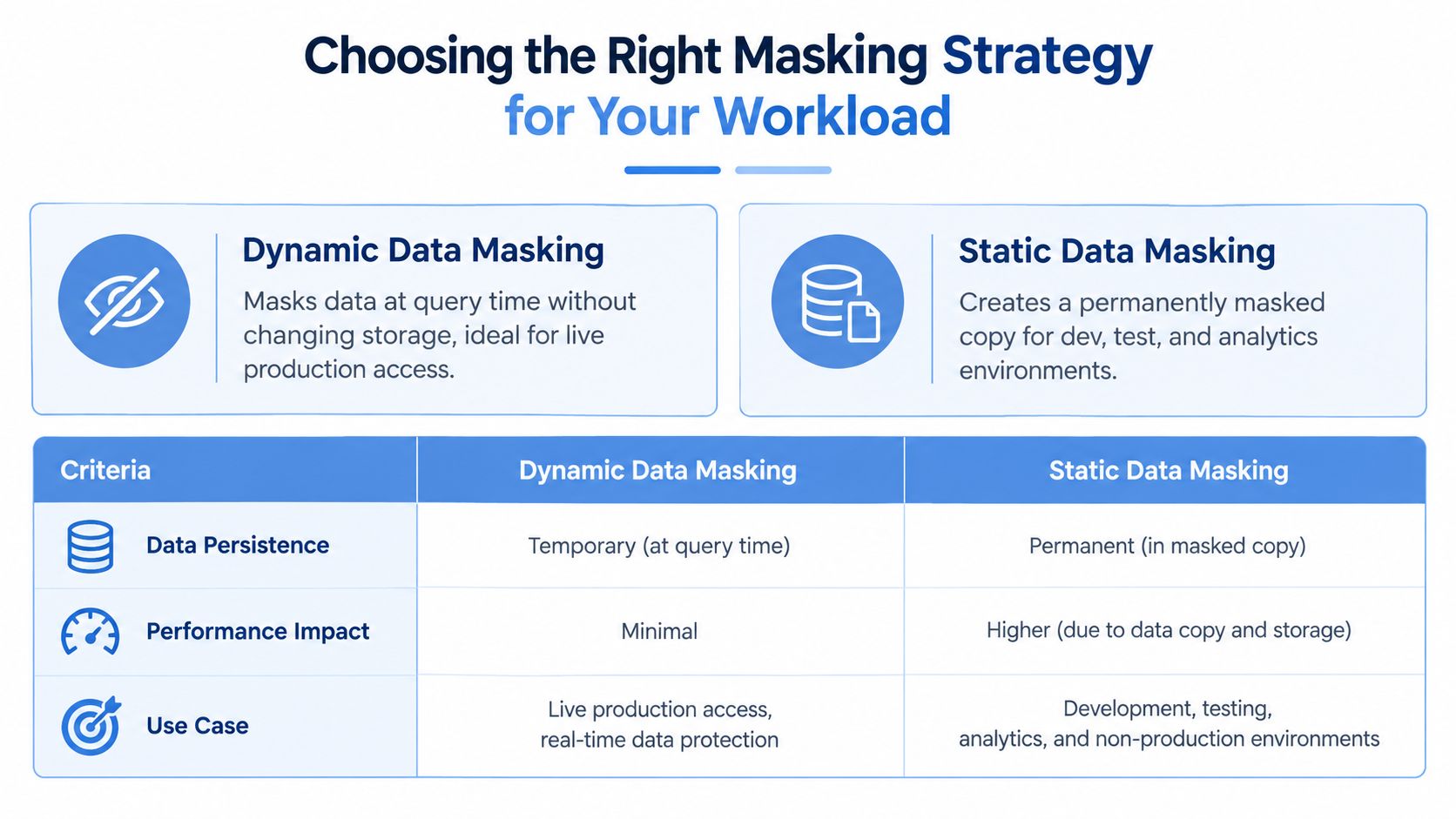
Choosing the Right Masking Strategy for Your Workload
The first question isn’t which Azure menu to open. It’s whether developers and support staff need controlled access to the live database, or whether they need a separate dataset they can freely query, export, and modify.
Dynamic Data Masking, or DDM, is a policy-based control applied at query time. Microsoft documents that Azure SQL Database, Azure SQL Managed Instance, Microsoft Fabric SQL database, and Azure Synapse Analytics support DDM. The feature hides sensitive values from nonprivileged users while leaving the stored data unchanged, as described in Microsoft’s Dynamic Data Masking overview for Azure SQL. Authorized users with the necessary unmask permissions can still retrieve the original values.
That makes DDM useful when the application must continue reading the production schema and the database owner wants a centralized policy rather than masking logic scattered across services. It also means DDM isn’t a data export control. The original value remains in storage, and Microsoft states that masking is applied on read, not at rest.
Static masking takes a different route. A pipeline extracts data, transforms sensitive fields, and writes the result into an isolated environment. The transformed values persist in that copy, so developers, test tools, analysts, and external platforms don’t receive the original records. This approach requires more pipeline design, especially when foreign keys, repeated identities, dates, and business rules must remain coherent.
Use the boundary as your decision point
A practical decision matrix looks like this:
| Requirement | Dynamic masking | Static masking |
|---|---|---|
| Original data must remain in the database | Strong fit | Not the primary purpose |
| Developers need a freely usable sandbox | Weak fit | Strong fit |
| Policy should affect query results centrally | Strong fit | Requires pipeline enforcement |
| Data will be exported outside the database | Poor fit | Stronger fit |
| Referential integrity must survive transformation | Limited | Designed into the pipeline |
| Application code should remain unchanged | Usually strong fit | May require environment validation |
DDM works well for controlled production access, operational support, and narrowly scoped reporting. It doesn’t stop a user from changing a masked column when that user has write permission. It also doesn’t make ad hoc querying safe by itself, because repeated queries can help a knowledgeable user infer values. Microsoft recommends combining masking with least privilege, SQL permissions, roles, and row-level security in its Azure SQL security best-practice guidance.
Static masking is the better default when the copy will be copied again. A sanitized database should remain safe even if someone restores it locally, loads it into a notebook, or hands it to a vendor. For teams validating that approach alongside realistic HTTP behavior, data masking best practices for GoReplay provides a useful traffic-layer complement.
Configuring Dynamic Data Masking in Azure SQL
DDM is straightforward to enable, but the security model around it deserves more attention than the mask syntax. The feature changes what users see in result sets. It doesn’t replace authorization, prevent writes, or remove the original value from storage.

Start with a column inventory
List sensitive columns before applying policies. Include direct identifiers such as email addresses and phone numbers, but also fields that become identifying when combined, such as names, postal information, account references, and free-text notes. Record who needs the unmasked value, which application reads it, and whether the column is writable.
In Azure Portal, open the database and go to Security, then Dynamic Data Masking. Add a masking rule by selecting the schema, table, and column. Choose a built-in mask type where it fits, or define a custom rule for the field’s format. Microsoft describes this configuration as database-level policy management, which lets teams apply controls without changing every application that queries the column.
For T-SQL, a typical pattern is:
ALTER TABLE dbo.Customers
ALTER COLUMN Email ADD MASKED WITH (FUNCTION = 'email()');
A general replacement can use:
ALTER TABLE dbo.Customers
ALTER COLUMN Phone ADD MASKED WITH (FUNCTION = 'default()');
Custom patterns can be expressed with a partial mask, for example:
ALTER TABLE dbo.Customers
ALTER COLUMN CustomerCode ADD MASKED WITH
(FUNCTION = 'partial(2,"XXXX",2)');
The exact function must match the column type and the behavior the application expects. A mask that produces an invalid email, an unusable identifier, or an unexpected string length can break validation logic even though the database policy itself is working.
Separate read protection from write protection
Granting a user access to a table isn’t the same as granting permission to see the original value. Review database roles and explicit permissions, then give unmask access only to the identities that need it. Test with a normal application identity, a support identity, and an administrative identity. Each should receive the intended result without relying on assumptions about inherited permissions.
A masked result also doesn’t imply a read-only result. Microsoft specifically warns that DDM doesn’t prevent updates to masked columns. Remove unnecessary write permissions, use stored procedures where appropriate, and apply row-level security when users should see only selected records. Avoid broad ad hoc access, because users may combine filters, aggregates, errors, and repeated queries to infer information that the mask hides in a single response.
Security boundary: DDM controls visibility in query results. It isn’t a substitute for authorization, input validation, audit review, or data minimization.
Test views and stored procedures explicitly. Azure Synapse guidance states that DDM is enforced on read for nonprivileged users whether data is accessed directly from a table, through a view, or through a stored procedure. The same guidance limits DDM support to the dedicated SQL pool, not Apache Spark pool or serverless SQL pool, so the execution engine matters when you design a Synapse estate. See Microsoft’s Synapse security guidance before assuming a workspace-wide policy applies everywhere.
A small validation query should inspect both the visible output and the permission path:
EXECUTE AS USER = 'qa_reader';
SELECT Email, Phone
FROM dbo.Customers;
REVERT;
Run the same query as the approved unmask identity, then test updates separately. Capture the expected behavior in automated integration tests so a role change or schema migration doesn’t weaken the policy.
The following Microsoft video provides a visual walkthrough of the feature and its configuration concepts.
Building Static Masked Copies with Data Factory and Databricks
Dynamic masking protects a read path. Static masking protects a dataset after it has been copied. That distinction matters when a development team can download files, when an analytics platform receives extracts, or when a test database must be operated without privileged production access.
Azure Data Factory is a good fit for predictable transformations. Use linked services and datasets to read from the source, map columns, and write into an isolated target. Mapping Data Flows can handle straightforward replacements, conditional transformations, and column-level routing without requiring a large custom codebase.
Databricks is more suitable when the transformation must preserve relationships across many tables, apply reusable deterministic rules, or process complex nested data. A PySpark job can maintain a protected mapping dictionary, normalize values before hashing, and apply the same transformation everywhere an identity appears.
Preserve relationships deliberately
A random replacement can make a dataset look private while destroying its testing value. If the same customer appears in Customers, Orders, support tickets, and audit records, each reference must resolve to the same masked identity. The pipeline should transform the parent value first, then apply that stable mapping to child tables.
Deterministic hashing is useful for this purpose. Normalize the input, combine it with a secret value held outside the dataset, and write the resulting token wherever the original identifier appears. Don’t use unsalted, publicly reversible transformations for sensitive fields. The test environment needs consistency, not a recoverable copy of production.
The same principle applies to dates and categorical fields. Preserve the relationships that drive application behavior, but avoid retaining unnecessary real-world meaning. For example, a date-shifting rule can keep order chronology while changing the actual calendar values. Names and email addresses should remain syntactically valid if the application validates them, but they shouldn’t map back to real people.
Choose the pipeline according to complexity
| Pipeline choice | Practical strength | Common weakness |
|---|---|---|
| Azure Data Factory | Visual orchestration and mapping-based transformations | Complex cross-table rules become difficult to maintain |
| Azure Databricks | Programmatic control, reusable logic, and large transformation jobs | Requires stronger engineering discipline and notebook governance |
| Combined approach | Data Factory schedules and moves data, Databricks performs transformation | More components must be secured and monitored |
Write the output directly to a controlled sandbox, not to a broadly accessible staging location. Remove temporary extracts after successful validation, restrict pipeline identities, and make sure logs don’t record raw values. A masked database isn’t safe if the pipeline activity log, failed file, or notebook display contains the original record.
Validation should cover referential integrity, format compatibility, duplicate behavior, null handling, and application queries. Load the copy with production-like schema constraints, run migrations against it, and compare business invariants rather than comparing raw values. The test data should behave like production data without being production data.
Automating Governance with Microsoft Purview
A masking policy is only as complete as the column inventory behind it. In a growing Azure estate, developers add tables, rename fields, introduce new event payloads, and create analytical copies faster than a security team can maintain a spreadsheet.
Microsoft Purview can provide the discovery layer. Scan Azure SQL and related data sources, review classifications, and use the results to identify columns that require DDM rules or static transformation. The important design choice is to treat classification as an input to enforcement, not as proof that masking already exists. A label can tell you that a field appears sensitive. It doesn’t automatically make a copy safe unless a downstream policy consumes that information.
Connect classification to action
A workable governance flow separates detection from transformation:
- Discover sensitive fields through scheduled Purview scans.
- Review classifications that could affect production access or data movement.
- Map approved classifications to DDM rules, Data Factory mappings, or Databricks transformations.
- Gate exports and lower-environment refreshes when required masking rules are missing.
- Re-scan the destination to confirm that the resulting copy no longer exposes prohibited values.
For a SQL workload, an approved classification for an email or phone field can trigger a policy review for the corresponding column. For a pipeline, the same classification can select a deterministic transformation function. Keep the mapping explicit. Automatic discovery is valuable, but an ambiguous label shouldn’t decide how a financial reference, internal identifier, or operational token is transformed.
Make schema change part of the control
Connect Purview findings to work items or deployment checks. A schema migration that introduces a sensitive column should produce a visible security task before a refresh pipeline publishes data to a sandbox. The pipeline can fail closed when required classification metadata is absent, or route the new field into a quarantine path until an owner approves its treatment.
Purview also helps with ownership. Assign data stewards to domains, document why a field is masked, and record whether the rule is dynamic or static. That context prevents the common mistake of applying a generic replacement to a field whose format has contractual or application significance.
Access policies still need identity and permission controls. A classification doesn’t grant or revoke database access by itself. Combine Purview’s catalog and discovery role with Azure SQL permissions, least privilege, row-level security, and pipeline controls. Governance works when the classification, enforcement rule, deployment process, and validation report remain connected.
Testing Masked Environments with Production Traffic Replay
A masked database can pass a manual smoke test and still fail under real application behavior. Production clients send unusual headers, repeat requests, depend on session state, and exercise combinations of endpoints that a hand-written test rarely covers. If masking changes an email format, truncates a name, or replaces an identifier with an unexpected value, the application may reject the request or select the wrong record.
Traffic replay adds that missing behavioral layer. Capture production HTTP traffic only after removing or transforming sensitive request data, then direct the sanitized stream to a test environment backed by the masked database. GoReplay is one option for capturing and replaying HTTP traffic, with middleware available for masking PII in headers and JSON paths.
Capture safely before replay
Don’t write raw production traffic to disk and plan to clean it later. Put the filtering step at capture time, define which headers are sensitive, and inspect request bodies for credentials, tokens, personal fields, and uploaded content. The replay target must never be able to authenticate against production systems.
A simplified capture command can look like this:
gor --input-raw :8080 \
    --middleware "gor --input-stdin --output-stdout" \
    --output-file sanitized.gor
The exact middleware implementation should parse the request and replace approved JSON paths and headers before the event reaches storage. Keep the transformation deterministic where the application requires stable identity, and use test-only credentials when the target service expects authentication.
For replay, route traffic to the test listener and control the rate rather than sending an uncontrolled burst:
gor --input-file sanitized.gor \
    --output-http "https://masked-test.example.internal"
Use a test hostname, isolated downstream dependencies, and explicit allowlists. If the application calls payment, email, identity, or partner APIs, stub those integrations or redirect them to safe test endpoints. Replay should exercise your application and masked database, not accidentally trigger production side effects.

Test semantics, not just response codes
A successful HTTP response doesn’t prove that masking works. Compare application behavior across representative flows:
- Identity lookup: Confirm that masked emails and usernames still pass expected validation.
- Record joins: Verify that transformed customer and order references resolve consistently.
- Authorization: Confirm that a nonprivileged test identity can’t retrieve an unmasked response through another endpoint.
- Caching: Check that a response generated for an authorized identity isn’t reused for an unauthorized one.
- Error handling: Inspect logs and error payloads for raw values that the main response hides.
- Write paths: Ensure masked fields can’t be modified by roles that should only read them.
Traffic replay should also include requests that expose inference risks. Filters, search endpoints, sorting, exports, and autocomplete APIs can reveal more than a direct row query. Test the aggregate behavior of the application, not only the database column rule.
For a deeper operational workflow, see replaying production traffic for realistic load testing. Keep captured artifacts access-controlled, expire them according to your retention policy, and report any raw value found in the capture, replay output, application log, or monitoring event as a defect.
Troubleshooting Masking Failures and Validating Security
The most dangerous masking failure is the one that looks successful. A query returns XXXX, the dashboard appears compliant, and another endpoint returns the original value from a view, cache, export job, or error message.
Start validation as an adversarial test. Use a nonprivileged identity and inspect direct table queries, views, stored procedures, ORM-generated queries, exports, background jobs, and API responses. Microsoft’s Azure guidance warns that masking can be weakened through inference over multiple queries, so test filters, comparison behavior, ordering, aggregates, and repeated requests rather than checking one response.
Common failure patterns
- Partial exposure: A regex or partial mask leaves a recognizable fragment that shouldn’t be visible.
- Permission leakage: A role inherits unmask permission through a broad database role.
- Write access remains: A user can’t see a value but can still update it.
- Engine mismatch: A Synapse workload runs through an engine where the documented DDM support doesn’t apply.
- Application disclosure: Logs, cache entries, traces, or validation errors contain the original value.
- Broken test data: Static transformations destroy foreign-key relationships or produce invalid formats.
For regex-based rules, test valid, short, long, malformed, null, Unicode, and boundary-case inputs. Azure SQL supports centrally managed regex masking rules, but Microsoft also cautions that imprecise patterns can over-mask legitimate content or leave sensitive fragments exposed. Store the test corpus without real personal data and require a review whenever a pattern changes.
Practical rule: Prove what each identity can read, write, export, infer, and replay. A masked column is only one part of that path.
Re-run the validation suite after schema changes, permission changes, pipeline changes, and application releases. Compare classifications against actual enforcement, inspect generated SQL, and check that newly added columns don’t bypass the refresh process. Treat masking as a maintained control with ownership and tests, not a one-time database setting.
GoReplay can capture and replay sanitized HTTP traffic so your masked Azure environments are tested with realistic application behavior rather than isolated requests. Visit GoReplay to evaluate its traffic replay and masking capabilities, then add the workflow to your next database refresh and release validation cycle.