
Mastering Data Driven Tests with GoReplay

You can’t test what you can’t predict.
That’s the fundamental problem with old-school, scripted testing. We build beautiful, logical test cases based on how we think users will behave, but reality is always messier. Users click things out of order, submit strange data, and generate traffic patterns you would never dream of writing a script for.
This is where separating your test logic from your test data changes the game. Instead of hardcoding everything, you can run the same core test against hundreds or thousands of different inputs. It’s a huge shift from testing predictable, clean paths to really stress-testing your system’s resilience against the chaos of the real world.
Why Data-Driven Tests Are No Longer Optional
Let’s be honest: traditional scripted tests just don’t cut it anymore. They’re great for confirming that a specific, planned user journey works, but they completely miss the beautifully unpredictable nature of real-world interactions.
By using a tool like GoReplay to capture and replay live HTTP traffic, you stop guessing what users might do and start testing against what they actually do. This approach immediately starts finding bugs and performance issues that purely synthetic tests are blind to.
See What Synthetic Tests Always Miss
When you switch to replaying real traffic, you start uncovering problems that were always there, just hidden from your scripted tests.
- Hidden Edge Cases: You’ll finally see how your system handles those bizarre API call combinations or weird data inputs that only crop up in production.
- Real Performance Bottlenecks: It’s one thing to test a single API endpoint in isolation; it’s another to see how a slow database query chokes the system during a very specific, high-traffic user journey that you never thought to script.
- Complex User Flows: Some multi-step interactions are just too cumbersome to script by hand, yet they happen all the time. Replaying traffic validates these complex flows naturally.
Testing with real user data is the difference between checking if a door’s lock works and seeing how the entire frame holds up when a crowd pushes against it. One confirms a feature; the other confirms resilience.
The Massive Shift Toward Realistic Testing
This isn’t just a niche trend; it’s a critical response to the growing complexity of modern applications. The proof is in the numbers.
The global software testing market, which is being massively shaped by data-driven methods like traffic replay, is expected to jump from USD 57.73 billion in 2026 to USD 99.79 billion by 2035.
This explosive growth makes one thing clear: modern QA and DevOps teams absolutely must adopt tools that mirror actual user behavior. It’s the only way to build genuinely reliable applications. You can read the full research about the software testing market to see just how big this shift is.
Capturing and Sanitizing Production Traffic Safely
The real power behind any data-driven test is its source material. For truly realistic results, you need to capture live HTTP traffic, but I get it—the thought of touching a production environment can be nerve-wracking. Luckily, tools like GoReplay are built to listen passively. They create a copy of your traffic without adding any latency or becoming a point of failure.
This whole process kicks off by setting up a listener on your production server. Think of it as a network tap; it just observes the requests and responses flowing through your application without getting in the way. You can set it to capture everything, but a more strategic approach is to filter traffic to zero in on specific API endpoints or critical user journeys you really want to put through their paces.
The Non-Negotiable Step: Data Sanitization
Grabbing raw traffic is just the beginning. The most critical part of this entire process is sanitizing the data before it ever leaves your production environment. I can’t stress this enough: you absolutely cannot store or replay data that contains Personally Identifiable Information (PII), passwords, API keys, or session tokens. Doing so is a massive security and privacy nightmare waiting to happen.
This is where GoReplay’s built-in rewriting and filtering capabilities are indispensable. You can configure rules to find and replace sensitive data patterns on the fly. For instance, you could use regular expressions to identify and hash email addresses, swap out credit card numbers with placeholders, or anonymize user IDs.
This process flow shows how testing evolves from basic checks to sophisticated, data-driven validation.
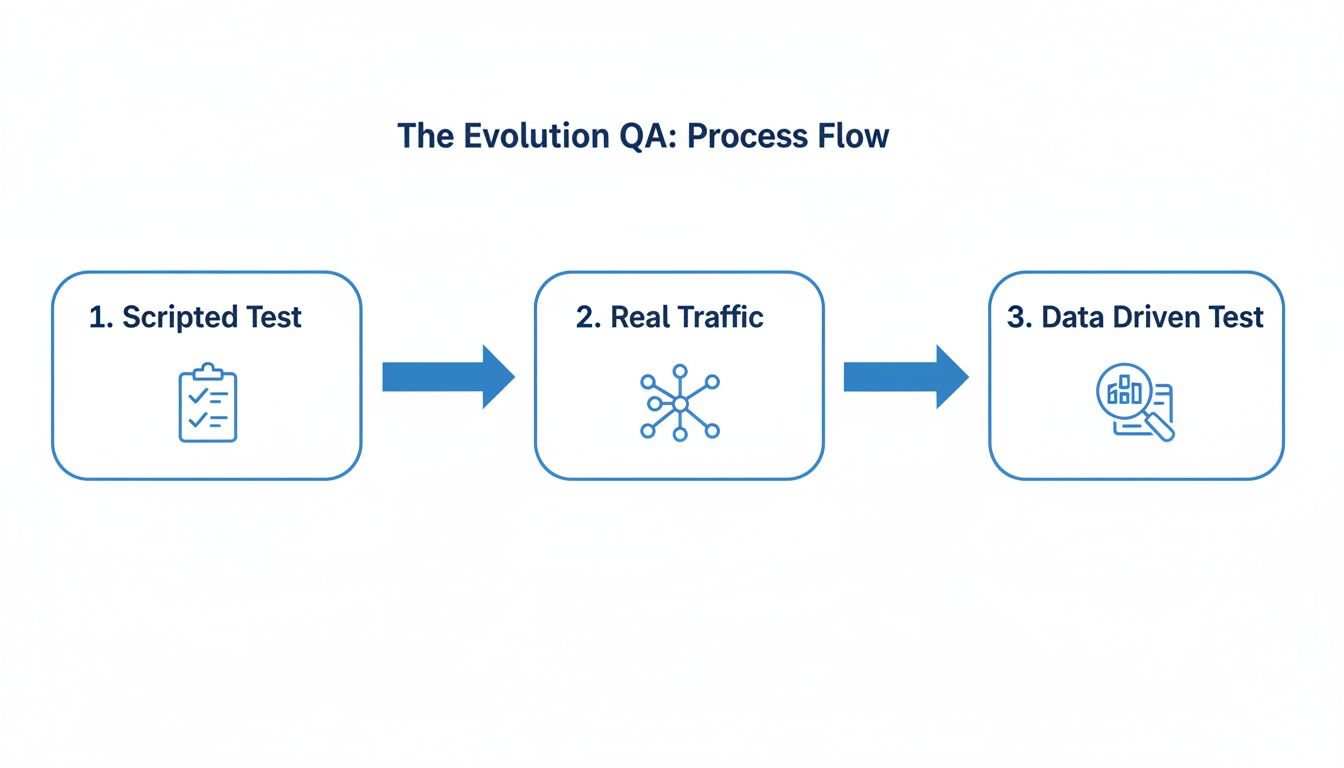
The diagram really drives home how using real, sanitized traffic is the final step in maturing a QA process. It’s how you move beyond simple scripts to truly comprehensive and realistic testing. For a deeper dive into more advanced scenarios, check out our guide on masking production data for testing to make sure your datasets are both safe and effective.
Creating a Reusable and Compliant Dataset
Once your sanitization rules are locked in, GoReplay saves the modified traffic to a file. This file becomes your golden dataset—a perfect, privacy-compliant replica of real user behavior that you can now safely move to your staging or local environments.
The goal is to create a test dataset that is statistically identical to production traffic in its patterns and complexity but completely anonymous in its content. This balance is the key to powerful and responsible data-driven tests.
By following this capture-and-sanitize playbook, you build a foundation for tests that are not only incredibly powerful but also adhere to strict security and privacy standards.
Designing Smarter Tests with Real Data
So, you’ve got a clean, safe dataset of real traffic. Now the fun part begins. We’re moving away from the old, rigid world of hardcoded test scripts and into a far more dynamic approach. This is the heart of data-driven testing: you separate your test logic from the data it runs against.
Instead of scripting a test for one specific user action, you’re designing a test that can handle any user action from the traffic you captured. It’s a fundamental shift. You’re no longer scripting a predictable path like “User A buys Product B.” You’re building a validation framework ready to process a thousand different user sessions, each with its own unique timing, sequence, and payload.
From Static Values to Dynamic Parameters
The key to making this work is parameterization. A typical scripted test might have a hardcoded productId or userId baked right into it. But in a data-driven test powered by GoReplay traffic, these become variables. Your test script is designed to simply pull these values straight from each replayed request.
Let’s say you’re validating an API endpoint. Your test logic doesn’t really care what the specific user ID is. It just needs to confirm that for any given request from your captured traffic, the response from the staging server is correct for that particular user.
This approach is incredibly efficient. A single, well-designed test case can easily replace hundreds of manually scripted variations. That means you’re drastically cutting down on long-term maintenance. When your application logic changes, you update one test, not a mountain of brittle, outdated scripts.
Building Realistic Functional and Integration Tests
Okay, let’s get practical. What does this actually look like for different kinds of tests?
- Functional API Validation: Imagine you’re testing a
/user/{id}endpoint. Your test logic simply reads the{id}from the path of the replayed request. Then, it asserts that the staging environment’s response contains the correct user data for that specific ID, just like production did. Simple. - Session-Aware Integration Tests: This is where replaying real traffic truly shines. A user’s journey—like adding items to a cart, applying a coupon, and checking out—is a chain of API calls that all rely on a persistent state. GoReplay replays these sessions in their original order and timing, letting you validate the entire, messy, complex workflow, not just one isolated endpoint at a time.
By replaying entire user sessions, you’re not just testing individual features; you’re validating the intricate dance between services that defines the actual user experience. This uncovers integration bugs that simple unit or API tests will always miss.
The difference in test coverage and the sheer effort required for maintenance is night and day when you compare this method to older styles.
Traditional Scripted Tests vs Data Driven Replays
When you put traditional testing side-by-side with data-driven replays, the advantages become crystal clear. One is about simulating a perfect world; the other is about preparing for the real one.
| Aspect | Traditional Scripted Testing | Data-Driven Testing with GoReplay |
|---|---|---|
| Test Coverage | Limited to manually scripted scenarios and hardcoded data values. | Expands automatically to cover every unique user journey in the captured traffic. |
| Maintenance | High. A small UI or API change can break dozens of brittle scripts. | Low. Test logic is separate from data, requiring fewer updates when data changes. |
| Realism | Low. Simulates perfect, predictable user paths. | High. Directly mirrors real-world user behavior, including errors and edge cases. |
| Setup Time | Initially fast for a few scripts, but scales poorly. | Requires initial setup for capture and sanitization but scales effortlessly. |
Ultimately, designing tests with real data isn’t just a different technique—it’s about building a resilient validation system that grows right alongside your application. It finds real-world problems because it uses real-world inputs, making sure your QA efforts are focused on what truly matters to your users.
Alright, you’ve captured and cleaned up your traffic data. Now for the fun part: putting it to work. This is where all that careful prep pays off, turning your dataset into a seriously powerful tool for validating your application. By replaying this real-world traffic in a staging or test environment, you can run data driven tests that are far more realistic than anything you could script by hand.
You’re about to see how your app really behaves under pressure.

We’ll look at two key ways to use these replays: first, for catching functional regressions, and second, for cranking up the pressure with high-stress load testing. Both are absolutely essential for building robust, reliable software.
Catching Regressions with Functional Replays
The most straightforward way to use your captured traffic is for functional regression testing. The goal is simple but incredibly effective: make sure your latest code changes haven’t accidentally broken something. You’re essentially replaying real user sessions, at their original speed, to see if the application still works the way it’s supposed to.
To do this, you’ll point your saved traffic file at your staging environment and let it run. The magic happens when you compare the responses from your staging server to the original responses from production.
Here are a few tips to make these functional replays count:
- 1:1 Speed: Always replay traffic at its original speed (
--speed 1). This mimics user session timing precisely and can help you spot tricky race conditions you’d otherwise miss. - Focus on Diffs: The difference report is your gold mine. A big spike in discrepancies between production and staging responses is a massive red flag that you’ve introduced a regression.
- Isolate Changes: Get in the habit of running these tests after every significant deployment. It makes it so much easier to pinpoint exactly which change introduced a bug.
This method is amazing at catching the kinds of subtle bugs that scripted tests just can’t find, like weird issues with session handling or state changes that only happen deep into a user’s journey.
Simulating Peak Traffic for Load Testing
Functional replays confirm your app is correct, but load testing confirms it’s resilient. The goal here is to find your system’s breaking point before your customers do. Instead of a simple 1:1 replay, you’re going to amplify the traffic to simulate what happens during peak hours, a flash sale, or a viral marketing campaign.
You can easily do this by cranking up the replay speed or duplicating the traffic. For example, replaying traffic at ten times its original speed (--speed 10) is a quick way to simulate a 10x increase in user load. This creates a much more authentic load profile than most synthetic tools because it preserves the complex, messy request patterns of actual users.
The real beauty of using captured traffic for load testing is that you’re stressing the exact same API endpoints and user paths that get hit during a real traffic spike. It’s not a simulation; it’s a realistic rehearsal for production chaos.
This whole approach is a big part of why the automation testing market is exploding. It was valued at USD 17.5 billion in 2021 and is on track to hit USD 57 billion by 2030. This growth is fueled by techniques like real data replays that let teams run tests that accurately predict failures. In fact, companies that use traffic replay often report a 40-60% reduction in pre-production defects. It just works.
Running these replays gives you a complete picture of your application’s health, ensuring it’s not only working correctly but is also tough enough to handle whatever the real world throws at it. For a deeper dive, check out our guide on using production traffic for realistic load testing.
Automating Data-Driven Tests in Your CI/CD Pipeline
If you’re only running data-driven tests manually, you’re leaving most of the value on the table. The real magic happens when you bake these tests directly into your development lifecycle, turning them into an automated quality gate within your CI/CD pipeline.
Suddenly, every single build gets validated against the reality of production traffic. This is how you catch regressions before they ever have a chance to escape.
Instead of a developer remembering to trigger a replay, picture this: a developer pushes a new commit. A CI job immediately kicks off, spins up a fresh staging environment, and runs a GoReplay session using your latest sanitized traffic. The build passes or fails based on the results. Testing is no longer an afterthought—it’s a core, frictionless part of how you build software.
Integrating Replays into Your Workflow
Getting GoReplay into tools like GitHub Actions or Jenkins is refreshingly straightforward. Since it’s a command-line tool, you can script the entire capture-and-replay process right inside your pipeline configuration.
A typical automated workflow looks something like this:
- Trigger: The pipeline kicks off on a new commit or pull request.
- Deploy: Your latest code is automatically pushed to a clean staging environment.
- Replay: A script executes GoReplay, pointing your pre-sanitized traffic file at the staging server.
- Compare: GoReplay does its thing, comparing the new responses from staging against the original ones from production.
- Report: The pipeline checks the output. If the percentage of mismatched responses crosses your threshold—say, 1%—the build fails.
This immediate feedback loop is a game-changer for developer productivity. No more waiting around for manual QA cycles. Developers know within minutes if their change broke something important.
This automated approach ensures every single change is pressure-tested against realistic, complex user behavior. It’s the ultimate safety net, helping you ship high-quality, stable releases without slowing your team down.
The Growing Need for Continuous Validation
Data-driven testing truly comes alive in a continuous integration pipeline. Replaying actual user sessions uncovers bottlenecks and edge cases that scripted, synthetic tests just can’t see.
This isn’t just a niche idea; it’s a major shift in the industry. The continuous testing market is expected to jump from USD 2.54 billion in 2026 to USD 3.09 billion by 2031. With on-premise deployments still holding a massive 71.5% share in 2024 due to security concerns, tools that can safely handle production data are more critical than ever.
For teams using GoReplay, this translates to real results. We’ve seen that session-aware replays can detect up to 90% more edge cases than traditional mocks.
If you want to dig into the numbers behind this trend, you can discover more insights about the continuous testing market. By automating these powerful tests, you’re not just improving quality—you’re building a more resilient development process for the future.
Analyzing Results and Fixing Common Replay Issues

Running the tests is really just the first step. The real magic happens when you start digging into the results and turning them into meaningful fixes. Once a replay is done, your best friend is the difference report. This is where you’ll see every discrepancy between the original production responses and the new ones from your test environment.
Don’t be alarmed if your first report is a sea of red. A high number of differences is completely normal, especially on your initial run. The trick is to learn how to cut through the noise, spot the real regressions, and uncover those silent errors or performance drains.
Pinpointing the Root Cause of Discrepancies
Your first job is to start categorizing the differences you see. Not all mismatches are bugs. Many are just expected variations, like timestamps or dynamically generated IDs. Filtering these out lets you zero in on what actually matters.
From my experience, a few usual suspects are behind most replay issues:
- Dynamic Tokens: Things like CSRF tokens or session IDs are designed to be different every time. You’ll likely need to write some simple middleware to rewrite these fields or just tell the comparison engine to ignore them.
- Third-Party Dependencies: If your staging environment calls an external API, it might get different data than what production saw during the capture. This can cause a whole cascade of mismatches down the line.
- Environment Drift: This one is sneaky and incredibly common. A tiny configuration mismatch between production and staging—like a forgotten feature flag or a slightly different database state—can cause a world of headaches.
A sudden spike in response time discrepancies, even if the content matches, is a critical performance regression signal. This is often the first sign that a recent change introduced a database bottleneck or an inefficient algorithm.
A Practical Troubleshooting Checklist
When a replay is failing, having a system for debugging saves a ton of time. I’ve developed a mental checklist that starts with the most common culprits, helping you move from a raw report to a confident fix much faster.
- Check for Environment-Specific Data: First things first, hunt for any hardcoded environment URLs or identifiers that are causing obvious mismatches.
- Analyze Third-Party Mocks: Are your mocked external services in staging truly behaving like their production counterparts? Double-check them.
- Inspect Dynamic Content: Look for fields like
createdAttimestamps or auto-incrementing IDs. These will almost always cause diffs and often need to be ignored. - Validate the Initial State: Make sure the database in your test environment has all the necessary seed data. A missing user or product record in staging is a classic reason for a replayed request to fail.
Common Questions About GoReplay
We’ve walked through a lot of the nitty-gritty of data-driven testing with GoReplay. But as with any powerful tool, a few questions tend to pop up when teams are just getting started. Let’s tackle some of the most common ones.
How Does GoReplay Handle Sensitive Data?
This is a big one, and rightly so. GoReplay has solid, built-in features for managing sensitive production data. You can set up simple rewriting rules on the fly to hash or completely replace specific fields, like passwords and API keys.
For more complex sanitization, you can pipe the traffic through your own custom middleware scripts. This gives you total control to perform advanced data masking before the traffic is ever saved or replayed. It’s the best way to keep your test datasets secure and compliant.
Can GoReplay Test Non-Web Applications?
While GoReplay’s sweet spot is HTTP traffic, the core philosophy is universal. The goal is always to use real inputs to drive your tests, no matter the protocol.
If you’re working with databases or message queues, you’d naturally turn to different tools designed for those protocols. However, the methodology—capturing and replaying production-like inputs—is a highly effective strategy for boosting quality across any system.
How Does This Differ From JMeter?
Tools like JMeter are fantastic for generating synthetic load based on scripted behaviors. GoReplay is different; it uses real captured user traffic. This provides a more realistic load profile because it includes all the quirks and complex interactions of actual users, which are nearly impossible to script accurately.
Ready to stop guessing and start testing with real user traffic? GoReplay provides the tools you need to build a resilient, data-driven testing strategy. Get started today at https://goreplay.org.