
Connection Pooling Timeout: Causes, Settings and Fixes
Your API starts returning timeout errors during a traffic spike. The database is reachable, CPU isn’t obviously pinned, and restarting an application instance buys temporary relief. The tempting change is to increase the connection pool maximum, but that can hide a leak or send even more work to an overloaded database.
A connection pooling timeout tells you a wait exceeded its budget. It doesn’t, by itself, tell you whether the application waited for a reusable connection, failed to establish a new connection, or borrowed a socket that an intermediary had already closed. Diagnose the stage before changing the setting.
Timeout Settings and Their Defaults at a Glance
| Setting | What It Limits | Documented Default | Symptom When It Fires |
|---|---|---|---|
| Pool acquisition timeout (Prisma v6) | Wait for a free pooled connection | 10 seconds | Exception when no pool connection is obtained |
| Connection establishment timeout (Prisma v6) | Open a new connection | 5 seconds | Connection attempt fails |
| Idle connection lifetime (Prisma v6) | How long an unused connection is kept | 300 seconds | Normal expiry retires the connection; mismatched upstream limits can cause resets |
waitQueueTimeoutMS (MongoDB) | Wait for an available pooled connection | No wait limit unless configured; a request queues until a connection frees | Queue wait error under saturation once a bound is set |
connectTimeoutMS (MongoDB) | Establish a new connection | Unbounded unless configured; set it explicitly so a stalled attempt fails fast | A stalled attempt may remain unbounded |
| Maximum pool size (Microsoft.Data.SqlClient) | Connections allowed in the pool | 100 | Requests queue once all usable connections are borrowed |
| Connect timeout (Microsoft.Data.SqlClient) | Open a connection, including waiting for a usable pooled connection | 15 seconds | Timeout when no usable connection becomes available |
Read this table as three separate failure domains. Acquisition limits the wait for a reusable connection, establishment limits the cost of opening a fresh socket, and idle lifetime decides how long an unused connection survives. Each fires at a different stage, so each deserves its own metric: queue wait time for acquisition, handshake duration for establishment, eviction counts for idle expiry.
The Microsoft rows show why names mislead. In Microsoft.Data.SqlClient, the connect timeout covers opening a connection and waiting for a usable pooled one, so it behaves like an acquisition budget even though the name suggests a network timer. A timeout exception from that driver can mean the pool never lent a connection rather than the database refusing a handshake. The MongoDB rows carry the opposite trap: unbounded defaults look safe in quiet testing, then a saturated pool or a stalled connect leaves threads hanging with no error to alert on.
Setting names aren’t portable. The defaults above describe the configurations identified, not every driver release, adapter, or deployment. For JVM applications, the Hikari connection pool guide shows how one widely used pool splits these budgets into distinct properties.
Copy your driver’s effective settings into your configuration notes, including environment overrides. Then compare the acquisition limit with the caller’s request deadline before editing either value.
Why Connections Run Out of Time
A saturated pool has no usable connection to lend within the caller’s acquisition budget. Microsoft’s timeout troubleshooting guide identifies connection leaks, slow queries, blocked transactions, excessive concurrency, pool fragmentation, and database capacity limits as causes.
Start with missing returns and long-held connections because they’re actionable application defects, not because every service encounters them in the same order. An exception branch can skip cleanup; an otherwise correct query can occupy its connection much longer than the application budget allows.
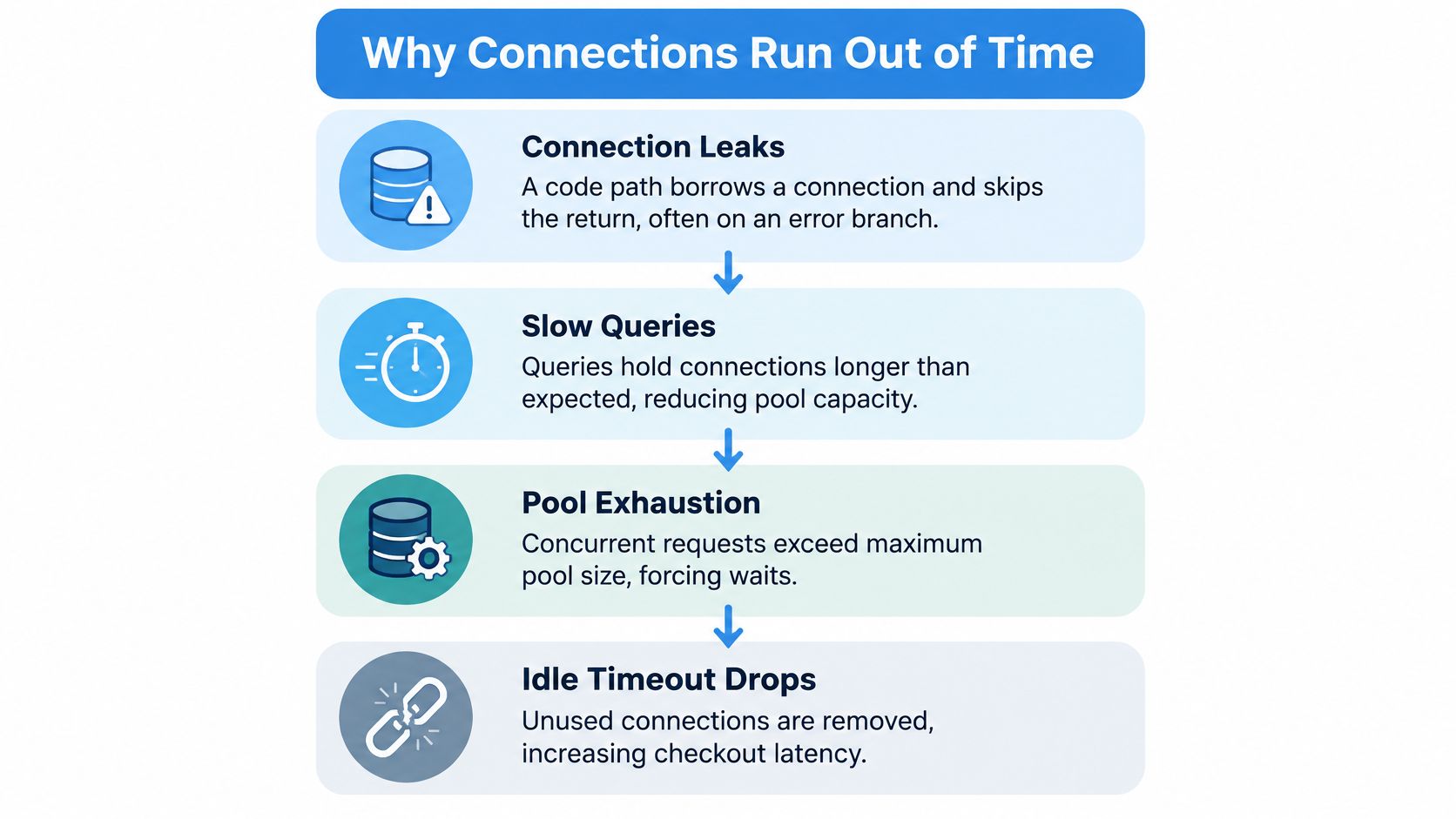
| Cause | Code-level example | First check |
|---|---|---|
| Connection leak | An exception between borrow and release skips cleanup | Active connections remain high; checkout events lack matching returns |
| Slow query | A report query holds a connection throughout a long scan | Checkout duration compared with query execution time |
| Blocked transaction | An UPDATE waits for a lock held by another session | Database lock waits and transaction age |
| Excessive concurrency | An unbounded task fan-out requests more connections than the pool permits | Concurrent database operations versus active connections |
| Pool fragmentation | Slightly different connection strings create separate pools | Pool instance count and utilization per pool |
| Database capacity limit | The server refuses or delays new sessions at its configured limit | Server connection count, CPU, and connection failures |
Recognize the code shape
A transaction that spans an external HTTP call holds database capacity while waiting on another service. A background worker that launches every queued job simultaneously creates demand without regard to available database capacity.
Fragmentation is subtler. If tenant-routing code constructs distinct connection configurations, one pool can be exhausted while another has unused capacity. A fleet-wide connection total won’t reveal that imbalance.
Idle connection removal deserves separate treatment. Retiring an unused connection isn’t a leak, although replacement work can increase checkout latency when demand returns.
First check: Compare borrowed connections with completed returns before treating the pool maximum as the problem.
The application log can make these causes look alike. Pool utilization, checkout duration, and database-side session activity distinguish a connection that was never returned from one that’s still legitimately busy.
What a Pool Timeout Means and Which One Fired
A pool manages ownership of reusable physical connections. Application code requests a connection, receives exclusive use of it according to the driver’s pooling model, performs work, and releases the logical handle so the underlying connection can be reused.
The important boundary is checkout to return, not query start to query finish. Reading results, committing a transaction, application processing inside a connection scope, and cleanup can all extend ownership.
A tool handoff is a useful analogy: the resource isn’t available to the next worker until the current worker returns it.

Separate ownership from connectivity
An acquisition failure means the pool couldn’t provide a usable connection before the wait expired. It doesn’t prove the database endpoint was unreachable. The application may already have healthy physical connections, all occupied by other requests.
A physical connection failure concerns creating a new path to the endpoint. Depending on the driver, its timer may include transport establishment, authentication, or other startup work. An API named Open can involve both borrowing and physical establishment, so the method name alone isn’t diagnostic.
An idle reset is different again. The application obtained a pooled handle, but the underlying transport was no longer usable when it tried to send work. Increasing queue patience won’t repair that socket.
| Symptom | Likely Timeout or Cause | First Check |
|---|---|---|
| Pool or queue wait errors while CPU and network look normal | Pool saturated or connections not returned | Acquisition wait and active connection count over time |
| Connect attempts stall before any query runs | Connection establishment, DNS, TLS, or database startup | Physical connect latency and endpoint reachability |
| First request after an idle period fails with a reset | Idle connection outlived a proxy or server limit | Idle lifetime versus the shortest intermediary idle limit |
| Latency spikes only during bursts | Concurrency above sustainable database capacity | Concurrent database work versus pool maximum |
| Pool never recovers after a slow operation | Leaked connection or unbounded transaction | Checkout duration and guaranteed cleanup paths |
Read the metrics together
Measure acquisition wait around the request for a pooled connection. Measure physical connect latency using driver instrumentation where possible. Timing only the public connection-opening method can conflate the two.
Add pool identity, active and idle counts, pending borrowers, exception type, and the caller’s remaining deadline to the same diagnostic context. Keep credentials and sensitive connection-string values out of logs.
Database CPU doesn’t settle the diagnosis. Sessions can wait on locks while CPU remains modest, and application code can hold checked-out connections while doing no database work at all.
Likewise, a long checkout isn’t automatically a leak. Match it to query activity, transaction state, result consumption, and the eventual release event before assigning a cause.
Rising acquisition wait with flat physical connect latency points toward occupied capacity. Rising physical connect latency points toward connection establishment.
Record which timer fired, acquisition wait, and physical connect latency before changing configuration. If both latency measures rise, investigate connection creation and pool pressure together rather than forcing the incident into a single category.
How Pool, Connect and Idle Timeouts Interact
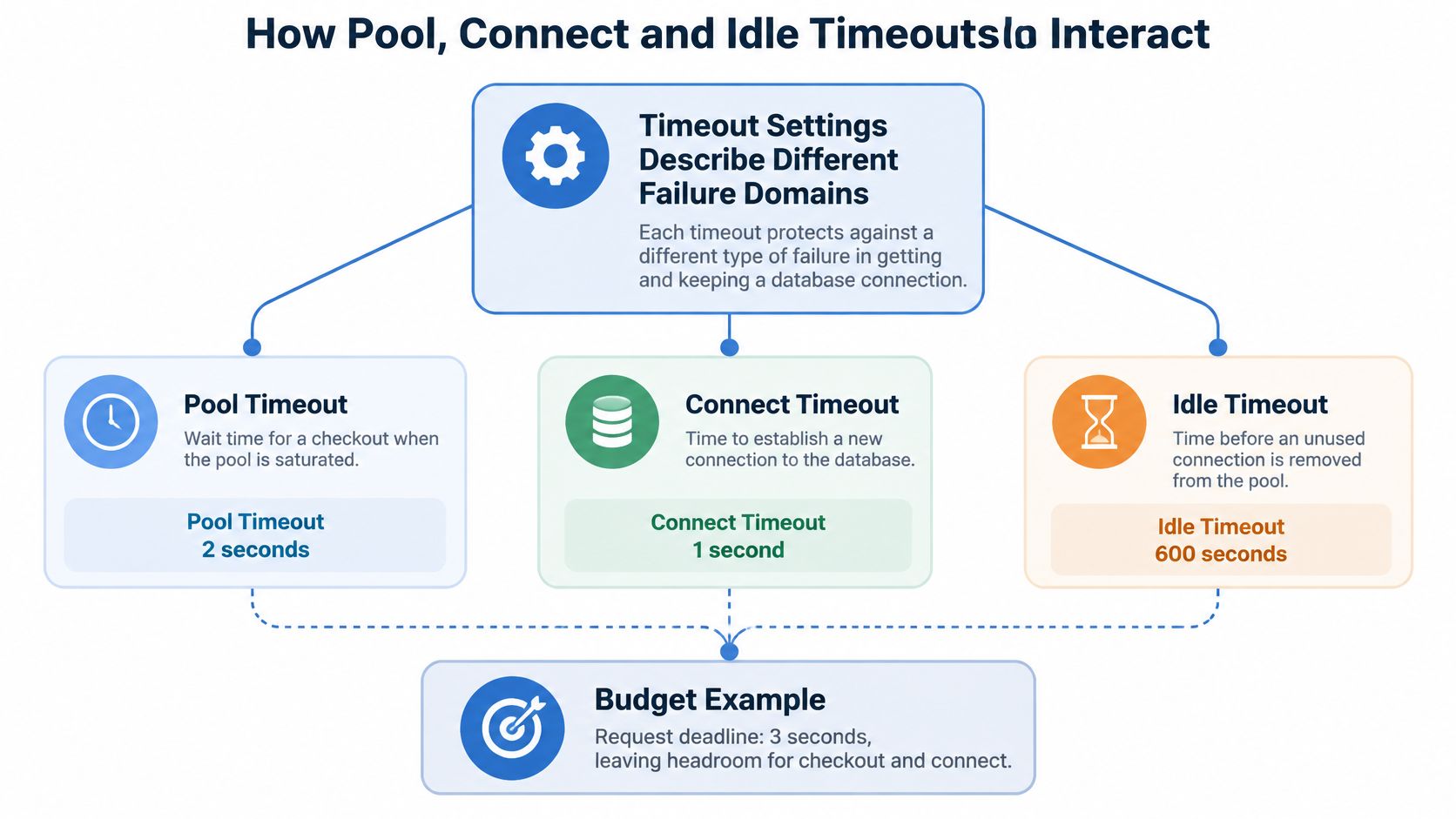
Timeouts protect different resources. The Microsoft SQL Server connection-pooling documentation describes the distinction between obtaining pooled capacity and creating connections; Prisma v6’s documented defaults distinguish a 10-second acquisition timeout, 5-second establishment timeout, and 300-second idle lifetime.
Map those boundaries before building a request budget.
Budget against remaining time
Treat acquisition, connection creation when required, query execution, and response handling as consumers of the caller’s remaining time. Don’t assign every phase the entire request deadline.
For a hypothetical budget, reserve a short acquisition window, a bounded establishment window when a new connection is needed, and explicit headroom for execution and returning the response. Verify whether your driver includes connection creation inside acquisition timing, because nested timers aren’t necessarily additive.
If acquisition can continue after the caller has abandoned the request, waiting work can retain application resources without producing a useful response. Propagate cancellation and verify that the driver stops the relevant work.
A very short acquisition limit has a different cost: it rejects bursts that might have cleared safely. Choose that limit through load testing, not by making every timer as small as possible.
Treat idle lifetime separately
Persistent HTTP connections established the same lifecycle problem: retain useful connections without assuming they remain valid forever. The HTTP persistent-connection specification describes reusable transport connections and inactivity timeouts.
For database pools, compare idle retention with the shortest proxy, load-balancer, and server idle limit. Retiring connections earlier avoids lending sockets that an intermediary has already discarded, but aggressive retirement adds repeated connection-establishment work.
This video provides additional context for connection-pool behavior.
Keep an inventory of the acquisition limit, connect limit, and idle lifetime, alongside the request deadline and intermediary limits. They belong in the same operational record, not under a single generic timeout setting.
Why Raising the Pool Size Rarely Fixes It
A larger pool is useful only when the database can serve additional concurrent work. It doesn’t make a checked-out connection return sooner or make an expensive query cheaper.
Consider an application with missing disposal on an exception path. Increasing the maximum lets more requests succeed before the pool fills again. The failure arrives later, making the deployment look healthier while the underlying defect remains.
Follow the bottleneck
| Existing constraint | What a larger pool changes | What it doesn’t fix |
|---|---|---|
| Missing release | More connections can be lost before exhaustion | The cleanup defect |
| Slow queries or lock contention | More work can enter the database | Query cost or lock ownership |
| Server session limit | More connection attempts can reach the server | Available server capacity |
| Insufficient application pool capacity | More healthy work can run concurrently | Any downstream constraint |
For slow queries, extra concurrency can increase competition for the same CPU, storage, and locks. Acquisition wait may fall while query duration rises, leaving end-to-end latency unchanged or worse.
If the database is already refusing sessions, expansion can change the visible error from a pool wait failure to a physical connection failure. That’s a change in failure stage, not a recovery.
When resizing is justified
Increase capacity when measurements show short, properly released checkouts, sustained legitimate demand, and database headroom. Include every application replica, background worker, and separate pool when checking the server connection budget.
A pool maximum is permission to consume database resources, not a promise that those resources exist.
I would approve a resize only with an expected metric change and a rollback condition. For example, acquisition wait should fall without worsening query latency, lock waits, or server resource pressure.
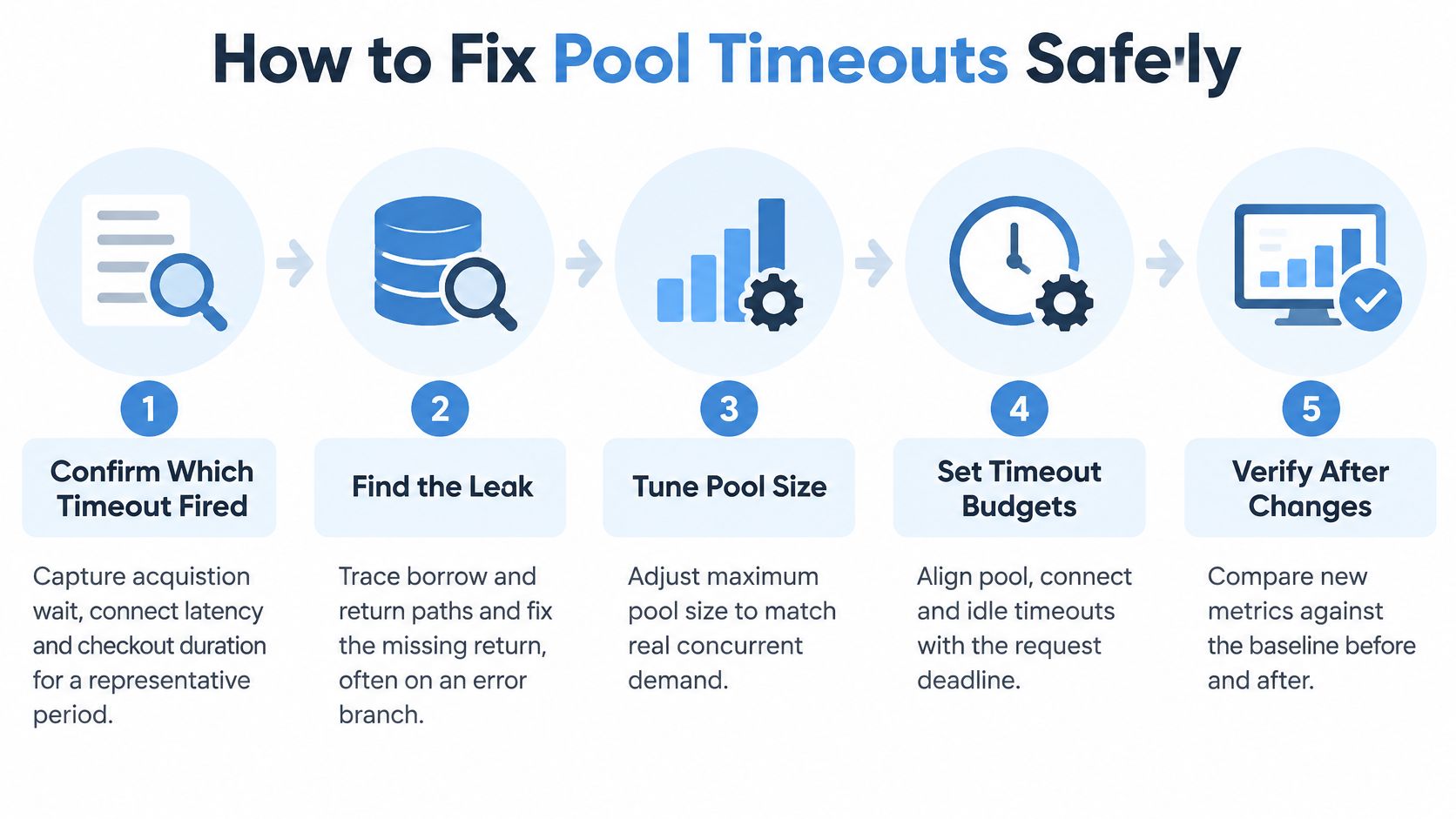
How to Fix Pool Timeouts Safely
Make the smallest change that addresses the measured failure domain. Preserve a baseline so a quieter traffic period doesn’t get mistaken for a successful fix.
Use this process as a diagnostic checklist rather than permission to resize first.
Repair ownership and execution boundaries
-
Identify the timer and establish a baseline. Capture acquisition wait, physical connect latency, checkout duration, and timeout errors by type under representative demand. The common slip is comparing total errors before and after a change without checking whether traffic or failure classification changed.
-
Audit every return path. Use scoped disposal,
finally, ordefer, including cancellation and exception branches; dispose readers and transactions according to the driver’s ownership rules. Cleanup only on the happy path leaves the exact failure branch most likely to drain the pool. -
Bound queries and transactions. Configure execution limits within the remaining request budget, and remove external calls or unrelated processing from transaction scopes. A query timeout longer than the caller’s remaining deadline allows work to continue after it can no longer help the caller.
Control demand before expanding supply
-
Limit database concurrency at the application edge. Use a semaphore, bounded worker queue, or endpoint-specific admission control so expensive jobs can’t monopolize shared capacity. Don’t replace an exhausted connection pool with an unbounded application queue; define queue limits and rejection behavior.
-
Align idle policies along the connection path. Inventory proxy, load-balancer, and server limits, then configure retirement and validation behavior appropriate to the driver. The common mistake is shortening idle lifetime to solve busy-connection exhaustion, which doesn’t release legitimately checked-out connections.
-
Resize only after verifying database headroom. Check server connection limits, CPU, query latency, and the aggregate pool allowance across the deployment before increasing capacity. Raising each instance’s maximum independently can overcommit a shared database even when an individual instance looks safe.
After each change, inspect recovery as well as peak behavior. Active connections should return toward their normal level after demand falls, and pending borrowers should drain without requiring a restart.
A larger pool often moves the bottleneck rather than removing it. Keep the change only when both application and database measurements support it.
Test Timeout Settings Under Load
Average latency hides the requests that wait behind occupied connections. A mostly fast service can still reject burst traffic, and a healthy-looking average says little about whether it recovers after contention.
Define pass criteria before the run. A load testing plan template helps keep workload shape, acceptance criteria, and rollback decisions consistent across configuration changes.
Exercise distinct failure domains
| Scenario | Test action | Pass criteria |
|---|---|---|
| Burst above pool capacity | Increase concurrent database demand beyond the configured maximum | Acquisition wait stays within its budget; timeout errors remain within the agreed limit; queues drain after demand drops |
| Slow-query injection | Delay a selected endpoint’s database work | Checkout duration reflects the delay; unrelated endpoints retain acceptable service; connections return after completion or cancellation |
| Partial connection outage | Make new physical connections slow while observing existing ones separately | Establishment attempts terminate within policy; worker use stays bounded; recovery doesn’t require restarting the application |
For the burst test, preserve the request mix and fan-out behavior that create real database demand. Uniform requests can miss an endpoint that borrows several connections or keeps a transaction open during response preparation.
For the slow-query test, check cleanup after cancellation, not just the exception returned to the caller. A timed-out request that leaves a transaction active can affect later requests long after the test client reports failure.
Make comparisons repeatable
Replay captured HTTP traffic into an isolated test environment with production side effects disabled. Sanitize sensitive content and prevent test requests from sending real notifications, charging payments, or writing to production dependencies.
Record timeout type and queue delay separately, alongside checkout duration and database pressure. Rerun the same scenarios after each configuration change so differences are attributable to the setting rather than a different workload.
Confirm Your Timeout Budget Before Resizing the Pool
Start with a configuration record for each service and pool. Write down the effective acquisition limit, connect limit, idle lifetime, request deadline, and the shortest intermediary idle limit.
Use explicit decision criteria rather than treating every timeout as a capacity shortage:
- Budget mismatch: Correct waits that can outlive the caller and retention policies that exceed upstream idle limits.
- Ownership defect: Repair missing releases or unbounded transaction scopes before adding capacity.
- Measured saturation: Consider a larger pool only when checkout discipline is sound and the database has connection and execution headroom.
A timeout adjustment is a hypothesis. State which measurement should improve, which downstream measurements must not worsen, and what result will trigger rollback.
Our GoReplay load testing feature replays a captured HTTP workload at a chosen speed against a test environment, then measures latency, errors, and resource limits. That gives teams a repeatable workload for checking burst behavior while they introduce controlled query delays or connection failures in the test environment.
Keep the configuration change only if errors in the targeted failure domain decline without creating a different bottleneck. A lower acquisition-error count isn’t sufficient if query latency or physical connection failures rise.
Change the budget before the pool size, and change one setting per run.
GoReplay captures and replays HTTP traffic so you can test connection-pool changes against realistic request patterns before deployment. Visit GoReplay to build a repeatable timeout test, compare acquisition waits and connection failures, and validate your next configuration change in an isolated environment.