
Cloud Development Environments: cloud development environments for teams
Picture this: your local development machine is like a cluttered garage. Tools are scattered everywhere, it’s tough to find what you need, and every project setup is a little bit different from the last. Now, imagine a professional, on-demand workshop in the cloud—perfectly organized, fully stocked, and identical for every single person on your team. That’s the promise of cloud development environments. They are remote, pre-configured workspaces designed to kill local setup headaches for good.
Why Move Your Code to the Cloud
The classic developer excuse, “it works on my machine,” isn’t just a meme. It’s a symptom of a deep-seated problem that has slowed down software teams for decades. Local development setups are notoriously fragile. They lead to countless hours of lost productivity as engineers wrestle with dependency conflicts, OS differences, and out-of-sync configurations. This friction slows down everything, from onboarding a new hire to shipping a critical bug fix.
Cloud development environments (CDEs) tackle these pain points head-on by separating the workspace from the physical laptop. Instead of every developer managing their own unique, snowflake setup, the entire team works from a single, standardized, and reproducible environment hosted in the cloud. It sounds simple, but this shift has a massive impact on team velocity and collaboration.
Ending the Setup Nightmare
Getting a complex project up and running can take a new developer days. With a CDE, that whole process shrinks to minutes. A new team member clicks a link and gets a fully functional, production-like environment, ready to go. They can start writing real code on day one.
This doesn’t just speed up onboarding; it removes a huge barrier to productivity. It makes it easier to scale your engineering team, bring on contractors, or even welcome open-source contributors into a project. The benefits are obvious:
- Instant Onboarding: New hires are productive almost immediately, no more configuration marathons.
- Perfect Consistency: Every developer, CI pipeline, and staging server runs on the exact same environment.
- Simplified Collaboration: Stuck on a bug? Share a snapshot of your entire workspace with a teammate to debug together in real-time.
Driving Market Growth and Innovation
The move to CDEs isn’t just a trend; it’s a fundamental change in how modern software gets built. You can see it in the market’s explosive growth, which is being fueled by the demand for cloud-native tools that help teams build and ship faster. The global cloud-native technologies market, which is the foundation for these environments, is projected to rocket from USD 57.69 billion in 2026 to an incredible USD 172.45 billion by 2034.
A cloud development environment ensures that the answer to “Does it work?” is no longer a guess dependent on an individual’s machine. It becomes a verifiable, consistent “yes” across the entire team, from development all the way to production.
This shift to the cloud brings huge business advantages, like better agility and faster time-to-market. For a deeper dive, check out our guide on the transformative business benefits of cloud computing. By getting rid of the limitations of local hardware and manual setups, CDEs let developers focus on what they do best: building great software.
To make this crystal clear, let’s break down the core problems CDEs are designed to solve.
Cloud Development Environments at a Glance
| Common Developer Problem | How CDEs Provide a Solution | Primary Benefit |
|---|---|---|
| ”Works on my machine” syndrome | Provides a single, standardized environment for the entire team. | Consistency |
| Lengthy new hire onboarding | Pre-configured workspaces are ready with a single click. | Productivity |
| Complex local setup maintenance | The development environment is managed centrally in the cloud. | Efficiency |
| Difficulty collaborating on bugs | Entire workspaces can be snapshotted and shared instantly. | Collaboration |
| Local machine performance issues | Offloads heavy computation and resource usage to powerful cloud servers. | Performance |
Ultimately, CDEs are about removing friction. They take the tedious, error-prone parts of development off the table so teams can move faster and build more reliable software.
Understanding Different CDE Architectures
Not all cloud development environments are created equal. Just like a carpenter uses a different workshop for a birdhouse versus a skyscraper, the architecture of your CDE needs to fit your project and your team. Picking the right tool for the job starts with understanding these different models.
The core idea is to shift development from a local, often finicky setup to a centralized, powerful cloud-based workspace. It’s the difference between a cluttered personal garage and a clean, organized professional workshop—a move that ultimately speeds up innovation.
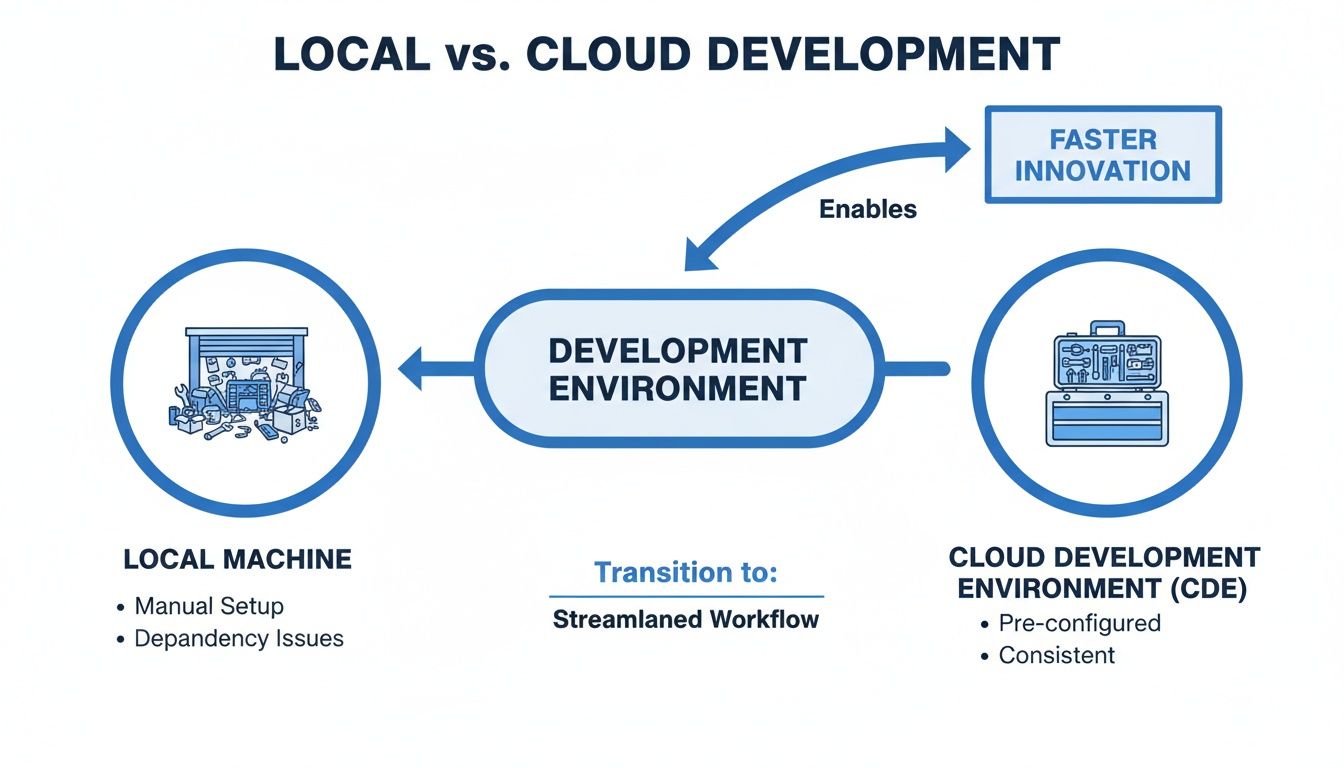
This transition gives teams consistent, on-demand tools, getting rid of all the friction that comes with local machine limitations. Let’s dig into the three main architectures you’ll come across.
Browser-Based IDEs
Think of a browser-based IDE as “Google Docs for code.” It’s the most direct path into cloud development, giving you a familiar editor experience (like VS Code) right in your web browser. No local install needed; just log in and start coding from any machine.
This model is fantastic for its simplicity. It lets developers jump into a project, make a quick change, or review code without the headache of cloning a repo and setting up a bunch of dependencies.
Key takeaway: Browser-based IDEs are great for lightweight tasks, quick edits, learning, and projects with simpler needs. They put accessibility and instant productivity first, often at the expense of deep environmental customization.
Keep in mind, a browser-based IDE is often just the editor. A full-blown CDE provides the editor plus all the underlying compute resources, databases, and services your application needs to actually run.
Container-Based Workspaces
This is where CDEs really start to show their power. A container-based workspace is like getting a pre-packaged LEGO kit for your application. Each workspace is a completely isolated, self-contained environment running in a container, usually with tech like Docker.
This architecture guarantees that every single developer on the team is working with the exact same tools, libraries, and configurations. It kills the dreaded “it works on my machine” problem for good, because the “machine” is just a standardized, version-controlled container definition.
These workspaces are perfectly reproducible and can mirror your production environment down to the last detail, which slashes the odds of bugs popping up only after you deploy. Many CDEs also integrate with managed services like an RDS Relational Database Service to handle database management inside these containerized setups, making them even more robust.
This model is a perfect fit for complex projects with tons of dependencies, microservices, and teams that need absolute consistency from development all the way to production.
Ephemeral Development Sandboxes
The final model, ephemeral sandboxes, pushes the container concept one step further. Imagine getting a brand-new, perfectly clean workshop that spins up just for a single task—and then automatically vanishes when you’re done. That’s an ephemeral sandbox.
These on-demand environments are created for a specific, short-term purpose, like:
- Reviewing a pull request: A reviewer gets a live, running version of the new code to test interactively.
- Fixing a single bug: A developer gets a fresh environment to reproduce and squash an issue without messing up their main workspace.
- Testing a new feature branch: You can instantly spin up an isolated sandbox to experiment with new code without any side effects.
This approach is incredibly efficient. It keeps your main development environment from getting cluttered and prevents “environment drift” over time. By automatically creating and destroying these sandboxes, teams can slash cloud costs, paying only for resources when they’re actually in use. This makes ephemeral sandboxes a game-changer for agile teams focused on fast iteration and a rock-solid, bug-free codebase.
The Real-World Benefits of Cloud-Based Development
Adopting a cloud development environment isn’t just a technical upgrade; it’s a strategic move that pays off in big ways. These benefits go far beyond making a developer’s life a little easier—they directly boost your company’s productivity, strengthen its security, and improve the bottom line. When you centralize workspaces in the cloud, you unlock a level of efficiency and collaboration that’s simply out of reach with scattered, local-only setups.
This shift is fueling a massive wave of cloud adoption. The global cloud computing market, which is the engine behind these environments, is seeing incredible growth. It hit USD 781.27 billion in 2025 and is on track to explode to USD 2,904.52 billion by 2034. This trend, detailed in a recent Fortune Business Insights analysis, shows a clear industry-wide agreement: cloud-based operations are the future.
Supercharge Developer Productivity and Onboarding
One of the first things you’ll notice with cloud development environments is how fast they are to get going. Traditionally, onboarding a new engineer means days of fighting with configuration scripts, installing dependencies, and sorting out weird environment drift issues. CDEs just get rid of all that noise.
With a pre-configured, version-controlled workspace, a new hire can be coding within minutes. They click a link, and boom—a fully functional environment that’s identical to production is ready to go. This means they start adding real value from day one.
A cloud development environment shifts the developer experience from one of friction and endless maintenance to one of focus and genuine creation. It gives engineers back their most valuable asset: time.
And this isn’t just for the new folks. Seasoned developers can instantly switch between projects or feature branches without worrying about messing up their local machine.
Achieve Perfect Environment Consistency
The classic excuse, “it works on my machine,” has caused more bugs, delayed releases, and wasted hours than anyone cares to admit. The problem is that no two local machines are ever really the same. Tiny differences in operating systems, library versions, or environment variables can make code act in strange, unpredictable ways.
CDEs put an end to this for good by making sure every single person on the team is working from the exact same standardized environment.
- Development: Everyone from the junior dev to the senior architect uses the same setup. No exceptions.
- Testing: CI/CD pipelines run tests in an identical environment, which means no more chasing down phantom bugs.
- Production: The final application is deployed to an environment that mirrors the development workspace, dramatically cutting the risk of post-launch surprises.
This consistency builds a reliable and predictable development lifecycle, making it far easier to build, test, and ship solid code much faster.
Enhance Security and Collaboration
Leaving source code and sensitive credentials scattered across individual laptops is a huge security risk. A lost or stolen device can quickly turn into a major data breach. CDEs tighten up security by keeping everything in a secure, managed cloud infrastructure.
This approach gives you a few key advantages:
- Centralized Control: You can manage access with fine-grained permissions and shut it off instantly if needed.
- Reduced Attack Surface: The source code never actually lives on developers’ local machines, minimizing exposure.
- Consistent Patching: Security updates are applied once to the base environment, making sure everyone is protected without lifting a finger.
On top of that, these environments make working together a breeze. Stuck on a tough bug? A developer can share a live snapshot of their entire workspace with a colleague, who can then jump right in and debug in real-time. Sharing a complete, running context like this is a total game-changer for pair programming and mentoring.
Testing with Real Traffic in Your CDE
A clean, isolated cloud development environment is a massive leap forward, but it has one big blind spot: it’s totally detached from the messy, unpredictable nature of production. Unit and integration tests are vital, but they’ll never catch the weird bugs that only crawl out from under the chaos of real-world user traffic. To close that gap, you need a way to test your code against conditions that are as close to production as you can possibly get.
This is where the idea of traffic replay becomes a complete game-changer.
Imagine you could record the exact requests, headers, and payloads coming from your live users and then just “play them back” inside your safe, isolated CDE. We’re not talking about synthetic load testing with generic requests; this is about simulating the genuine, often erratic, flow of your actual production traffic.

This approach lets you find those elusive, hard-to-reproduce concurrency bugs and get a real-world look at performance bottlenecks before your code ever ships. When you test with a true mirror of production, you can deploy with a whole new level of confidence.
Introducing GoReplay for Realistic Simulations
This is exactly the problem that an open-source tool like GoReplay was built to solve. Think of it as a high-fidelity flight recorder for your production environment. It captures live HTTP traffic without hurting performance, and once you have that recording, you can replay it against any environment you want—including your CDE.
Instead of just guessing how your application will hold up under pressure, GoReplay lets you throw the real thing at it. It faithfully duplicates all the complex interactions and concurrent requests that are simply impossible to script by hand. Your testing goes from a theoretical exercise to a practical, real-world validation.
By replaying actual user sessions, you’re not just testing code in isolation. You are validating how your entire system—from the application logic to the database connections—responds to the authentic rhythm of production traffic.
This technique gives you insights that you just can’t get from traditional testing. You can see how new code hammers the database, spot memory leaks that only show up after thousands of requests, and make sure your dependencies can actually handle the load.
Key Capabilities for CDE Testing
GoReplay has several features that make it especially powerful for testing inside a cloud development environment. It’s not just a dumb traffic forwarder; it’s an intelligent system designed for safe and effective simulation.
- Session-Aware Replay: It actually understands user sessions. This means a sequence of related requests gets replayed in the right order to the same dev instance, which is crucial for testing stateful apps, login flows, or shopping cart logic.
- Data Masking and Filtering: You can’t just replay raw production traffic without thinking about security. GoReplay lets you filter or mask sensitive data like passwords, API keys, and personal info, keeping your dev environment secure and compliant.
- Load Simulation Control: You’re in the driver’s seat. You can slow down the traffic or speed it up to see what happens, helping you find your application’s breaking point or test how it scales.
A Practical Workflow Example
Getting traffic replay into your CDE workflow is surprisingly straightforward. The process usually looks something like this:
- Capture Traffic: A lightweight GoReplay agent sits in your production environment, passively listening to network traffic and recording HTTP requests to a file or forwarding them in real-time.
- Spin Up a CDE: When you start working on a new feature branch, a fresh, ephemeral CDE is created. It’s an exact replica of production but totally isolated.
- Replay and Observe: The captured traffic is replayed against your new CDE. You can watch the logs, performance metrics, and application behavior under realistic stress.
- Identify and Fix: Any bugs, performance regressions, or errors that pop up are caught right away. Since the CDE is isolated and disposable, you can debug and iterate quickly without messing up anyone else’s work.
This cycle—capture, replay, fix—ensures your application isn’t just functionally correct, but genuinely production-ready. By testing with a true copy of user activity, you stop guessing and start building more resilient, reliable software.
Establishing Security and Governance
Shifting to cloud development environments is a big move. On one hand, you get a huge boost in productivity. On the other, you’re fundamentally changing your security perimeter—it’s no longer about individual laptops but a shared, centralized platform. This isn’t a step back in security; it’s a chance to build it stronger and more deliberately than ever before.

The old model of local development often operated on a “trust everyone” basis. With a CDE, that changes. You can finally implement strict, role-based access controls and ensure developers only touch the code and services they absolutely need to. This is the principle of least privilege, and it’s a cornerstone of modern security.
Implementing Granular Access Control
Real security starts by defining exactly who can do what. Instead of handing every developer admin rights on their own machine—and hoping for the best—a CDE lets you enforce incredibly precise permissions. This dramatically shrinks the blast radius if an account is ever compromised or someone makes an honest mistake.
A few key measures make all the difference:
- Role-Based Access Control (RBAC): Assign permissions based on clear roles like “Developer,” “QA Tester,” or “DevOps Engineer.” This stops a junior dev from, say, accidentally tweaking a production infrastructure config.
- Time-Based Access: Need to bring a contractor on for a two-week project? Grant them temporary access that automatically expires.
- Audit Trails: Keep a detailed log of every action taken in the environment. This is non-negotiable for compliance and absolutely essential for tracing any security incidents.
By centralizing your development workspaces, you gain a single pane of glass for security and compliance. You can enforce policies, monitor activity, and respond to threats in a way that’s impossible when code is scattered across dozens of unmanaged laptops.
Better yet, you can enforce security policies uniformly across the board. When a new vulnerability pops up, you patch the base CDE image just once. The very next time a developer starts their workspace, the fix is already there. No more chasing people down to update their machines.
Securing Your Code and Dependencies
Beyond just controlling who gets in, you have to secure the code and its dependencies inside the environment. CDEs are the perfect place to bake automated security checks right into the development workflow, catching problems long before they have a chance to hit production.
First up: secrets management. API keys, database credentials, and other secrets should never be hardcoded. Ever. Instead, you integrate your CDE with a tool like HashiCorp Vault or a cloud provider’s native service. The environment fetches what it needs at runtime, keeping sensitive credentials completely out of your codebase.
You can also build security scanning directly into your development containers. Imagine every time a developer spins up a workspace, it automatically scans for known vulnerabilities in third-party libraries. It’s a proactive approach that helps build a secure software supply chain from day one. To take this a step further, many teams implement practical managed network security solutions to protect data and simplify IT management across their entire cloud setup.
This proactive stance is critical. With enterprises now spending over $19.7 billion on cloud security, tools that validate application resilience are becoming indispensable. Solutions like GoReplay let you safely replay real production traffic into these secure cloud environments. This helps teams find security flaws or performance bugs under realistic conditions—before they go live. You can learn more about the growth in cloud market spending and how it’s shaping security priorities.
How to Choose the Right CDE for Your Team
Picking the right cloud development environment is a huge decision. It’s something that will directly shape your engineering team’s daily workflow and, ultimately, their velocity. The market is crowded with options, each built on a different philosophy and architecture. To cut through the marketing noise and make a smart choice, you need a solid framework that focuses on what actually matters to your team.
Think of it like choosing a new headquarters for your company. You wouldn’t just pick the flashiest building. You’d dig into the location, the infrastructure, security, and how well it supports the unique way your teams work. A CDE is your team’s digital headquarters, and it deserves that same level of careful consideration.
To make this easier, we can break down the evaluation into three core pillars: Developer Experience, Operational Requirements, and Enterprise Readiness. Asking the right questions in each of these areas will steer you toward a CDE that truly fits your tech stack, team size, and business goals.
Evaluating the Developer Experience
Let’s be blunt: the main point of a CDE is to make developers more productive and happier. If the tool is slow, clunky, or just gets in the way, it has failed its most basic mission. This is all about the day-to-day, hands-on-keyboard usability of the platform.
Start with speed and workflow. How long does it actually take to spin up a new environment? Are we talking seconds or minutes? Does it support the IDEs your team already knows and loves, or does it try to shoehorn everyone into a browser-only editor? A CDE should feel like a massive upgrade, not a frustrating compromise.
Here are some essential questions to grill vendors on:
- IDE Support: Does it offer a full-desktop IDE experience with local file syncing, or is it purely a web-based editor?
- Performance: What’s the latency like? Does coding feel snappy and responsive, even for developers on the other side of the world?
- Onboarding: How steep is the learning curve? Can a new developer get a fully configured workspace just by clicking a link in a pull request?
- Collaboration: How easy is it for two or more developers to jump into a shared live environment to squash a bug together?
The best CDEs are almost invisible. They slide right into a developer’s existing habits, removing friction without forcing them to completely change their preferred tools and workflows.
Assessing Operational and Infrastructure Needs
Next, it’s time to look under the hood. How will this CDE plug into your existing infrastructure and DevOps practices? This is where your platform engineering team will have some strong opinions, and for good reason. The goal is to find a solution that complements your current stack, not one that forces a painful, six-month migration project.
For teams already deep in the Kubernetes ecosystem, a Kubernetes-native CDE is often a deal-breaker. It ensures your development environments are as close to a true replica of production as you can get. Another critical fork in the road is the deployment model. Do you want a fully managed SaaS solution, or do you need the control and security that comes with a self-hosted platform running in your own private cloud? To go deeper on these different models, you can explore this guide on development environment setup strategies.
Considering Enterprise Readiness and Cost
Finally, you have to put on your business hat. Does the CDE meet your company’s security, compliance, and budget needs? This means looking for non-negotiable features like role-based access control (RBAC), comprehensive audit logs, and clean integrations with your single sign-on (SSO) provider.
And of course, there’s the cost. A platform might look cheap on a per-user basis, but how does it handle resource consumption behind the scenes? Look for smart features like automatic workspace shutdown for idle environments—this alone can stop your cloud bills from spiraling out of control. Understanding the total cost of ownership (TCO) is absolutely critical.
Choosing the right CDE involves a careful balancing act between what developers need to be productive, what your operations team can support, and what the business can approve. To help you structure this evaluation, we’ve put together a table outlining the key questions to ask.
Comparison of CDE Evaluation Criteria
| Evaluation Category | Key Questions to Ask | Why It Matters |
|---|---|---|
| Developer Experience | How fast can I start coding? Does it support my favorite IDE? How is the performance? | A clunky, slow, or restrictive tool will kill productivity and developer morale, defeating the entire purpose of a CDE. |
| Operational & Infra | Is it Kubernetes-native? Can we self-host it? How does it handle secrets and networking? | The CDE must align with your existing infrastructure and security practices to avoid creating operational nightmares. |
| Collaboration | How easily can developers share environments for debugging or pair programming? | Seamless collaboration is a key benefit of CDEs, enabling teams to solve problems faster without “it works on my machine” issues. |
| Enterprise Readiness | Does it have RBAC, audit logs, and SSO? What compliance standards does it meet? | Security and governance are non-negotiable in most organizations. The CDE must meet your company’s security posture. |
| Cost & TCO | What’s the pricing model (per-user, per-hour)? Does it auto-sleep idle workspaces? | The initial price is only part of the story. Hidden cloud resource costs can make a seemingly cheap solution very expensive. |
Using this framework helps ensure you’re not just buying a tool, but investing in a platform that will genuinely accelerate your team’s ability to ship great software. Take the time to run proofs-of-concept and get real feedback from the developers who will live in it every day.
Common Questions About CDEs
When teams start looking into cloud development environments, a few practical questions almost always pop up. Getting these sorted out early on helps everyone see the real value and makes the transition way smoother. Here are some straight answers to the things we hear most often.
What’s the Difference Between a Cloud IDE and a CDE?
This is a great question, and the distinction is super important. Think of it this way: a Cloud IDE is just the code editor that runs in your browser. It’s the workbench.
A full Cloud Development Environment (CDE) is the entire workshop.
A CDE wraps the IDE in all the surrounding infrastructure it needs to be useful—the actual compute power, runtimes, terminals, databases, and all the tools required to build, run, and debug a real application. You write code in the Cloud IDE; your code lives and executes in the CDE.
Aren’t CDEs Too Expensive for Small Teams?
Not at all. In fact, for a lot of smaller teams, CDEs actually end up being cheaper than sticking with local setups. The magic here is that you shift your spending from big, upfront hardware costs to predictable, operational ones.
Most CDE providers have generous free tiers or pay-as-you-go models tied directly to your compute usage. This approach flips the traditional cost model on its head:
- No More High-End Laptops: You can stop buying every developer a beast of a machine that costs thousands of dollars.
- Slash Cloud Waste: CDEs are smart. They can be set to automatically spin down or “sleep” when idle, so you’re not burning money on resources nobody is using.
- Pay for What You Use: Instead of guessing at hardware needs and overprovisioning, you only pay for cloud resources when developers are actively coding.
When you factor in the massive productivity boost from developers not having to wrestle with local setups, the total cost is often significantly lower.
How Do You Handle Secrets in a Cloud Environment?
Managing secrets like API keys and database credentials is a non-negotiable part of any secure workflow, and CDEs are built for this. The golden rule is simple: never, ever hardcode secrets into your codebase or config files.
The right way to do this is to integrate your cloud development environments with a real secrets management tool. Think HashiCorp Vault, Doppler, or a cloud-native service like AWS Secrets Manager or Google Secret Manager.
You then configure the CDE to fetch these secrets securely when it starts up. This means they are never exposed in your Git repo, container images, or logs. It centralizes control, making it a breeze to rotate keys and audit access—a huge security upgrade from passing around .env files on individual laptops.
Ready to eliminate production bugs by testing with real-world traffic? GoReplay is an open-source tool that lets you capture and replay live user traffic in your CDE, ensuring your application is truly production-ready before you ship. Learn more and get started for free.