
CI/CD Pipeline Optimization That Actually Works
CI/CD pipeline optimization is all about making your automated software delivery workflow faster, more reliable, and cheaper. It’s not just about speed, though. The real goal is to boost code quality, make your developers more productive, and sharpen your business’s agility by fine-tuning every step from code commit to deployment.
Why Slow Pipelines Are Costing You More Than Time
 Let’s be honest—a slow CI/CD pipeline is more than just an annoyance. It’s a direct drain on your business.
When developers are stuck waiting for builds to complete or tests to run, the feedback loop completely breaks down. This delay kills momentum, crushes morale, and forces the kind of context-switching that absolutely tanks productivity.
The hidden costs add up quickly, too. Sluggish pipelines mean your team ships features and bug fixes slower, which directly impacts your time-to-market and hands your competitors an edge. And don’t forget, every minute a pipeline runs is a minute you’re paying for compute resources. Inefficient processes quickly become a major operational expense.
The Real-World Impact of Inefficiency
This problem has only gotten worse with the explosion of microservices. While breaking down a monolith into smaller, independent services gives you flexibility, it also creates a complex web of interconnected pipelines. A single bottleneck in one service can easily trigger a cascade of delays across the entire system.
This is exactly why ci/cd pipeline optimization is a critical strategic move, not just a technical tweak. It’s about building resilience and efficiency into the very core of your development process. It’s no surprise that the global DevOps market, which is tightly linked to CI/CD, is projected to hit $25.5 billion by 2028.
We’ve seen organizations that implement best practices like parallel testing and automated builds cut their build times by up to 50% and see deployment failures drop by 30%. You can explore more great insights on CI/CD best practices at Kellton.com.
A slow pipeline is a tax on every single developer. It quietly erodes productivity and innovation by forcing your most valuable talent to wait instead of create.
To get a clearer picture of where to focus your efforts, here’s a breakdown of the most common optimization areas and the tangible benefits they deliver.
Key Optimization Areas and Their Real-World Impact
| Optimization Area | What It Solves | Expected Outcome |
|---|---|---|
| Parallel Testing | Long, sequential test suites that block deployments for hours. | Drastically reduced test execution time, faster feedback for developers. |
| Build Caching | Re-downloading dependencies and re-building unchanged code every time. | Significantly faster build times, lower compute costs. |
| Smaller Docker Images | Bloated images that are slow to pull, push, and scan for vulnerabilities. | Faster image transfers, reduced storage costs, and a smaller attack surface. |
| Traffic Shadowing | Uncertainty about how new code will perform under real-world load. | High-confidence deployments, early detection of performance regressions. |
Ultimately, investing in your pipeline isn’t just a “nice-to-have.” It’s about reclaiming lost time and resources so you can focus on building great products.
When you treat pipeline performance as a core driver of reliability and quality, you start to see real benefits:
- Faster Feedback Loops: Developers can iterate more quickly, catching bugs earlier when they are cheaper and easier to fix.
- Increased Developer Morale: Fast, reliable pipelines empower developers, reducing frustration and allowing them to focus on what they do best—writing code.
- Reduced Operational Costs: Efficient pipelines use fewer compute resources, which directly lowers your cloud or infrastructure bills.
- Improved Software Quality: With more frequent and reliable testing, you can deploy with greater confidence, knowing your code is robust.
Slash Your Build and Test Times with These Tactics
Long build and test cycles are the silent killers of developer productivity. Nothing grinds a team’s momentum to a halt faster than waiting around for a pipeline to finish after every small change. That crucial, rapid feedback loop that makes agile development work just… stops.
To get that time back, you have to move beyond just running your pipeline and start actively managing its performance. The real goal here is to give your developers fast, meaningful feedback so they can iterate with speed and confidence.
Just look at how quickly the time adds up. Even a seemingly reasonable build and test cycle can become a major bottleneck when you’re deploying multiple times a day.
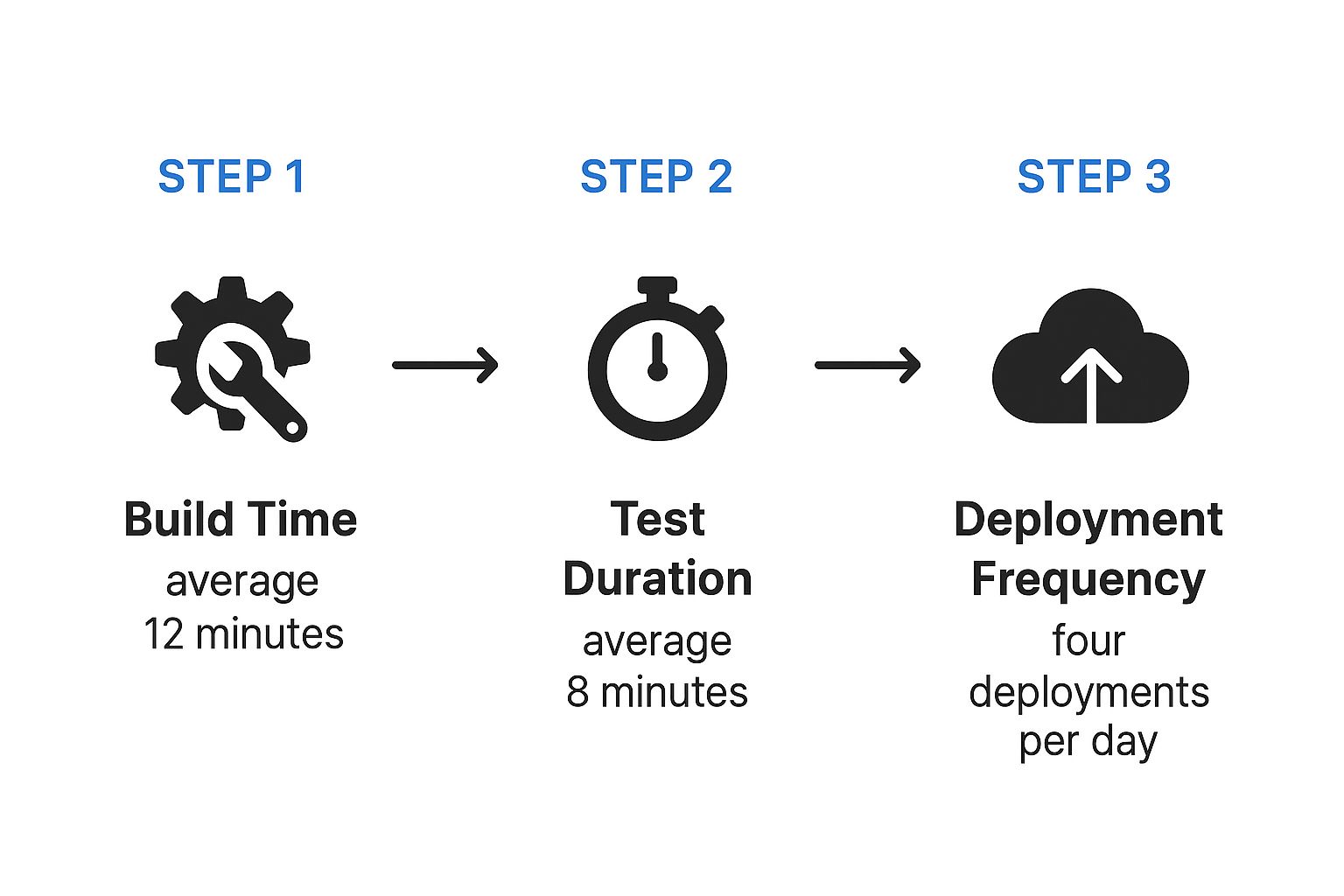
With a 12-minute build and an 8-minute test, you’re looking at a 20-minute wait for every single run. That’s a huge chunk of a developer’s day eaten up by waiting.
Implement Incremental Builds
One of the single most effective changes you can make is to stop rebuilding your entire application from scratch on every commit. It’s often completely unnecessary.
Incremental builds are a much smarter approach. They work by only compiling the specific components that have changed, along with anything that directly depends on them. This shifts your pipeline from a monolithic, brute-force process to an intelligent one that actually understands your codebase.
Think about a large microservices app. A tiny change to the “user-authentication” service shouldn’t force a full rebuild of the “product-catalog” service. It just doesn’t make sense. I’ve seen teams slash their build times by 35–60% just by adopting this strategy.
Run Jobs and Tests in Parallel
Why force your pipeline to wait for tasks to finish one by one when you can run a bunch of them at the same time? Parallelization is all about splitting up a large job—like a massive test suite—into smaller chunks and running them simultaneously on different build agents.
This one change can absolutely gut the longest stages of your pipeline.
Imagine a test suite that takes a full 30 minutes to run from start to finish. If you split it into four parallel jobs, you could realistically cut that time down to under eight minutes. This isn’t just for tests, either. You can parallelize all sorts of stages:
- Unit and Integration Tests: Run different suites at the same time.
- Linting and Static Analysis: Check code quality while other jobs are running.
- Building Multiple Artifacts: If you produce several binaries or container images, build them all at once.
The concept is simple: you’re turning a single-file line into a multi-lane highway. Every job you can run in parallel directly shaves time off the clock for your developers.
Use Test Impact Analysis
Let’s be honest: not every test is relevant to every single code change. Test Impact Analysis (TIA) is a technique that intelligently runs only the tests directly affected by the code you just committed.
TIA tools analyze your commit, map the changes to your test suite, and create a minimal, highly-targeted set of tests for that specific run. This is how you avoid the colossal waste of running thousands of unrelated tests for a one-line bug fix.
You get the critical feedback you need, fast, without sacrificing quality for that specific change. Of course, you’ll still want to run your full test suite on a schedule—like in a nightly build—to ensure nothing slips through.
To truly validate these optimizations, you also need to see how they hold up under real-world conditions. For that, you need a solid performance testing strategy. Check out our guide on how to do performance testing for modern applications to get started.
Mastering Caching and Dependency Management
Once you’ve tightened up your build and test times, the next big win in CI/CD pipeline optimization is stamping out redundant work. Think about it: your pipeline does the same things over and over again. It downloads dependencies. It pulls base container images. This is where smart caching and dependency management become your secret weapon for speed.
The whole idea is beautifully simple: stop redoing work. Instead of fetching the same packages from a remote server every single time, a good cache keeps these assets locally on the build runner. When the next pipeline kicks off, it pulls from this local stash, which is worlds faster.
But caching isn’t a silver bullet. The trickiest part is cache invalidation—knowing precisely when to toss an old cache and grab fresh assets. Get it wrong, and you’ll be pulling your hair out over subtle bugs. A stale cache can lead to a build passing with an outdated dependency, only to have it blow up later in production.
Effective Caching Strategies
To get the most bang for your buck, start by caching the most common and time-draining tasks. Each type of cache tackles a different bottleneck.
-
Dependency Caching: This is your bread and butter. It’s all about storing project packages like npm modules, Maven artifacts, or Go modules. The key is to use your project’s lock file (like
package-lock.jsonorgo.sum) as the cache key. This way, the cache is only busted when your dependencies actually change. Simple, yet incredibly effective. -
Build Artifact Caching: Does one job create a binary that another job needs? Don’t build it twice. Cache the output from the first job so the next one can grab it directly.
-
Docker Layer Caching: We’ve all watched
docker buildcrawl along as it pulls huge base images. By enabling layer caching, your CI tool smartly reuses any unchanged layers from previous builds, which can turn a 10-minute image build into a 30-second one.
A well-configured cache feels like a superpower. It transforms your pipeline from a process that starts from scratch every time into one that intelligently picks up where it left off, saving precious minutes on every single run.
Streamlining Your Dependencies
Beyond caching, it’s worth taking a hard look at what you’re actually pulling into your project. Dependency lists have a way of getting bloated over time with packages that are unused or just plain oversized.
Regularly auditing your dependencies is a practice that pays dividends but is often skipped. Fire up a dependency analysis tool to find and prune out the dead weight. For the packages you keep, see if there are smaller, more focused alternatives available.
This kind of proactive management does more than just speed up downloads. A leaner dependency tree shrinks your application’s final size and, just as importantly, reduces its security attack surface. When you combine this discipline with smart caching, you create a pipeline that’s not just faster, but leaner and more secure.
Smart Infrastructure and Resource Allocation
Let’s be honest. Even the most perfectly optimized code and clever caching strategies will eventually hit a wall if your underlying infrastructure can’t keep up. Your CI/CD pipeline is only as fast as the machines it runs on. That’s why smart resource allocation is a core pillar of CI/CD pipeline optimization.
It’s all about making your infrastructure a strategic asset, not another bottleneck.
A common trap I see teams fall into is relying on a fixed fleet of self-hosted runners. During quiet periods, these machines just sit there, idle and burning cash. But when a deadline looms and everyone pushes code at once, they get completely overwhelmed. Builds start queuing up, and productivity grinds to a halt. You end up with the worst of both worlds: over-provisioning (wasted money) and under-provisioning (slow builds).
Embrace Auto-Scaling and Ephemeral Runners
The real solution is to ditch static infrastructure and move to dynamic, on-demand resources. This is where cloud-based, ephemeral runners completely change the game. Think of them as temporary build agents, spun up just-in-time for a specific job and then torn down the moment it’s done.
This approach brings some serious advantages:
- Cost-Effectiveness: You only pay for compute resources when your pipeline is actually running. No more paying for idle machines overnight or on weekends.
- Infinite Scalability: When ten developers push code simultaneously, ten runners can spin up to handle the load in parallel. This completely eliminates pipeline queues.
- Pristine Environments: Every job kicks off in a clean, fresh environment. This gets rid of those frustrating “it works on my machine” issues caused by leftover artifacts or configurations.
Adopting ephemeral, auto-scaling runners transforms your infrastructure from a fixed operational cost into a variable one that perfectly aligns with your team’s actual workload. You get the power you need, precisely when you need it.
Right-Sizing Your Build Agents
While auto-scaling solves the “how many” problem, you also have to tackle the “how powerful” question. Running a simple linting job on a massive, high-CPU machine is just as wasteful as trying to compile a huge application on a tiny instance.
Right-sizing is all about matching the compute resources (CPU, RAM) of your build agents to the specific needs of the job at hand. Take a look at the resource consumption of your most common pipeline stages. Your main build stage might need a memory-optimized instance, but your simple unit tests can probably get by on a much smaller, cheaper machine.
Most modern CI/CD platforms let you define different classes of runners for different tasks. This granular control ensures you’re not overpaying for power you don’t need. When you combine this with service virtualization and mocking, especially in complex environments like Kubernetes, the optimization becomes even more powerful. You can explore this further in our guide on optimizing Kubernetes scalability. This way, your infrastructure isn’t just fast—it’s incredibly cost-efficient.
Future-Proofing Your Pipeline with AI
 Let’s be honest, the next big leap in CI/CD optimization isn’t just about faster runners or smarter caching. It’s about making our pipelines truly intelligent. We’re starting to see AI and machine learning shift pipeline management from a reactive, fire-fighting chore to a proactive, data-driven strategy. This is where we stop relying solely on human-defined rules and start letting the data itself guide our optimizations.
Think about a pipeline that actually learns from its own history. Emerging tools are now digging into historical build logs, test results, and performance metrics to predict failures before they even happen. This is a game-changer. It allows your team to get ahead of problems instead of being caught off guard, turning your CI/CD process into a system that anticipates and prevents issues.
Intelligent Test Selection and Resource Management
One of the most exciting applications I’ve seen is intelligent test selection. Instead of just running the same massive test suite every single time, an ML model can look at a specific code change and pinpoint the exact tests needed to cover the highest-risk areas. It’s smart enough to run what’s critical while skipping tests that are completely irrelevant to the change. Maximum coverage, minimal wasted time.
This AI-driven approach also extends to the infrastructure itself. With dynamic resource allocation, machine learning models can adjust compute power on the fly. The system can predict the resources a job will need based on its complexity and past performance. It’ll spin up a beefy runner for a heavy compile job and use a lightweight one for a quick linting check. No more paying for idle power.
The real goal of an AI-enhanced pipeline is to make smarter decisions, faster. It automatically finds that sweet spot between speed, cost, and risk—a balance that’s incredibly difficult to hit manually, especially at scale.
From Reactive Fixes to Predictive Power
This shift isn’t just theory; it’s backed by some pretty compelling results. Machine learning is being used more and more for pipeline optimization, offering insights that old-school methods just can’t provide.
In fact, some studies have shown that ML models can predict pipeline failures with 85–90% accuracy simply by analyzing historical data. This kind of predictive power helps organizations slash unplanned downtime by up to 30%. On top of that, intelligent resource allocation has helped teams cut their cloud infrastructure costs by 15–25% by stamping out idle compute time. You can dive deeper into these findings on optimizing continuous delivery if you’re curious.
This isn’t science fiction. It’s the practical application of data to solve complex, everyday engineering problems. By embracing these AI-powered techniques, you’re building a CI/CD pipeline that is not only faster but also more resilient and cost-effective. You’re truly future-proofing your entire software delivery process.
Answering Your CI/CD Optimization Questions
Diving into CI/CD pipeline optimization can feel like a maze. With so many tools and strategies out there, it’s tough to know where to start. You’re not alone.
Let’s cut through the noise. Here are answers to the most common questions I hear from teams looking to make their pipelines faster and more reliable.
Where Do I Even Begin with Optimization?
Your best starting point is always the biggest bottleneck. Don’t guess—let the data tell you the story. Run a few pipeline builds and look at the duration of each stage. In most cases, you’ll find that one or two jobs hog the majority of the total run time.
These slow stages are often tied to running massive test suites or installing dependencies from scratch every single time. By focusing your initial efforts on these specific, high-impact areas, you’ll see the most significant improvements right away. A single tweak here can easily shave minutes off every build.
The golden rule of optimization? Find the biggest pain point and fix that first. A small improvement to your longest-running job will have a far greater impact than a huge improvement to a job that already finishes in seconds.
How Do I Speed Up the Pipeline Without Sacrificing Tests?
This is the classic dilemma. But you don’t have to choose between speed and quality. The real solution is to test smarter, not less. Cutting down on test coverage just to get faster builds is a dangerous game—it inevitably leads to bugs slipping into production, where they are far more painful and expensive to fix.
Instead, let’s look at running your tests more efficiently. Here are a few strategies I’ve seen work wonders:
- Parallelize Your Test Suites: This is the single most effective tactic. Split your tests into smaller, logical chunks and run them across multiple build agents simultaneously. It’s a game-changer for cutting down test time without losing coverage.
- Use Test Impact Analysis: Why run thousands of tests for a one-line bug fix? Test impact analysis tools identify and run only the tests relevant to the code that actually changed.
- Create Scoped Pipelines: Not every build needs the full-blown, end-to-end test suite. A great practice is to set up a lightning-fast pipeline for pull requests that only runs unit tests, giving developers quick feedback. Save the comprehensive (and slower) tests for a nightly or pre-production build.
This tiered approach gives you the best of both worlds: rapid feedback during development and the full safety net of complete testing before you release.
Is Caching Always a Good Idea?
Mostly, yes—but with a huge warning label. Caching dependencies, build artifacts, and Docker layers can make your builds dramatically faster. The performance gains are real and often substantial.
The catch, however, is cache invalidation. A stale or “poisoned” cache is a ticking time bomb, introducing subtle, nightmarish bugs into your builds. Imagine your pipeline pulling an outdated library from a bad cache, passing all its tests, and then causing chaos in production.
To avoid this, you need a rock-solid cache invalidation strategy. The key is to tie your cache key directly to the file that defines its contents, like a package-lock.json or a Dockerfile. This ensures that the moment a core dependency changes, the cache is automatically busted, and a fresh version is fetched.
How Often Should I Revisit My Pipeline for Optimization?
CI/CD optimization is not a one-and-done task. Think of it as continuous improvement. Your codebase, dependencies, and testing needs are always changing, and today’s perfect pipeline could easily become tomorrow’s bottleneck.
Treat your pipeline like any other critical piece of software you maintain. I recommend setting aside time to review its performance metrics regularly—maybe once a quarter, or whenever the team starts complaining about slow builds. By proactively looking for new bottlenecks, you can keep your development workflow fast, efficient, and reliable.
Frequently Asked Questions
When it comes to fine-tuning CI/CD, the same questions often pop up. Here’s a quick-reference table with straightforward answers to help you navigate common challenges.
| Question | Quick Answer |
|---|---|
| What’s the first thing I should optimize? | Always start with your biggest bottleneck. Use build analytics to find the slowest job in your pipeline—usually testing or dependency installation—and focus your efforts there for the biggest immediate impact. |
| How can I balance speed with thorough testing? | Test smarter, not less. Use strategies like parallelizing test suites, running only tests relevant to code changes (test impact analysis), and creating different pipelines for different contexts (e.g., fast unit tests for PRs, full E2E tests for nightly builds). |
| Is caching always a good optimization strategy? | Mostly, yes, but you must have a strong cache invalidation strategy. Tie your cache key to dependency files (like package-lock.json) to prevent using stale or “poisoned” caches that can introduce hard-to-diagnose bugs. |
| How often should I review my pipeline’s performance? | Pipeline optimization is an ongoing process, not a one-time project. Review your pipeline metrics quarterly or whenever you notice a slowdown. Treat your pipeline like any other piece of critical software that requires regular maintenance. |
Hopefully, these answers give you a clear path forward. The key is to be data-driven and treat your pipeline as a product in itself—one that requires continuous care and improvement.
Ready to stop guessing and start knowing how your optimizations perform under pressure? GoReplay lets you capture and replay real production traffic in your staging environments. This gives you unmatched confidence that your changes can handle real-world load before they ever reach your users. Discover how GoReplay can bulletproof your releases.