
Blue Green Deployment Strategy: Achieve Zero-Downtime Releases and Rollbacks

A blue-green deployment is a release strategy that drastically cuts down on downtime and risk. It works by running two identical production environments, which we call Blue and Green. Blue is your current, live application, and Green is where the new version lives. Once you’re sure Green is good to go, you just switch live traffic over to it. The new version becomes live instantly, and the old one is still there, just in case.

What Is the Blue Green Deployment Strategy
Think of it like a magic trick on a grand stage. Your live application is the performance happening on the “Blue” stage, in front of a full house. While that show is running, your team is backstage, setting up the next act on an identical “Green” stage. They check the lights, test the sound, and make sure every prop is perfect.
Instead of stopping the show to change the scenery, the entire stage platform swaps in a blink. The audience sees a seamless transition, with no awkward pauses or intermissions. That’s the heart of the blue-green deployment strategy. It’s a high-availability release model built to sidestep the headaches and downtime that come with traditional, in-place updates.
The Core Components
At its core, this whole strategy hinges on just two things:
- Two Identical Environments: You have the “Blue” environment, which is your current, stable production setup handling all live user traffic. Then you have the “Green” environment, an exact clone that starts out idle, waiting for the new version of your application.
- A Traffic Router: This is a load balancer or a similar tool that sits in front of both environments. It’s the traffic cop, deciding which stage—Blue or Green—gets all the incoming user requests.
When a new release is ready, you don’t touch the live environment. Instead, you deploy it to the idle Green environment. This is your private sandbox where you can run every test imaginable—integration, performance, security—without a single user ever knowing.
The real magic of blue-green deployment is its simplicity. The switch isn’t a complex, multi-step update; it’s a single, atomic flip of a routing rule. This makes rolling back just as fast and safe as rolling out.
Once you’re completely confident that the Green environment is solid, you just tell the router to send all new traffic there. And just like that, Green is now live. The Blue environment doesn’t disappear; it hangs around as a hot standby. If something unexpected goes wrong, you can flip the switch right back. This built-in safety net is something traditional deployments just can’t offer.
Blue Green vs Traditional Deployment at a Glance
To really see the difference, it helps to put the two approaches side-by-side. Traditional deployments, where you update servers in place, have been the standard for years, but they come with a different set of trade-offs.
Here’s a quick breakdown:
| Feature | Blue Green Deployment | Traditional Deployment |
|---|---|---|
| Downtime | Near-zero, often undetectable by users. | Requires a maintenance window; downtime is expected. |
| Rollback | Instantaneous; a simple traffic switch back to the old environment. | Complex and slow; often involves restoring backups or redeploying the old version. |
| Risk | Low; testing happens on a production-like environment without affecting users. | High; updates happen on live servers, risking failures that directly impact users. |
| Cost | Higher; requires maintaining two full production environments, at least temporarily. | Lower; only one production environment is needed. |
| Complexity | More complex to set up (requires sophisticated routing). | Simpler to set up initially, but the deployment process itself is risky. |
Ultimately, blue-green deployment trades a bit of infrastructure cost for a massive gain in reliability and speed. For teams that need to release frequently and keep users happy, it’s a game-changer.
The Benefits and Real-World Tradeoffs
Adopting a blue-green deployment strategy brings a powerful set of advantages that tackle the most common fears around software releases. For many engineering teams, the benefits more than justify the architectural overhead. It transforms deployments from high-stress, all-hands-on-deck events into routine, predictable operations.
The biggest win is the near-total elimination of downtime. Because the traffic switch from the blue to the green environment is instantaneous, users experience a completely seamless transition. This means those dreaded “maintenance windows” that disrupt users and hurt business operations become a thing of the past. Releases can happen during peak business hours without anyone even noticing.
This approach also fundamentally changes how you handle failures. Rollbacks are no longer a frantic, multi-step scramble to redeploy old code or restore backups.
Instead, a rollback is just another traffic switch—this time, back to the original blue environment, which has been patiently waiting on standby. This ability to revert to a known good state in seconds provides an incredible safety net.
Unpacking the Core Advantages
The practical impact on development cycles and system reliability is huge. Teams that implement blue-green deployments often see immediate improvements in their operational stability and how fast they can ship new features.
Key advantages include:
- Disaster Recovery Built-In: The standby blue environment doubles as a ready-to-go, full-scale disaster recovery solution. If the live green environment experiences a critical failure for any reason, the blue environment can take over traffic instantly.
- Simplified Rollback Process: Reverting a failed deployment is as simple as flipping a switch at the router or load balancer. This slashes the Mean Time to Recovery (MTTR) from hours to mere seconds, minimizing the blast radius of any bugs that slip through.
- Comprehensive Pre-Release Testing: The green environment is an exact replica of production. This allows for exhaustive testing—including performance, security, and integration tests—under realistic conditions before a single user is exposed to the new code.
Balancing the Equation with Real-World Tradeoffs
However, this strategy isn’t a silver bullet. It comes with its own set of challenges and costs that you need to weigh carefully.
The most obvious tradeoff is the financial cost of running duplicate infrastructure. For the entire duration of the deployment process, you are effectively doubling your production environment’s resource consumption, which can get expensive fast.
This is the central calculation every organization has to make: is the cost of that extra infrastructure less than the cost of downtime and botched deployments? For applications where availability is everything, the added expense is often a no-brainer.
The data backs this up. Statistically, blue-green deployments can slash failure rates by up to 90% in critical applications. A prominent State of DevOps Report noted that high-performing teams relied on it for 83% of their releases, a stark contrast to the 22% among low-performing teams who were constantly fighting outages.
Beyond cost, there are technical complexities to navigate:
- Database Migrations: Handling database schema changes is a major hurdle. Your database must support both the blue and green versions of the application simultaneously, which requires careful planning to ensure backward and forward compatibility. This is often the trickiest part.
- Stateful Applications: Managing user sessions or in-memory state can be complicated. A user who starts a transaction on the blue environment might lose their session when traffic switches to green unless a shared session management system is in place.
- Architectural Overhead: Setting up and automating the creation and teardown of these environments isn’t trivial. It requires sophisticated tooling and real expertise in infrastructure-as-code and CI/CD pipelines.
Key Architecture and Traffic Routing Patterns
At the heart of any solid blue-green deployment is a single, crucial component: the traffic conductor. This is almost always a load balancer or a sophisticated router that sits in front of your application and decides where to send every single user request.
This component’s ability to instantly flip a switch—directing traffic from the old “blue” environment to the new “green” one—is what makes zero-downtime deployments a reality.
Think of it like a railway switch operator. The main track is your live production traffic, and it leads to two identical destinations: the Blue Station (your current app version) and the Green Station (the new one). The operator controls a single lever. With one decisive pull, they can send all incoming trains to the other station, with no disruption to the passengers on board.
This model is a massive leap forward from clunky, old-school methods like DNS updates. Sure, you could try to switch traffic using DNS, but it’s a slow, unpredictable nightmare. DNS records get cached all over the internet, so a change could take minutes or even hours to fully propagate. You’d end up with some users seeing the old version and some seeing the new one—a recipe for confusion and bugs.
A router or load balancer update, on the other hand, is immediate and clean.
Why Router-Based Switching Is Superior
Using a load balancer gives you the precise, atomic control over traffic flow that this strategy demands. When you make the cutover, all new user sessions are directed to the green environment simultaneously. No ambiguity, no waiting.
The typical flow looks something like this:
- Before Deployment: The router is configured to send 100% of live traffic to the blue environment. The green environment is either sitting idle or hasn’t even been built yet.
- During Deployment: You spin up a new green environment as an exact clone of blue. The new code is deployed here, and it goes through a battery of tests while being completely isolated from any real users.
- The Switch: Once you’ve validated that green is stable and working as expected, you make a single configuration change to the router. It now sends 100% of all incoming traffic to the green environment.
- After Deployment: Green is now your live production environment. Blue gets no new traffic but is kept on standby, ready for an instant rollback if anything goes wrong.
This entire pattern is designed to decouple the deployment process from the live environment. You’re never operating on a “live wire.” Instead, you get the new environment ready in a safe, isolated space and only expose it to users when it’s proven to be solid.
Common Traffic Management Setups
While the concept is straightforward, the implementation can look different depending on your tech stack. Modern cloud platforms and container orchestrators have fantastic built-in tools that make this process incredibly smooth.
For example, services like an AWS Application Load Balancer (ALB) or orchestrators like Amazon ECS and Kubernetes have native support for blue-green deployments baked right in. These tools can manage the whole workflow—from provisioning the new environment to handling the traffic shift and even orchestrating automated rollbacks. It’s far more efficient than messing with network devices by hand.
If you’re exploring similar but more gradual release models, it’s also worth understanding the canary deployment strategy, which shifts traffic over incrementally instead of all at once.
Ultimately, no matter which tool you use, the core principle is the same. The architecture must support two identical, isolated production environments fronted by a routing layer that can be reconfigured instantly. This is the technical foundation that provides the safety, speed, and reliability that make blue-green deployments so powerful.
How to Implement a Blue-Green Deployment Pipeline
Putting the blue-green deployment strategy into practice means building a solid, automated CI/CD pipeline. Let’s be clear: automation is the whole game here. Trying to juggle this process manually is a recipe for human error, which completely defeats the purpose of this safe deployment model. A great pipeline is all about executing a series of well-defined stages, every single time.
The process boils down to spinning up a new environment, deploying the code, running a gauntlet of tests, and then carefully managing the traffic switch. Here’s a look at the standard, automated workflow for getting this powerful strategy integrated into your development lifecycle.
The diagram below shows you exactly what’s happening with the traffic routing—how user requests are directed before, during, and after the deployment.
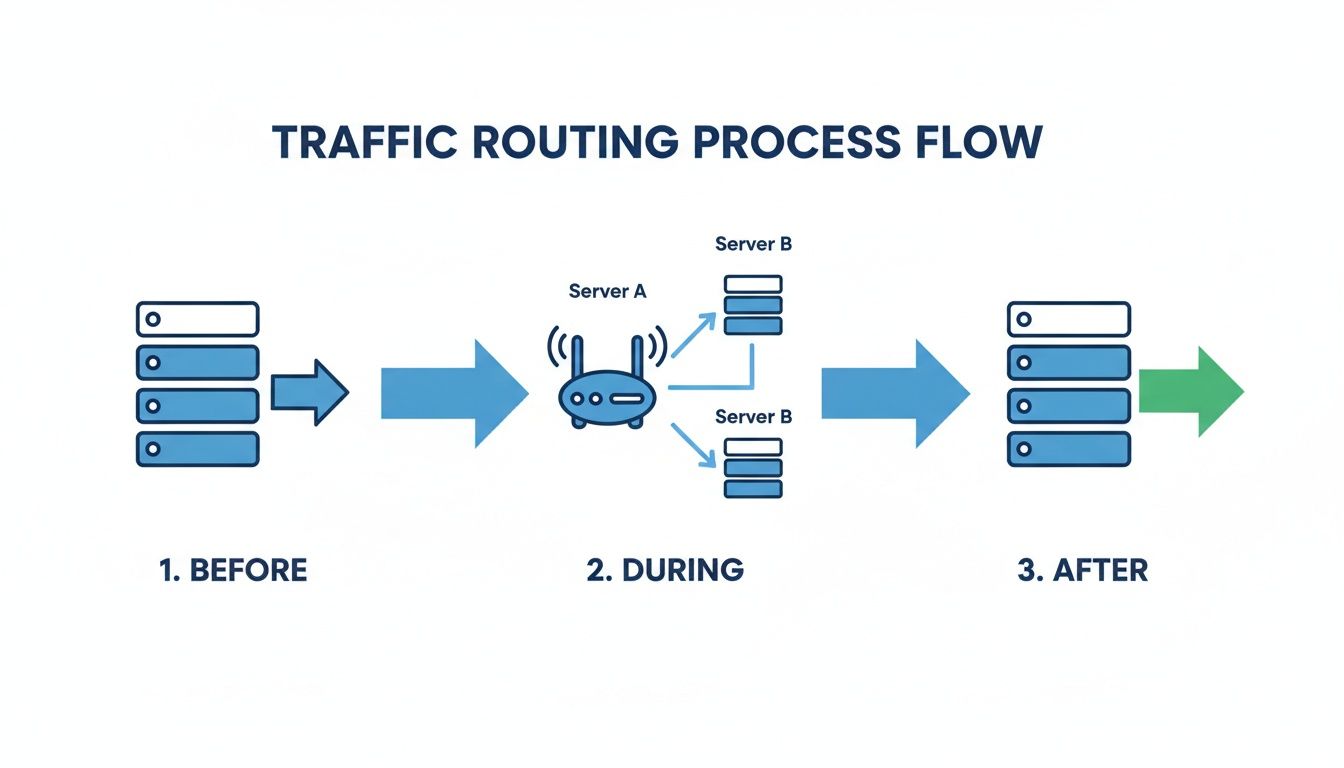
You can see the simplicity of that final cutover. Once the new version is validated, the router just flips a switch, instantly redirecting all traffic from blue to green.
Stage 1: Provision the Green Environment
First things first, the pipeline has to build the “green” environment. This isn’t just about spinning up a few servers; it’s about creating a perfect, production-grade clone of the existing “blue” environment. Every last detail—from compute instances and container configs to networking rules and environment variables—has to be identical.
This is where Infrastructure as Code (IaC) tools like Terraform or AWS CloudFormation are non-negotiable. IaC ensures your environment is provisioned repeatably and without any configuration drift, which is absolutely critical for your tests to mean anything. The pipeline just executes these templates to build the new environment from scratch.
Stage 2: Deploy and Validate the New Application
With a fresh green environment ready to go, the CI/CD pipeline deploys the new application version into it. This whole step is completely isolated from live users, giving you a safe sandbox to kick the tires.
Once the deployment is done, a battery of automated tests fires off. And we’re not talking about simple unit tests. This should be a comprehensive suite that covers:
- Integration Tests: Make sure the new version plays nicely with all its dependencies—databases, caches, third-party APIs, you name it.
- Performance Tests: Confirm the new code meets performance benchmarks and doesn’t introduce any nasty regressions in speed or resource usage.
- Smoke Tests: Run a quick set of basic checks to confirm the application starts up and its core features are working.
Modern platforms like Amazon ECS even offer deployment lifecycle hooks. These are fantastic because you can trigger automated validation—say, by invoking an AWS Lambda function to run your test suite. If any test fails, the function tells the pipeline to slam on the brakes, stopping the deployment long before a single user is affected.
Stage 3: Execute the Traffic Switch
This is the moment of truth, and it’s surprisingly simple. Once all the automated tests have passed and you’ve confirmed the green environment is healthy, the pipeline makes one tiny change to your load balancer or router configuration.
The traffic switch is an atomic operation. The router is reconfigured to direct 100% of incoming production traffic to the new green environment. All new user sessions will now be served by the new application version.
The old blue environment stops receiving new traffic but is left running on standby. Think of it as your instant-rollback safety net, ready to take over if post-release monitoring uncovers any issues.
Stage 4: Monitor and Decommission
The job isn’t over just because the traffic has switched. The pipeline now enters a monitoring phase. The newly live green environment is watched like a hawk for any strange behavior. You’ll want to keep a close eye on key metrics like error rates, CPU utilization, and application latency.
This monitoring period, sometimes called a “bake time,” might last anywhere from a few minutes to an hour. If the system stays stable and all the metrics look good, the deployment is officially a success.
Only then does the final cleanup happen. The pipeline automatically terminates the old blue environment’s resources to cut down on infrastructure costs. This final step ensures you’re only paying for the one active production environment and completes the deployment cycle.
How to De-Risk Deployments with Production Traffic

Automated tests in your CI/CD pipeline are a great start, but they have a massive blind spot. They just can’t replicate the chaotic, unpredictable nature of real users. So how can you be sure your new ‘green’ environment won’t fall over when faced with the unique load patterns that only happen in production?
This is where a more advanced technique called traffic shadowing (or traffic mirroring) comes in. It’s the ultimate pre-release confidence check because it moves way beyond synthetic tests.
Instead of just running scripts, traffic shadowing quietly copies the live HTTP traffic from your ‘blue’ environment and replays it against the ‘green’ one in real-time. This all happens in the background, without a single user ever noticing. Your ‘green’ environment gets a full stress test using the genuine chaos of production.
Putting Real Traffic to Work
This approach is an absolute game-changer for de-risking a blue green deployment strategy. When you throw a realistic load at the new version, you uncover all sorts of hidden problems that a standard QA process would almost certainly miss.
Here’s what you gain:
- Realistic Load Testing: You get to see exactly how the new code performs under its true production load. This is perfect for spotting performance bottlenecks or memory leaks before they ever touch a customer.
- Catching Regressions: It’s brilliant for finding subtle performance regressions. You can directly compare response times and error rates between the blue and green environments to prove the new code is just as fast and reliable.
- Uncovering Elusive Bugs: Some bugs only surface under weird, hard-to-replicate conditions. By replaying thousands of real user interactions, you dramatically increase the odds of triggering those edge-case failures in a safe environment.
The idea is simple but incredibly powerful: validate the new with the old. By replaying identical requests to both environments, you can directly compare their behavior and stability. Any major difference in the green environment is a red flag you need to investigate before flipping the switch.
Using GoReplay for Effective Traffic Shadowing
This is exactly what open-source tools like GoReplay were built for. GoReplay sits like a proxy, listening to your live traffic. It duplicates each request, sending one copy to the ‘blue’ environment (so the user gets a normal response) and the other copy to your ‘green’ environment for testing.
The process is completely transparent to your end-users, ensuring zero performance impact while giving you priceless testing data. For any team serious about building more resilient systems, you can learn more about implementing shadow testing with GoReplay.
This setup lets you analyze and compare the responses from both environments side-by-side. Are the status codes the same? Are the response bodies identical? Is the green environment’s latency creeping up? These comparisons give you hard data to make a confident go/no-go decision.
Ultimately, adding traffic shadowing to your blue-green pipeline turns your deployment from a simple checklist into a true production rehearsal. It’s the closest you can get to predicting the future, making sure your new release isn’t just functional, but truly ready for the real world.
Mastering Rollbacks and Avoiding Common Pitfalls
One of the best things about a blue-green deployment strategy is its clean, instant rollback. When something goes wrong, you don’t have a frantic scramble on your hands, trying to redeploy old code or restore a messy backup. The fix is a simple, low-stress flip of a switch.
All it takes is a quick router reconfiguration to send traffic right back to the original ‘blue’ environment, which you kept on standby for exactly this reason. The impact on users is tiny, and you can take the problematic ‘green’ environment offline to figure out what happened without the pressure of a live outage. This turns a potential crisis into a manageable hiccup.
The blue-green deployment strategy really took off in the DevOps world around 2010, with companies like Google and Netflix using it to nail zero-downtime releases. The results speak for themselves. One DORA report found that elite teams could execute a blue-green rollback in under an hour for 95% of incidents. Meanwhile, lower-performing teams often took days to recover from the same kind of failure. You can find more insights about blue-green deployment on datacamp.com.
But getting to that level of operational smoothness isn’t automatic. It takes careful planning to sidestep the common issues that can trip up the whole process.
Common Pitfalls and How to Avoid Them
Even with a solid plan, a few challenges can derail an otherwise perfect deployment. Knowing what to look for is key to making sure your rollbacks are as clean as your deployments.
-
Database Schema Migrations: This is usually the biggest headache. If your new application version needs a database schema change that isn’t backward-compatible, rolling back is off the table. The old ‘blue’ application simply can’t talk to the updated database.
- Solution: Make backward-compatible schema changes your default. Use techniques like adding new columns with default values or keeping old ones around temporarily. This lets both the blue and green versions of your app work with the same database schema during the transition.
-
Managing User Sessions: What happens to a user in the middle of a checkout when you switch from blue to green? If their session data is stored in-memory on the application servers, that state is gone. It’s a terrible user experience.
- Solution: Move session data out of your application servers. Store it in a shared, centralized cache like Redis or a database. This separates the session state from the app instances, allowing users to move between environments without even noticing.
The Golden Rule of Standby Environments
One last critical pitfall is forgetting to properly maintain the standby environment after a successful deployment. Once all your traffic is flowing to the ‘green’ environment (which is now your new ‘blue’), the old environment has to be decommissioned eventually to keep costs in check.
The core principle is simple: always have a known good version ready to take over. The moment the ‘green’ environment becomes the new production ‘blue,’ your next deployment target becomes the new ‘green.’
By tackling these challenges head-on—especially around your data and session management—you can truly cash in on the safety and speed of blue-green deployments. It ensures your rollback plan is a reliable safety net, not a source of new problems.
Frequently Asked Questions
Even with the best game plan, you’re bound to have questions when you’re adopting a new deployment strategy. Let’s tackle some of the most common ones that pop up with blue-green deployment so you can get your implementation right.
How Is Blue Green Deployment Different From a Canary Release
The biggest difference comes down to the traffic switch. A blue-green deployment is an all-or-nothing move, flipping 100% of user traffic from the old environment to the new one in an instant. It’s simple, fast, and makes rolling back just as quick.
A canary release, on the other hand, is a much more gradual and cautious process. You start by directing a tiny slice of users (say, 5%) to the new version. If everything looks stable, you slowly ramp up that percentage until everyone is on the new release.
Key Takeaway: Blue-green is your go-to for fast, low-risk deployments where changes have already been well-tested. Canary releases are a better fit when you want to cautiously validate new, high-impact features with a small segment of real users before going all-in.
Can You Use Blue Green Deployment for Databases
This is where things get tricky. Applying this strategy directly to databases is a major challenge because they are stateful. You can’t just swap one for another without risking data loss or corruption.
The most common way to handle this is by making sure any database schema changes are backward-compatible. This allows both the new (green) and old (blue) versions of your application to work with the same database schema at the same time. If you have major, breaking database changes, blue-green deployment probably isn’t the right tool for the job without a very complex and carefully planned data migration strategy.
What Are the Biggest Implementation Challenges
When teams first try to implement a blue-green strategy, they usually run into one of three common hurdles:
- Infrastructure Cost: The most obvious challenge is the cost. You’re effectively doubling your infrastructure expenses during the deployment window by maintaining two full production environments, even if it’s only for a short time.
- Stateful Data Management: Any application that depends on stateful components, like user sessions stored in memory, needs extra planning. You’ll have to use a shared data store (like Redis) to make sure users don’t get logged out or lose their data when the traffic switch happens.
- Insufficient Validation: The single biggest risk is not testing the green environment thoroughly enough before flipping the switch. This is exactly why techniques like traffic shadowing are so powerful—they let you validate the new environment under the stress of real-world conditions, not just with synthetic tests.
Ready to eliminate deployment risk with real production traffic? GoReplay allows you to capture and replay live user traffic against your testing environments, ensuring your updates are flawless before they go live. Get started for free and deploy with confidence.