
GoReplay for Automation of API Testing
Automating your API testing is more than just a technical checkbox; it’s a strategic move essential for shipping reliable software. It’s about using smart tools to hammer on an API’s functionality, performance, and security without a human in the loop, ensuring the backbone of your application stays solid and predictable. This shift lets your team squash bugs earlier, speed up release cycles, and keep quality high, even as systems get more and more complex.
Why Traditional API Testing Misses the Mark
If you’ve been in the software world for a while, you know the routine. A team spends ages building a suite of API tests. They carefully script out what they think are the most common user journeys, checking specific endpoints and validating responses under a controlled, predictable load.
But here’s the thing: real users are messy. They’re chaotic. They hit your application in a million unexpected ways, creating a storm of requests that no hand-written test could ever truly anticipate. Traditional methods, whether it’s manual checks or scripted automation, are always limited because they’re built on assumptions.
The Maintenance Burden of Scripted Tests
One of the biggest headaches is the never-ending maintenance. Your APIs change, and your test scripts break. It’s inevitable. A tiny tweak to an endpoint or a data structure can cause a domino effect, forcing developers to burn hours fixing tests instead of building features.
This constant upkeep puts a real drag on development velocity. Teams get stuck in a tough spot: either slow down deployments to keep tests up-to-date or just let the test suite rot, making it totally useless.
The Unpredictable Nature of Live Traffic
Scripted tests live in a clean, sterile bubble. They can’t come close to simulating the messy reality of production traffic, with its random spikes, weirdly formed requests, and obscure edge cases you’d never dream of. This disconnect between the lab and the real world means critical bugs often slip right through, only to be found by your users.
These old-school methods often fall short when it comes to:
- Replicating Concurrency: Trying to script thousands of users hitting different endpoints at the same time is a nightmare.
- Generating Realistic Data: It’s a huge challenge to create test data that actually mirrors the variety and chaos of real user input.
- Discovering Unknown Unknowns: Scripted tests are great at finding problems you already know to look for. But what about the ones you don’t?
Modern applications are only making this problem worse. The global API testing market was valued at USD 2.32 billion in 2024 and is expected to explode to USD 10.59 billion by 2032. This isn’t just a random spike; it shows how the industry is desperately trying to find faster, more reliable testing methods to keep up with agile development. You can dig into the numbers in the full research about API testing market growth.
The core problem with traditional testing is that it tests a hypothesis of how your system should work, not how it actually holds up under real-world stress. This is exactly the gap that traffic shadowing is designed to fill.
How GoReplay Changes the API Testing Game
GoReplay offers a fundamentally different way to think about the automation of api testing. Instead of spending countless hours writing scripts that just guess at what users might do, it uses a technique called traffic shadowing.
So, what is it? Imagine making a perfect copy of every single request hitting your production environment—the good, the bad, and the completely unexpected. GoReplay captures this real, live traffic and lets you replay it against a staging or testing environment. This isn’t a simulation; it’s a real-world validation that scripted tests simply can’t match.
The whole process is handled by two core components: a listener (gor) and a forwarder. The listener silently observes network traffic on your production server without adding any noticeable overhead. The forwarder then takes that captured traffic and sends it straight to your test system. Simple as that.
The Power of Real User Traffic
When you test with actual production data, you start finding issues that would otherwise stay hidden until they hit your customers. Think subtle performance regressions, tricky concurrency bugs, or those bizarre edge cases triggered by unusual user inputs. You’re no longer just testing a hypothesis; you’re validating your system against how it’s actually used.
This approach also drastically cuts down the time spent writing and maintaining brittle test scripts. Forget constantly updating tests every time a new feature ships. Your test suite becomes a living thing, powered by your own users, automatically staying up to date. You can finally deploy changes with confidence, knowing they’ve been properly vetted against real-world conditions.
Just look at the efficiency gains. The difference between manual methods and a solid automated approach is night and day.
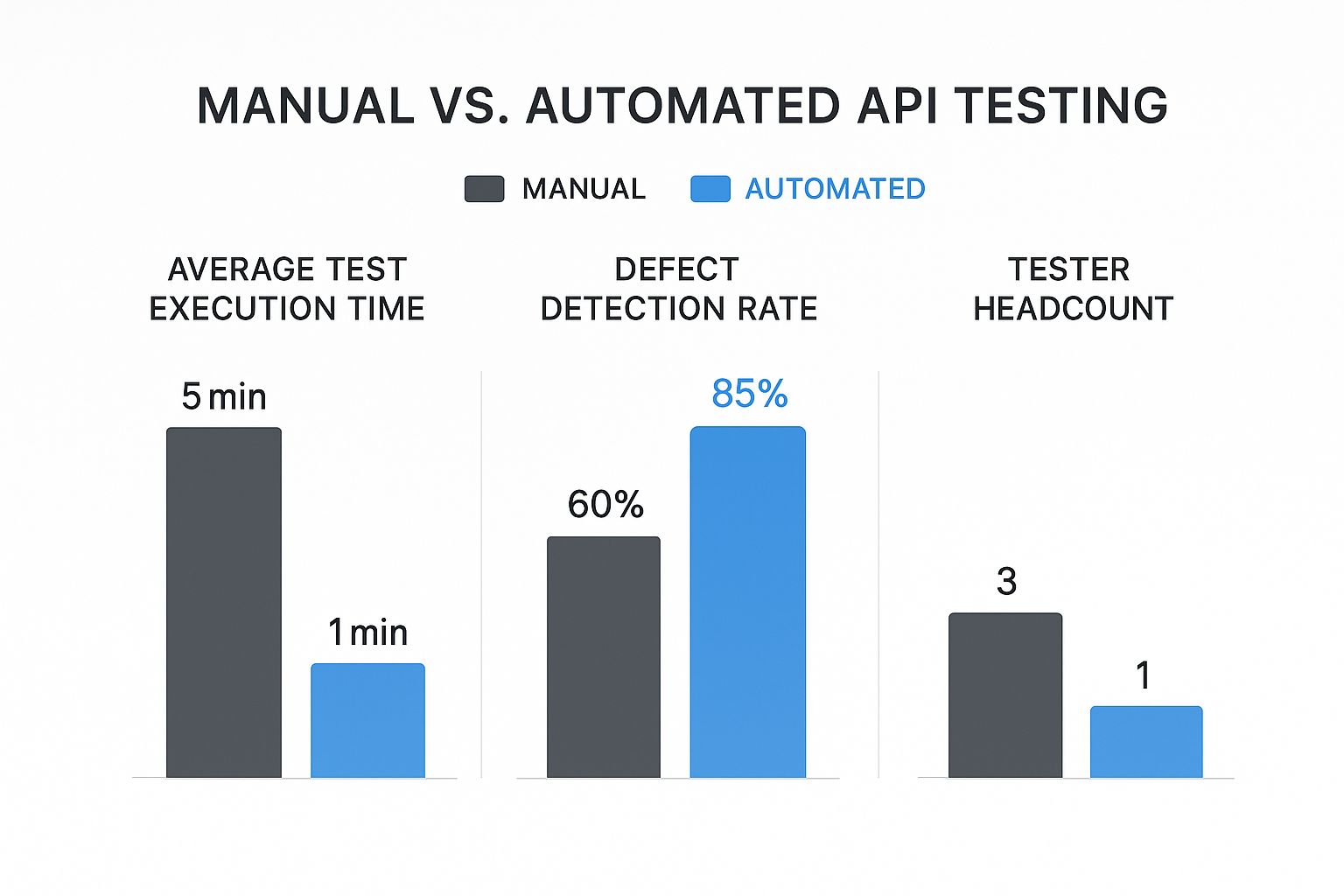
The data is clear: automation doesn’t just speed things up—it boosts defect detection and does it with fewer resources.
This isn’t just a niche idea; the industry is moving this way. The global API testing market was valued at USD 1.5 billion in 2023 and is on track to hit USD 12.4 billion by 2033. With cloud-based solutions making up over 68.5% of that market, it’s obvious there’s a huge demand for more scalable and realistic testing.
GoReplay vs Traditional Scripting Tools
It’s helpful to see how GoReplay’s traffic shadowing philosophy stacks up against traditional tools like Postman or REST Assured. They serve different purposes and solve different problems.
| Aspect | GoReplay (Traffic Shadowing) | Traditional Scripting Tools |
|---|---|---|
| Test Data Source | Real, live production traffic | Manually created, synthetic data |
| Test Coverage | Implicitly covers all user behaviors captured in traffic | Limited to what’s explicitly scripted |
| Maintenance | Low to none; tests “update” as user behavior changes | High; scripts must be updated for every API change |
| Realism | 100% realistic; uses actual user requests | A simulation of expected user behavior |
| Best For | Regression, performance, and load testing | Functional, unit, and contract testing |
While scripted tests are excellent for verifying specific business logic and contracts during development, GoReplay shines at ensuring the system works as a whole under the chaos of real-world load.
From Theory to Practice
Getting started with traffic shadowing is more straightforward than it might seem. The key is understanding what’s happening.
The core benefit of traffic shadowing is confidence. When you validate a new deployment against a mirror of your live production traffic and it holds up, you can release with a much higher degree of certainty that you haven’t introduced a critical regression.
This method effectively closes the gap between your development and production environments. It transforms testing from a periodic, manual chore into a continuous, automated feedback loop.
If you’re looking to dive deeper into this strategy, we’ve put together a guide on how to achieve complete API test automation. By integrating this approach, teams can catch more bugs earlier, seriously reduce deployment risks, and ultimately ship more resilient software.
Configuring Your GoReplay Environment
Alright, you get the “what” and “why” of traffic shadowing. Now it’s time to get your hands dirty. Setting up GoReplay is where the theory behind API testing automation becomes a practical reality. We’ll walk through the process on the most common platforms, but I’ll do more than just list commands—I’ll explain the reasoning behind them so you can easily adapt the setup to your own infrastructure.
The heart of GoReplay is a lightweight binary called gor. This single, powerful executable acts as both the listener (capturing traffic) and the forwarder (replaying it). This design makes installation incredibly simple, whether you’re working on a bare-metal server or deep in a containerized world.
Getting Started with a Linux Setup
For most of us running applications on Linux servers, installing GoReplay is a quick download-and-execute affair. The key is to place the gor binary on the machine where you want to capture traffic. This is typically your production web server or an API gateway.
First thing’s first: grab the latest release. You can find pre-compiled binaries directly on the official GoReplay GitHub releases page. Make sure you download the correct version for your server’s architecture, which is almost always amd64 for modern systems.
Once it’s downloaded, unzip it and make the binary executable. I always recommend moving it to /usr/local/bin because it makes the command accessible from anywhere on the system. It’s a small step that saves a lot of headaches later.
Just remember that GoReplay needs permission to listen to network traffic. This means you’ll almost always have to run
gorwithsudoor as a root user. This gives it the privileges it needs to actually capture packets from a network interface.
Essential Flags for Capturing and Forwarding
With gor installed, you can start shadowing traffic with a single command. The real magic is in the command-line flags, which tell GoReplay where to listen and where to send the copied requests.
Two of the most fundamental flags you’ll use constantly are --input-raw and --output-http.
--input-raw: This tellsgorto capture raw TCP packets directly from a network interface on a specific port. If your web server is running on port 80, your command would include--input-raw :80.--output-http: This flag points to the destination for the replayed traffic. You’ll aim this at your staging or test environment’s URL, like--output-http="http://staging-api.your-app.com".
Putting it all together, a basic traffic shadowing command looks like this:
sudo gor --input-raw :80 --output-http="http://staging.server"
This one line instructs GoReplay to listen for all traffic on port 80, copy it, and fire it off to your staging server in real-time. It’s a powerful, non-intrusive way to start validating changes with actual user behavior. Simple, right?
Using Docker for Containerized Environments
If your application lives in containers, using GoReplay with Docker is a fantastic approach. It keeps your testing tools neatly isolated and makes deployment repeatable. The easiest way to get started is by running the official GoReplay Docker image.
The main difference in a Docker setup is how you give the container access to the host’s network traffic. You need to run the container in host network mode by using the --net=host flag.
Here’s what a practical Docker command looks like:
docker run --net=host buger/goreplay:latest --input-raw :8080 --output-http="http://test-environment:80"
Let’s break that down:
--net=hostis the crucial piece. It allows the GoReplay container to see the same network interfaces as the host machine itself.--input-raw :8080listens for traffic coming into the host on port 8080.--output-http="http://test-environment:80"forwards that traffic to another service, maybe another container that’s accessible on the same Docker network.
This container-based approach is perfect for modern CI/CD pipelines and microservices architectures, where services are constantly being spun up and torn down for testing. Mastering these configurations puts you well on your way to building a truly robust and realistic testing workflow.
Your First Traffic Capture and Replay Session
Theory is great, but let’s get our hands dirty with a real-world scenario. This is where you’ll see just how powerful GoReplay can be for the automation of api testing. We’re going to capture live traffic, stash it in a file, and then unleash it against a test environment with surgical precision.
This two-step process—capture, then replay—is a game-changer. Instead of just shadowing traffic in real-time, saving it to a file gives you a reusable, high-fidelity snapshot of actual user behavior. You can run that same traffic file over and over for regression tests, performance benchmarks, or load tests, giving you a rock-solid baseline to measure against.
Capturing Real-World Traffic to a File
Imagine you’re running an e-commerce platform. The checkout API is the lifeblood of your business, and you want to capture a burst of customer traffic during a peak sales event to create the ultimate stress test.
To pull this off, you’ll use GoReplay’s listener (gor) with two simple flags: --input-raw to tell it where the traffic is coming from and --output-file to tell it where to save everything.
On your production server, the command is refreshingly simple:
sudo gor --input-raw :80 --output-file checkout-traffic.gor
So, what’s happening here?
--input-raw :80: This tells GoReplay to start listening to all incoming HTTP traffic on port 80.--output-file checkout-traffic.gor: Instead of forwarding traffic live,gordiligently writes every single request it captures into a file namedcheckout-traffic.gor.
Let this run for a few minutes or a few hours—whatever you need to get a good, representative sample. Once you stop the process, that file becomes your new secret weapon. It perfectly encapsulates the chaos, concurrency, and complexity of your real-world API interactions.
Replaying Traffic with Precision and Control
Now you’ve got your checkout-traffic.gor file. You can copy it to any machine and use it to hammer your staging environment. This is where the real fun begins, because you can start fine-tuning the replay to match your exact testing goals.
To get started, you’ll use --input-file to read from your saved traffic and --output-http to point it at your test server.
gor --input-file checkout-traffic.gor --output-http "http://staging.ecommerce-api.com"
This command replays the traffic exactly as it was recorded, maintaining the original speed. But what if you want to really push the system and see what it can handle? That’s when you take control of the replay speed.
By decoupling the capture and replay phases, you gain immense flexibility. You can test new code branches against historical traffic, simulate Black Friday loads on a random Tuesday, or debug a production incident by replaying the exact sequence of requests that caused it.
The need for better tooling is reflected across the industry. The global market for automation testing was valued at around USD 35.52 billion in 2024 and is projected to explode to USD 169.33 billion by 2034. That growth is driven by the very challenges we’re solving here: managing complex software and shipping faster with confidence. You can discover more insights on the automation testing market to see the full breakdown.
Filtering and Throttling for Targeted Tests
Just replaying a firehose of traffic isn’t always the right move. Sometimes you need to isolate a specific API endpoint or carefully control the load you’re sending. GoReplay has powerful flags built for exactly this purpose.
Let’s go back to our e-commerce site. Say you just deployed a change to the /api/v1/checkout/process endpoint and want to test its performance under a controlled, heavy load.
You can use a couple of flags to zero in on what matters:
--http-allow-url: This is your filter. It tells GoReplay to only replay requests that match a specific URL pattern. You can even use regular expressions for really granular control.--output-http-speed-limit: This lets you set the pace of the replay in requests per second. It’s perfect for a gradual ramp-up or a sustained stress test.
Combine these, and your command becomes much more sophisticated:
gor --input-file checkout-traffic.gor --output-http "http://staging.ecommerce-api.com" --http-allow-url /api/v1/checkout/process --output-http-speed-limit 100r/s
This command is incredibly focused. It reads your captured traffic but only replays requests to the checkout endpoint, and it does so at a steady clip of 100 requests per second. You’re no longer just blindly replaying traffic; you’re conducting a precise, repeatable load test using real user data.
This level of control is fundamental for building a solid automation of api testing pipeline. You can create different scripts that use the same traffic file but target different endpoints or simulate different load profiles—all without writing a single line of traditional test code. To dive deeper into this method, check out our guide on the benefits of record and replay testing. It’s the perfect next step.
Beyond the Basics: Advanced GoReplay Techniques
Once you get past the simple capture-and-replay workflow, you start to see where GoReplay really shines. This is where it goes from being a handy replay tool to a full-blown, programmable testing platform. The real magic is in its ability to manipulate traffic on the fly, solving the kind of gnarly, real-world problems that synthetic tests just can’t touch.
A classic example? Authentication tokens. We’ve all been there. You capture a perfect slice of production traffic, but by the time you replay it, every single auth token has expired. Suddenly, your entire test run is a sea of 401 Unauthorized errors, and you’ve learned absolutely nothing.
Traffic Manipulation with Middleware
This is the exact scenario the --middleware flag was built for. It’s hands-down one of GoReplay’s most powerful features. It lets you pipe every single request and response through an external script or application before it gets processed. That script can do just about anything—modify headers, rewrite parts of the request body, or even anonymize sensitive data.
Let’s say you’re testing a staging environment that needs its own unique auth credentials. You can whip up a simple script in Python, Go, or even Bash to intercept each request, strip out the old Authorization header, and inject a new, valid token for your test environment.
Your GoReplay command would look something like this:
gor --input-file traffic.gor --output-http "http://staging-api" --middleware "python token-rewriter.py"
This command effectively passes every request through your token-rewriter.py script. The script gets the request payload on its standard input, works its magic, and then prints the modified payload to its standard output. GoReplay takes that fresh, modified request and sends it on to your staging server.
The middleware approach is incredibly flexible. It’s not just for auth. We’ve seen teams use it to strip out Personally Identifiable Information (PII) from request bodies, change user IDs to match a test database, or inject special headers for deep debugging and tracing.
Validating Responses by Diffing What Matters
Just replaying traffic is only half the story. A real automated test has to answer the critical question: did my new code produce the same result as the old code? Manually comparing thousands of JSON responses is a non-starter, which is why automated response comparison is so essential.
GoReplay can be set up to compare the responses from your original production traffic with the new responses generated by your staging environment. It then produces a “diff” that highlights every little discrepancy. This is the leap from basic load testing to a truly sophisticated, automated regression testing workflow.
You can spin up a second gor instance to listen to responses from your staging server and compare them against the originals. This setup instantly flags any differences in status codes, headers, or response bodies. Catching a subtle change in a JSON payload before it goes live can be the difference between a smooth release and a major incident.
Essential GoReplay Command-Line Flags
As you get deeper into GoReplay, you’ll find yourself reaching for the same set of command-line flags over and over. Mastering these gives you precise control over your traffic shadowing and replay sessions. Think of them as your power tools.
To make things easier, here’s a quick-reference table summarizing the most important flags you’ll likely use.
A Quick-Reference Table
| Flag | Purpose | Example Use Case |
|---|---|---|
--middleware | Executes an external command to modify requests or responses. | Rewriting expired authentication tokens or anonymizing user data. |
--http-allow-url | Filters traffic to only include requests matching a URL pattern. | Isolating traffic to a specific API endpoint, like /api/v2/cart. |
--http-disallow-header | Strips specific headers from requests before replaying them. | Removing tracking or analytics headers that are irrelevant to testing. |
--output-http-timeout | Sets a timeout for requests sent to the test environment. | Identifying performance regressions by flagging slow responses. |
--split-output | Distributes replayed traffic across multiple destination servers. | Load testing a horizontally scaled cluster of application instances. |
These flags, especially when you start combining them, unlock a whole new level of precision. Imagine a scenario where you’re using middleware to rewrite auth tokens while simultaneously filtering traffic for a specific endpoint and splitting the load across three separate test servers. That’s how you build a robust testing pipeline that truly mirrors the complexity of your production environment and moves your automation of api testing strategy forward.
Common Questions About GoReplay
Jumping into traffic shadowing is a big step, and it’s totally normal to have questions. It’s a powerful way to automate API testing, but I find teams always want to understand the real-world impact before they dive in. Let’s tackle the most common concerns I hear.
Will This Slow Down My Production Servers?
This is usually the very first question people ask. The short answer? Almost certainly not.
GoReplay’s listener is engineered to be incredibly lightweight. It’s completely passive and works at the network packet level, which means it never hooks into your application code. It doesn’t add latency to your requests or hog your CPU.
Most teams I’ve worked with report a negligible performance hit—often less than 1% CPU usage. Think of it as a silent observer, safely copying data without getting in the way of your live traffic.
How Do I Handle Sensitive User Data?
This is a critical, non-negotiable point. You absolutely cannot replay raw production traffic with Personally Identifiable Information (PII) into a less secure environment. That’s a massive security and compliance nightmare waiting to happen.
This is where GoReplay’s middleware really shines. You can write a simple script that intercepts and sanitizes the traffic before it gets replayed.
With this middleware, you can:
- Anonymize Data: Hash or replace fields like emails, names, and addresses.
- Rewrite Tokens: Strip out production auth tokens and swap in valid credentials for your staging environment.
- Mask Financials: Obfuscate credit card numbers or other sensitive financial details on the fly.
This approach gives you the structural benefit of real traffic patterns without the risk of exposing sensitive information.
The bottom line is this: treat your replayed traffic with the same security diligence as you do your production data. Middleware isn’t just a cool feature; it’s a mandatory step for any responsible testing strategy that involves real user data.
Can GoReplay Work in a Kubernetes Environment?
Yes, and it’s a fantastic fit for modern, containerized architectures.
In a Kubernetes setup, the most common and effective pattern is deploying GoReplay as a sidecar container right inside the same pod as your application. This colocation gives it direct, immediate access to all of the pod’s network traffic.
By running as a sidecar, gor listens on your app container’s network interface without any complex network rules. From there, it can forward the captured traffic straight to your staging cluster. It’s a clean, scalable, and declarative approach that fits perfectly with Kubernetes principles, making it super easy to add to your existing Helm charts or deployment manifests.
Ready to stop guessing and start testing with real user traffic? GoReplay gives you the tools to build a robust API testing pipeline that catches issues before they impact your customers. Explore the power of traffic shadowing and deploy with confidence. Learn more at the official GoReplay website.