
Understanding the Modern Testing Tool Landscape

Choosing the right automated testing tool is more complex than just comparing feature lists. The old one-size-fits-all approach is gone, replaced by a need for choices based on specific, real-world factors. An effective automated testing tools comparison must consider your team’s dynamics, the realities of long-term maintenance, and distinct project goals. Relying on outdated advice or popular trends can lead to a stalled automation strategy and significant technical debt.
Successful QA leaders now focus on how a tool fits their team’s existing skills and workflow. For example, a team of seasoned developers might excel with a code-centric framework like Playwright, whereas a group with varied technical backgrounds could get faster results with a low-code platform. The goal is to find a solution that empowers the whole team. Recognizing the game-changing benefits of automated testing is crucial, but achieving them hinges on picking the right tool for your specific situation.
Market Trends Versus Practical Realities
The rapid growth of the testing tool market offers both opportunities and distractions. This expansion is a direct result of the industry’s demand for faster, more dependable software delivery. While manual testing was once the standard, by 2019, the global test automation market was already valued at $15.87 billion. Projections show this number is expected to reach $49.9 billion by 2025, confirming automation’s central role in modern QA.
While this growth is impressive, it’s vital to separate meaningful market trends from hype. The rise of AI in testing is a perfect example. Its practical application varies dramatically between tools. Some platforms use AI to intelligently repair broken tests, which genuinely cuts down on maintenance. Others simply attach the “AI” label to basic record-and-playback functions that provide little real-world value. The key is to see past the marketing and focus on features that solve your team’s actual problems.
Evaluating Beyond the Feature Set
A truly effective evaluation looks beyond a simple feature checklist to consider the total cost of ownership. This calculation must include not only licensing fees but also hidden costs that accumulate over time.
Consider these critical factors:
- Training and Onboarding: How long will it take for your team to become proficient with the tool?
- Maintenance Overhead: How much time will be dedicated to updating and fixing tests as the application evolves?
- Integration Effort: Does the tool connect smoothly with your existing CI/CD pipeline and other essential systems?
By asking these more difficult questions, you can move past surface-level comparisons. This approach helps identify a tool that will become a sustainable asset for your team rather than just a short-term solution.
Navigating Tool Categories That Actually Matter
The typical labels of “functional” or “performance” testing tools provide only a partial picture. A meaningful automated testing tools comparison must look past these broad categories and examine what a tool actually does for your team and how it solves specific challenges. A tool’s real value isn’t on the box—it’s revealed in its implementation reality when confronted with intricate user workflows, high-traffic scenarios, or complex API dependencies. Forcing a general-purpose tool into a specialist role often leads to frustration and wasted effort.
For example, a retail company preparing for a major sales event found their functional testing suite, which was great for validating UI elements, couldn’t simulate the required load. They needed a dedicated performance tool built for traffic shaping, not just user interaction. This demonstrates a key difference: functional tools verify what a system does, while performance tools validate how well it performs under stress. Similarly, platforms like Postman are exceptional for API testing because they are purpose-built, offering deep inspection capabilities that broader tools lack.
Strategic Use Cases by Tool Category
Matching the right tool to the right job is essential. A codeless platform might advertise speed, but if your application demands extensive custom logic, a code-based framework could prove more efficient in the long run. One team learned that their “codeless” solution still required writing JavaScript for data-driven tests, which defeated its main purpose for their non-technical testers. In contrast, a small, agile startup might thrive with a lightweight, open-source tool like Playwright for web automation, whereas an enterprise with legacy desktop applications would need a tool with broader technology support.
The first step is to clearly define your primary challenge. Are you dealing with API regressions, mobile compatibility issues, or load testing bottlenecks? Each problem points toward a different category of solution.
The table below offers a strategic breakdown of tool categories, focusing on their practical application and fit within different team structures. It moves beyond features to analyze the real-world factors that determine success.
Testing Tool Categories and Strategic Use Cases
Strategic analysis of tool categories based on real-world implementation success factors and team requirements
| Tool Category | Core Strength | Implementation Reality | Team Fit | Strategic Examples |
|---|---|---|---|---|
| UI Functional Testers | Validating user-facing workflows and front-end logic. | Can be brittle and require significant maintenance if tests are poorly designed or UI changes frequently. | Best for teams with QA specialists and front-end developers who understand UI structure. | Verifying the checkout process on an e-commerce site or validating form submissions in a web app. |
| API Testing Specialists | Deep validation of backend services, microservices, and data exchange protocols. | Demands a solid grasp of HTTP, REST, and other web protocols to write meaningful tests. | Crucial for backend developers and dedicated API test engineers, especially in microservice architectures. | Confirming data integrity for a POST request or validating error handling for a third-party API integration. |
| Performance/Load Testers | Simulating high volumes of user traffic to discover system bottlenecks and measure scalability. | Configuration can be complex, requiring careful scripting to create realistic user scenarios. | Essential for DevOps, SREs, and specialized performance engineers preparing for high-traffic events. | Simulating 10,000 concurrent users for a Black Friday sale or testing database response under sustained load. |
| Traffic Replay Tools | Testing with real user traffic to achieve production-like validation without guesswork. | Requires access to production traffic and a well-configured staging or shadow environment. | Ideal for teams prioritizing stability and release confidence, particularly in complex, high-stakes systems. | Validating a new microservice version with a mirrored copy of live production requests before a full rollout. |
This analysis helps shift the focus from a simple feature list to how a tool’s architecture aligns with your project’s specific needs. The goal is to choose a platform that solves your real-world problems instead of merely checking a box.
Open Source Versus Commercial: The Real Cost Analysis
The debate between open-source and commercial tools often fixates on upfront license fees, but this view misses the bigger picture. A genuine automated testing tools comparison shows that the initial price tag is just a fraction of the total investment. The most substantial costs are often hidden, appearing long after a tool is chosen. These expenses include implementation time, ongoing maintenance, team training, and the need for dedicated support, all of which shape the true total cost of ownership (TCO).
This dynamic market was valued at around $25.4 billion in 2024 and is expected to reach $29.29 billion by 2025. This rapid expansion means both open-source and commercial toolsets are evolving quickly, making a detailed cost analysis more critical than ever. To learn more about this growth, you can find details in the Automation Testing Market Forecast Report for 2025. The goal isn’t to find the “cheapest” tool; it’s to understand the real, long-term investment needed to achieve your quality goals.
The True Cost of Open Source
Open-source frameworks like Selenium, Playwright, and Cypress are powerful and have no licensing fees, which is a major attraction. However, “free” doesn’t mean zero cost. The actual investment is made in engineering hours. Your team becomes responsible for everything.
This includes:
- Initial Setup and Configuration: You must integrate the framework into your CI/CD pipeline and build reporting mechanisms from the ground up.
- Ongoing Maintenance: A significant amount of an engineer’s time can be consumed by updating test scripts every time the application UI changes or new browser versions are released.
- Building Supporting Features: Functions that are standard in commercial tools—like detailed analytics, test scheduling, and user management—must be developed and maintained internally.
The infographic below illustrates the relative popularity of leading open-source web automation frameworks, which often reflects the size of their support communities and available resources.
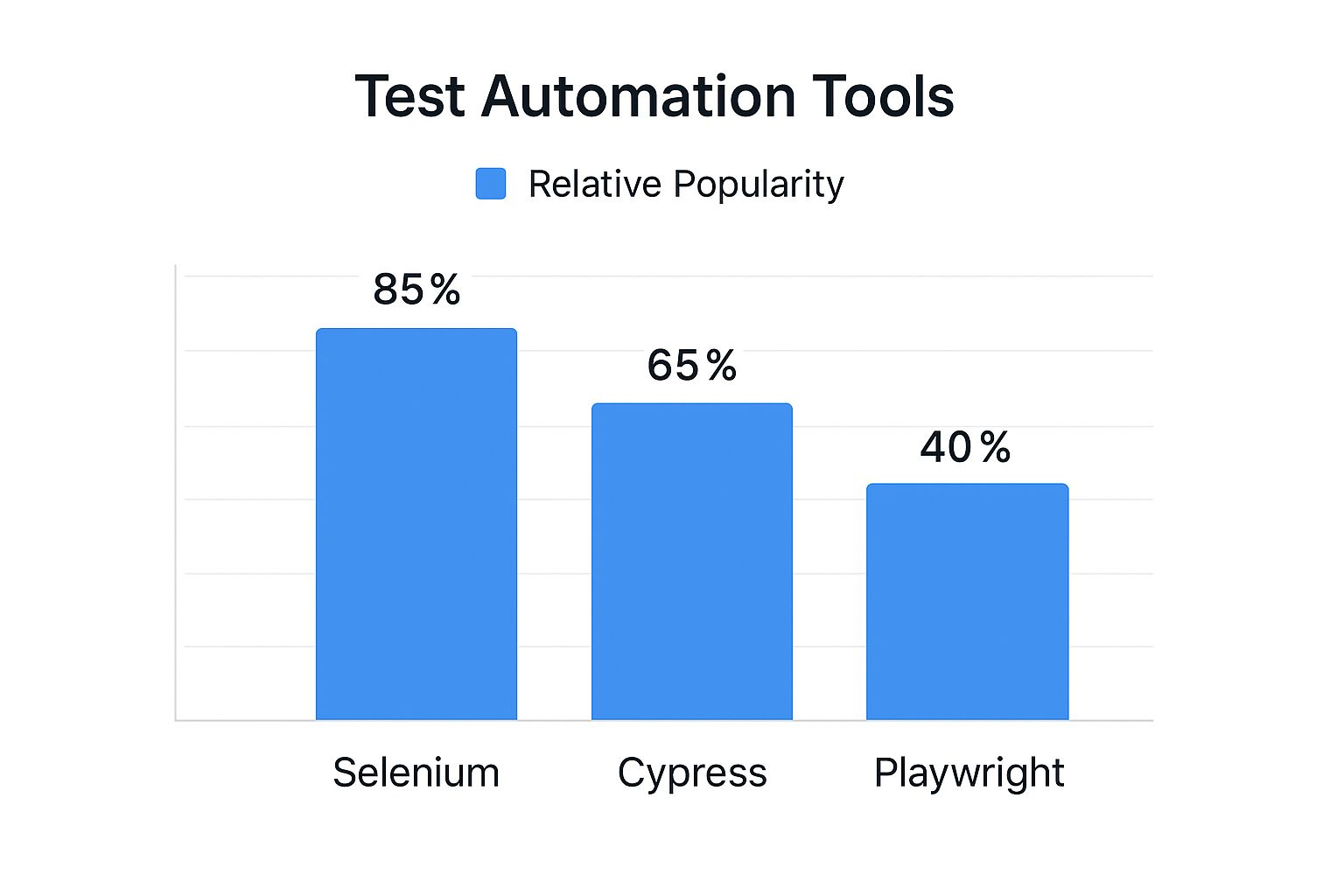
While Selenium’s long history keeps it popular, this data shows that newer tools like Playwright are rapidly gaining ground, indicating shifts in developer preferences and technical needs.
Commercial Tools: A Different Kind of Investment
Commercial platforms like TestComplete or Katalon Studio package many essential features out-of-the-box. The subscription fee usually includes dedicated support, pre-built integrations, and user-friendly interfaces that can lower the technical skill required for team members to contribute. While the license cost is a clear budget item, it frequently offsets other hidden expenses.
A primary advantage is accelerated productivity. Teams can often start writing and running tests much faster because the vendor manages the underlying infrastructure. For organizations where engineering time is a premium resource, this can lead to a lower TCO, even with recurring license fees. You can explore our guide on the best test automation tools for every team size and need to see how different platforms strike this balance.
To put this into perspective, let’s look at how these models compare in a real-world context. The table below breaks down the true costs and strategic implications of choosing between open source and commercial platforms.
Open Source Versus Commercial Reality Check
Total cost analysis comparing leading platforms based on real implementation experiences and long-term ownership costs
| Platform | License Model | True Implementation Cost | Maintenance Reality | Team Impact | Strategic Fit |
|---|---|---|---|---|---|
| GoReplay (Open Source) | Free (Community Edition) | Low upfront cost, but requires significant engineering time for setup, middleware development, and integration into CI/CD pipelines. | Depends on community support. Your team owns all maintenance, updates, and troubleshooting. | High engineering skill required. Best for teams with strong DevOps capabilities who can customize the tool to fit their exact needs. | Ideal for performance and shadow testing where precise traffic replication is key and the team can invest in building a tailored solution. |
| Selenium | Free (Apache 2.0 License) | High. Requires building a complete framework from scratch, including reporting, test runners, and grid management. | Very high. Constant updates needed for browser drivers and application changes. Can become a full-time job for an engineer. | Empowers skilled developers but has a steep learning curve for QA teams without coding experience. | A flexible foundation for large, mature organizations with dedicated test automation engineers who need maximum control. |
| Katalon Studio | Freemium/Commercial | Medium. The free version offers a lot, but scaling requires a paid license. Less setup than pure open-source, but more than fully managed tools. | Lower than pure open source. Vendor handles core updates, but script maintenance is still the user’s responsibility. | Accessible to mixed-skill teams. The UI-driven approach helps manual testers transition to automation. | A good middle-ground for teams that need to get started quickly but may require enterprise features later. |
| TestComplete | Commercial (Subscription) | Low initial effort. Designed for rapid setup with a record-and-playback interface. The license fee is the primary cost. | Low. The vendor provides support and regular updates, reducing the internal maintenance burden. | Lowers the technical barrier. Enables QA specialists and business analysts to create and run tests effectively. | Best for enterprise teams that prioritize speed of delivery and need to support a wide range of technologies (desktop, mobile, web). |
The choice ultimately depends on your team’s specific skills, project complexity, and how you value engineering hours versus direct software costs. An open-source tool might have a $0 license fee but cost $100,000 in engineering time, whereas a commercial tool with a $15,000 subscription might only require $20,000 in internal effort. This reality check is crucial for making a sound long-term decision.
AI-Powered Testing: Separating Hype From Reality
The term “AI” is attached to nearly every testing tool today, often promising to automate away every challenge. However, the practical value of these AI features varies dramatically. A genuine automated testing tools comparison must look past the marketing slogans to evaluate how AI actually improves test creation, maintenance, and execution. The true measure of an AI feature is whether it solves a real-world problem, like reducing test flakiness, or simply offers a flashy but impractical demo.
Platforms like Testim, Mabl, and Applitools are applying AI in practical, valuable ways. For example, self-healing tests represent a significant step forward. When a UI element’s locator changes—a frequent cause of test failures—these tools can intelligently identify the new selector. This prevents tests from breaking and saves developers countless hours of manual fixes, a clear advantage over basic record-and-playback tools that are often mislabeled as “AI-powered.”
The Reality of AI Implementation
Adopting AI-driven testing isn’t a simple switch you can flip; it introduces its own set of dependencies. Teams often discover that the effectiveness of AI features hinges on the quality and volume of the data they are trained on. An AI model is only as capable as the information it learns from.
Before committing to an AI testing tool, consider these practical points:
- Data Quality: AI features for visual validation depend on a clean, stable baseline of “correct” application snapshots. If your initial training data is flawed, the AI will learn incorrect patterns, leading to a frustrating mix of false positives and negatives.
- Team Training: Engineers and QA specialists must understand the AI’s logic to trust its findings. This involves learning to interpret AI-driven feedback and knowing when to override its automated decisions.
- Integration Challenges: An AI tool needs to integrate seamlessly into your existing CI/CD pipeline. If it creates bottlenecks or demands complex workarounds, its benefits are quickly lost to operational friction.
Where AI Adds Real Value—And Where It Falls Short
Today, the most impactful AI features are centered on test maintenance and analysis. Self-healing locators and AI-assisted visual regression testing, like that offered by Applitools, can identify subtle UI bugs that traditional assertions would easily miss. This capability helps teams catch visual defects before they ever reach production users.
However, the technology still has clear limitations. AI struggles to grasp business context. It can verify that a button is present and clickable, but it cannot judge if that button’s placement is logical within the user’s journey. This is where human oversight remains essential. By 2025, an estimated 72.3% of software testing teams will be actively using or exploring AI-driven solutions, showing a major shift in industry practices. You can discover more insights about these automation testing trends and how they are shaping the future of QA.
Ultimately, AI is a powerful assistant, not a replacement for skilled testers. It excels at managing repetitive, data-intensive tasks, which frees up human testers to concentrate on more complex, exploratory, and context-dependent testing scenarios.
Specialized Testing Needs and Tool Selection Strategy
A standard automated testing tools comparison often misses the most important factor: your application’s unique architecture. The best tool for a basic web application will be completely ineffective for a distributed microservices system or a native mobile app. A smart selection strategy goes beyond feature lists and matches tool capabilities to your specific testing requirements. Your application type is the primary filter for determining which tools are not just options, but truly effective.
For example, mobile application testing involves challenges that web automation never encounters. You need to validate gestures like swiping, pinching, and rotating, plus handle hardware interactions with the GPS and camera. This requires a tool built for the job, which is where a framework like Appium becomes critical. It gives you a standard API to automate native, hybrid, and mobile web apps on both iOS and Android, solving cross-platform compatibility from the start. As the diagram below shows, Appium’s design connects automation scripts with native mobile frameworks.

This setup lets teams write tests in various languages using a single API, which in turn translates commands to the native automation frameworks specific to each platform.
Matching Tools to Specific Architectural Patterns
Beyond mobile, other architectures also need specialized tools. A monolithic application might work well with a classic UI automation tool, but a system built on microservices requires a different strategy. Here, API testing is the priority, and a general-purpose tool might not have the features needed to properly check the contracts between services. This is a scenario where a dedicated API platform like Postman shines, offering strong features for building requests, validating responses, and running automated contract tests.
Likewise, performance testing should be based on real load patterns, not just scripted scenarios. Tools like GoReplay are distinct because they let teams capture and replay actual production traffic. This approach to load testing is far more precise than creating synthetic user journeys because it tests the system against the messy, unpredictable behavior of real users. This is particularly important for IoT applications, where device communication patterns are often intricate and hard to simulate by hand.
A Context-Driven Tool Evaluation Framework
To make a well-informed decision, assess tools through the lens of your specific operational needs. Stop asking, “Which tool has the most features?” and start asking, “Which tool solves our biggest problem?”
Think about these situational questions when choosing a tool:
- For Microservices: Does the tool provide strong API contract testing and service virtualization capabilities?
- For Cross-Platform Mobile: Can it manage native OS interactions and support a single test suite for both iOS and Android?
- For High-Stakes Performance: Is it capable of simulating realistic load, ideally by using real traffic from production?
By putting your context ahead of generic claims, your team can choose tools that directly fix your pain points. This leads to a more effective and durable automation strategy.
Implementation Success: Beyond Tool Selection
Even the most powerful tool from an automated testing tools comparison will fall short without a proper implementation plan. Moving to automation is less about installing software and more about shifting your team’s culture and processes. Real success depends on managing the human side of the equation: getting team members on board, navigating the learning curve, and scaling your efforts without disrupting the development cycle. Many initiatives fail because the rollout strategy was flawed, not the tool itself, turning a promising investment into a costly dead end.
A frequent misstep is trying to achieve 100% automation coverage right away. This approach often creates brittle, high-maintenance test suites and leads to team burnout. A much more practical strategy is to begin with a carefully chosen pilot project.
Designing Pilot Projects That Prove Value
A pilot project should be a focused effort designed to deliver a clear, measurable victory. The objective is to demonstrate the tool’s value quickly and build momentum for broader adoption.
Follow these steps to structure an effective pilot:
- Identify a High-Value, Low-Complexity Area: Select a critical user journey that is stable and typically needs a lot of manual regression testing. A login flow or a primary search feature are often great starting points.
- Define Clear Success Metrics: Think beyond a simple “pass/fail” count. Measure the actual reduction in manual testing hours, the drop in production bugs for that feature, and the time shaved off the release cycle.
- Involve a Small, Eager Team: Begin with a few developers and QA engineers who are genuinely excited about automation. Their success stories will become your best internal case studies.
This targeted approach delivers a tangible return on investment that gets the attention of key stakeholders. It validates the tool’s suitability for your specific environment and builds the internal support needed to expand its use.
Scaling Automation and Managing ROI
After a successful pilot, the next step is to scale your automation efforts. This demands a structured framework to prevent automation from becoming another development bottleneck. Rather than letting every team do their own thing, consider establishing a center of excellence or a dedicated automation guild. This group can set best practices, build reusable test components, and offer guidance to other teams, ensuring both quality and consistency.
Your method for measuring ROI should also mature. In the beginning, time saved is a great metric. Long-term, however, you should tie automation to business outcomes. Track metrics like a reduction in bug-related customer support tickets, faster time-to-market for new features, and improved developer productivity. By directly connecting automation to business goals, you change the conversation from a cost center to a key driver of quality and growth. This strategic alignment is the true sign of a successful implementation that provides lasting value.
Making Your Decision With Confidence
The final step in any automated testing tools comparison is translating your analysis into a concrete choice. This decision goes beyond a simple feature list; it involves a careful balance between a tool’s capabilities, your team’s existing skills, project budgets, and sometimes, even internal company dynamics. A confident decision is built on a structured evaluation that proves a tool’s value in your specific environment before you commit.
A common pitfall is choosing a tool based only on a sales demo or a feature spreadsheet. What looks perfect on paper can fail spectacularly when introduced to your actual infrastructure. This is why a Proof-of-Concept (PoC) is not just a good idea—it’s essential. A PoC isn’t a full-scale rollout but a targeted pilot project designed to answer critical questions about how a tool really performs with your code and systems.
Designing a Decisive Pilot Project
Your pilot project should be designed to validate the tool’s primary value proposition for your team. This means you need to move past generic “hello world” tests and instead address a genuine pain point.
Here’s a practical framework for structuring your PoC:
- Select a Meaningful Scenario: Pick a business-critical workflow that is currently a major source of manual testing effort. This could be a complex user checkout process, a report generation feature that handles large amounts of data, or an integration with a key third-party API. The idea is to test the tool where it will have the most impact.
- Define Success Metrics Upfront: Success is more than just a “pass” or “fail.” You should measure the total time required to create and run the test, the clarity and usefulness of the failure reports, and how smoothly the tool integrates into your CI/CD pipeline. These metrics give you objective data to support your final decision.
- Involve Key Stakeholders: Your pilot team should include at least one developer and one QA engineer. If possible, bring in a product owner as well. Each role will assess the tool from a different angle—developers on its integration friendliness, QA engineers on test creation efficiency, and product owners on its ability to provide clear quality signals.
Building Consensus and Validating Your Choice
The data gathered during the pilot becomes your most effective asset for getting everyone on board. Instead of relying on subjective opinions, you can present hard evidence. For instance, demonstrating that Tool A cut regression testing time for a specific feature by 80% is far more compelling than just saying it’s “user-friendly.”
This evidence-based approach helps bridge the divide between different stakeholder priorities. A finance lead might focus on licensing fees, while an engineering manager worries about the time needed for implementation. Your PoC data allows you to frame the discussion around total value, not just isolated costs. This changes the selection process from a contentious debate into a collective decision based on shared evidence, setting your team up for long-term automation success.
Ready to test with real-world traffic and eliminate guesswork? Discover how GoReplay can help you validate changes with production data, ensuring every release is rock-solid. Explore GoReplay today and see the difference for yourself.