
Advantage of Automation Testing: Boost Quality and Speed
The real magic of automation testing lies in its power to radically boost the speed, reliability, and coverage of your quality assurance efforts. It takes the soul-crushing, repetitive manual tasks and transforms them into efficient scripts that can run 24/7. The result? You catch bugs way earlier and speed up the entire development lifecycle.
Moving Beyond the Manual Testing Treadmill
Imagine trying to build a modern car, but every single bolt has to be tightened by hand. That’s what relying purely on manual software testing feels like. It’s slow, agonizingly repetitive, and a breeding ground for human error—a massive bottleneck in today’s world of rapid development.
With every new feature, your QA team is forced to perform the same exhaustive, click-by-click checks. They’re stuck on a treadmill they can never get off. This just doesn’t scale. As applications get more complex, the list of regression tests—making sure new code didn’t break old features—grows exponentially. A manual test run that took a few hours can suddenly stretch into days, delaying releases and frustrating everyone involved.
The Shift to Automated Efficiency
This is where automation testing completely changes the game. Instead of a human performing those tedious checks by hand, engineers write scripts to do it automatically. It’s like swapping out hand tools for a sophisticated, robotic assembly line.
This flowchart shows how testing has naturally evolved, moving from hands-on manual work to a far more efficient, automated approach for the core, repetitive QA tasks.
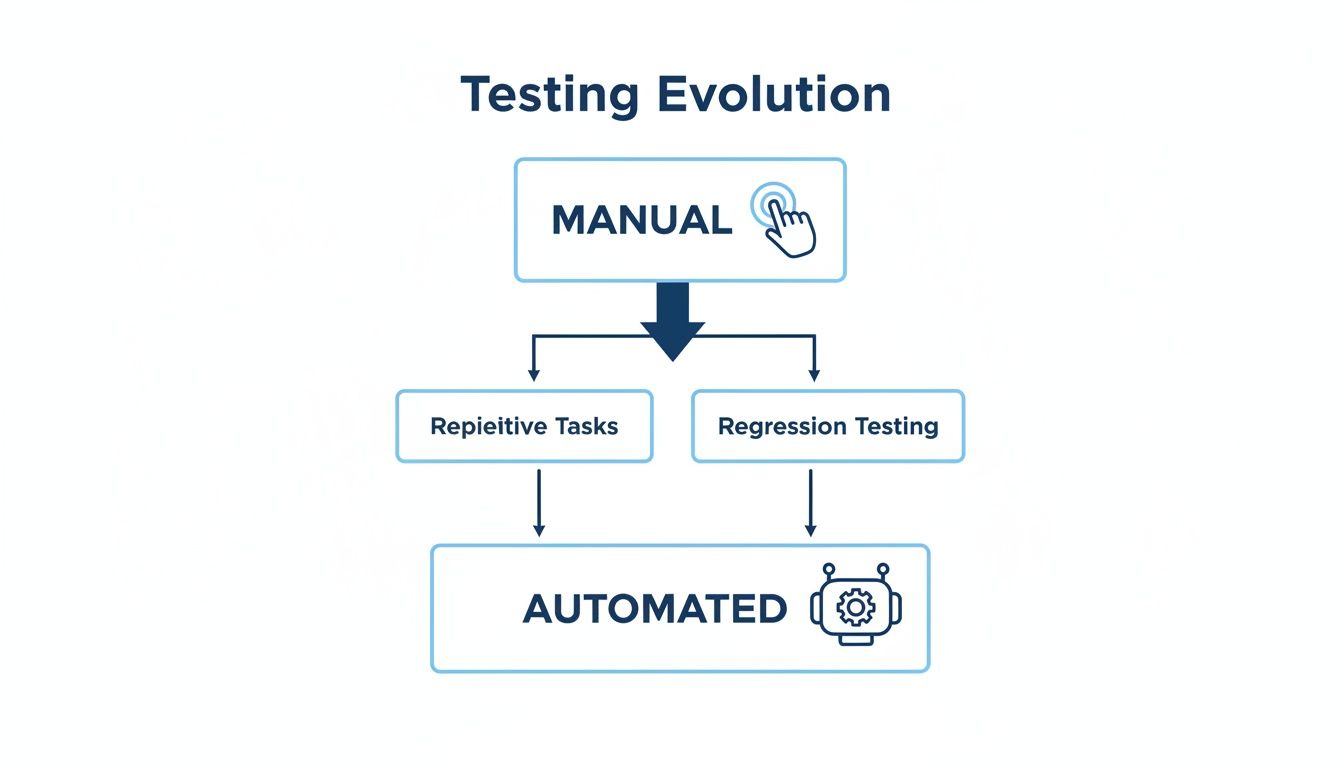
As you can see, automation takes over the grunt work of repetitive and regression-heavy testing. This frees up your human testers to focus on the things they do best.
Automation isn’t about replacing human testers; it’s about empowering them. By delegating repetitive tasks to machines, QA professionals can focus on exploratory testing, user experience evaluation, and complex problem-solving—areas where human intellect and creativity excel.
This transition turns QA from a gatekeeper into an accelerator. Automated tests can run overnight, giving developers a detailed bug report first thing in the morning. This tight feedback loop is exactly what you need to build high-quality software with both speed and confidence.
Let’s quickly break down the key differences between these two worlds.
Manual vs Automated Testing At a Glance
This table offers a quick comparison, highlighting the fundamental differences in approach, speed, and scope between manual and automated testing methods.
| Aspect | Manual Testing | Automation Testing |
|---|---|---|
| Execution | Performed by a human tester who follows a test plan. | Executed by scripts and tools without human intervention. |
| Speed | Slow and time-consuming, especially for large test suites. | Significantly faster, capable of running thousands of tests in hours. |
| Human Error | Prone to mistakes, oversights, and inconsistencies. | Highly consistent and reliable; the script performs the same way every time. |
| Best For | Exploratory, usability, and ad-hoc testing where human intuition is key. | Repetitive tasks like regression, performance, and load testing. |
| Initial Cost | Lower initial setup cost but high long-term operational cost. | Higher initial investment in tools and script development. |
| Long-term ROI | Can become a recurring bottleneck and cost center as the application grows. | Delivers significant long-term ROI through saved time and faster releases. |
While manual testing will always have its place for things like usability and exploratory checks, automation is a competitive necessity, not a luxury, for any team serious about continuous delivery.
The True Benefits of Test Automation
Think of it this way: adopting automation is like swapping a manual assembly line for a fully robotic one. It’s a fundamental shift in how you build software, turning quality assurance from a slow, painful bottleneck into a genuine accelerator for your entire team.
The real win isn’t just one single thing—it’s a whole set of strategic advantages that build on each other over time.

This change gets your engineers away from the soul-crushing, repetitive tasks. It frees them up to solve the tricky, complex problems where human creativity and intuition really shine. Let’s break down the core benefits that make this transformation so powerful.
Unmatched Speed and Efficiency
The first thing you’ll notice is raw speed. An automated test suite is like a bullet train, blasting through thousands of checks in the time it takes a manual tester to get through a single feature.
Automated scripts run 24/7 without needing a coffee break, giving developers a constant stream of feedback. A regression suite that might take a human tester days to complete can now run overnight. Your team walks in every morning to a fresh, complete quality report.
Rock-Solid Reliability and Consistency
Humans are brilliant, but we get tired. We make mistakes, especially when clicking the same button for the hundredth time. An automated test script is a tireless robot; it executes the exact same steps, in the exact same way, every single time. No exceptions.
This relentless consistency is a game-changer for regression testing. You get absolute certainty that a new piece of code didn’t silently break something else. Automation kills the “well, it worked on my machine” problem and gives you a dependable source of truth for your application’s health.
By eliminating human error from repetitive testing cycles, automation provides a trustworthy and consistent feedback loop. This reliability is the foundation upon which confident, high-speed development is built.
This isn’t just a small shift; it’s a massive industry trend. Recent data shows that 46% of testing teams reported that automation had replaced 50% or more of their manual work, with a full 20% replacing 75% or more. You can dig into more of these test automation statistics on Testlio. The message is clear: teams are offloading the grind to gain serious efficiency.
Deeper and Broader Test Coverage
Another huge advantage is the ability to achieve test coverage that would be completely impossible with a manual approach. Time and budget constraints often force manual testers to stick to the “happy path”—the most critical user flows.
Automation shatters those limits. It lets you:
- Test Thousands of Scenarios: Effortlessly throw a massive array of data inputs and user combinations at your application that a human team could never hope to cover.
- Validate Across Environments: Run your test suite simultaneously across dozens of different browsers, devices, and operating systems to guarantee a consistent experience everywhere.
- Simulate Edge Cases: Intentionally poke at the weird, unlikely user behaviors that are often the source of the most critical bugs.
Catching Bugs Earlier and Cheaper
When you bake automated tests directly into your development pipeline, you catch bugs just moments after a developer introduces them. Finding a defect this early is exponentially cheaper and faster to fix than discovering it right before a release—or worse, having a customer find it for you.
This “shift left” approach turns quality into a proactive habit, not a reactive firefight.
The Engine of Modern CI/CD
Let’s be blunt: modern Continuous Integration and Continuous Deployment (CI/CD) pipelines cannot exist without automation. These practices rely on getting instant, automated feedback to confidently merge and deploy code changes multiple times a day.
Without a robust automated test suite, CI/CD is just a nice idea. Automation provides the crucial safety net that lets your development team move fast without breaking things, making it absolutely essential for any high-performing engineering organization.
Calculating the Real Return on Your Automation Investment
Adopting automation testing isn’t free. There’s an upfront investment in tools, training, and the time it takes to build out your test scripts. That initial cost can look intimidating, but it’s a mistake to stop there.
The real advantage of automation testing isn’t just about squashing bugs faster; it’s about the massive, compounding return you get over the long haul.

This payoff shows up in a few concrete ways. First, you dramatically shrink your time-to-market. When a regression suite that used to take days now runs in a couple of hours, you can push out updates faster and with more confidence, grabbing market opportunities before your competitors do.
Second, you slash the eye-watering cost of fixing bugs after they’ve gone live. A bug found in production is exponentially more expensive to fix than one caught during development. Think of automation as a safety net that catches problems early when they’re still cheap and easy to handle.
Unlocking Engineering Potential
Beyond the direct cost savings, automation frees up your most valuable asset: your skilled engineers. They get to stop the mind-numbing, repetitive clicking through the same test cases release after release.
Instead, they can focus their brainpower on high-impact work—exploratory testing, performance optimization, and building out innovative new features. This isn’t just a morale booster; it directly fuels the growth of your product. You’re essentially reallocating your budget from tedious manual labor to creative problem-solving.
A common misconception is that ROI is only about saving money on QA salaries. The real value comes from accelerating development cycles and enabling engineers to build better products faster, which drives revenue and customer satisfaction.
The data backs this up. One recent analysis found that 36% of teams report a positive return on investment from automation, with 21% seeing a significant ROI. The same study showed regression testing is the top target for automation, with 45% of teams focusing their efforts there to get clear wins in speed and cost reduction. You can dig into more of these test automation insights from Katalon.
Modeling the Financial Gains
Let’s break it down with a practical scenario. Imagine a team of five manual testers spends 40 hours each on regression testing for every release cycle. That’s 200 hours of skilled labor.
After getting a solid automation suite in place, that time plummets to just 20 hours—mostly for reviewing results and probing a few complex edge cases. That’s a 90% reduction.
Over a year with monthly releases, that single change saves over 2,000 engineering hours. Even after you factor in the initial setup and ongoing maintenance, the investment is quickly dwarfed by the compounding value of faster, higher-quality releases. Your QA process stops being a cost center and becomes a strategic business advantage.
Testing Against Reality with Production Traffic Replay
Standard automation tests are incredibly useful, but they all share a common blind spot: they run on clean, predictable, scripted data. You write a test case, define the inputs you expect, and check that the outputs match. While this is absolutely essential for baseline quality, it’s a bit like testing a new car on a perfectly smooth, closed racetrack.
What happens when that car hits the real world, with its chaotic traffic, unexpected potholes, and unpredictable drivers? This is where your scripted tests can fall short. Real users are messy. They’re creative. They often do things you never even thought to test for.
This is precisely the gap that production traffic replay tools were designed to fill. A huge advantage of automation is running tests repeatedly, but traffic replay takes this to a whole new level by using recordings of your actual users’ behavior as the test data itself.
Uncovering the Unknown Unknowns
Your scripted tests are great at covering the “known unknowns”—the scenarios you anticipate might cause problems. Traffic replay, on the other hand, is uniquely powerful because it helps you find the “unknown unknowns.”
It captures the messy, multi-step user journeys and strange edge cases that are nearly impossible to script by hand. Think about a user who adds an item to their cart, leaves, comes back a day later, applies a coupon, and then changes their shipping address right before checking out. Scripting that exact sequence is a nightmare; replaying it is automatic.
This approach gives you a powerful safety net. Before you push new code to production, you can replay thousands of real user sessions against it to see if anything breaks.
By testing against a mirror of your production environment, you move from simulating user behavior to validating against actual user behavior. This dramatically increases deployment confidence and catches subtle, real-world bugs before they impact customers.
For example, a sudden spike in traffic from a specific region using a unique character set in user inputs might trigger a database error that no scripted test would have ever caught. Replaying this traffic would expose the issue instantly.
Validating Performance Under True Load
Performance testing often relies on synthetic load generation, which can struggle to replicate the nuanced, unpredictable rhythm of real-world traffic. Production traffic replay provides a far more realistic load profile.
The screenshot below from GoReplay’s homepage shows how it captures and directs real traffic, giving you a clear picture of how this process works.
This visual demonstrates the core idea: traffic from your live production server is captured and then replayed against a staging or test environment. This makes sure your performance tests accurately reflect the true peaks, lulls, and request patterns your application really experiences. You can learn more about how to replay production traffic for realistic load testing and see how this method proves your system can handle genuine user demand, not just a simulated guess.
This isn’t just about volume; it’s about the character of the traffic. You get the real mix of API calls, user session lengths, and concurrent requests that define your application’s actual workload. This makes it an invaluable tool for:
- Capacity Planning: Accurately figure out if your infrastructure can handle peak loads.
- Pre-Release Validation: Make sure a new feature doesn’t introduce performance regressions under real-world conditions.
- Infrastructure Migrations: Confidently switch to a new cloud provider or database by testing it with your actual traffic first.
Ultimately, integrating traffic replay elevates your automation strategy. It provides a final, reality-based check that ensures your software is not just functionally correct but also resilient enough for the messy, unpredictable nature of your real users.
How to Sidestep Common Automation Pitfalls
Getting the most out of test automation isn’t about buying a fancy tool; it’s about having the right mindset. Without a clear strategy, teams almost always fall into the same traps that kill budgets, waste time, and lead to a spectacular automation failure.
But here’s the good news: navigating this journey is completely doable. If you know what these pitfalls look like ahead of time, you can build a resilient, high-value automation practice from the get-go.

The secret is to treat your test automation code just like any other critical software project. It needs a solid architecture, a clear scope, and ongoing maintenance to actually deliver a return on your investment.
Pitfall 1: The “Automate Everything” Mindset
One of the most common mistakes is trying to automate every single test case. It sounds ambitious and thorough, but in reality, it’s a recipe for disaster. Not all tests give you equal bang for your buck when automated—some are just better left to human exploration.
Instead of a blanket approach, you need to be strategic. Focus your initial energy on the high-value targets that will make the biggest, most visible impact.
- Repetitive Regression Tests: These are the perfect candidates. They’re stable, run all the time, and eat up tons of manual effort, making them a slam dunk for automation.
- High-Risk Business Workflows: Think about the critical paths your users take—things like login, checkout, or core feature interactions. Automate these because a failure here would be catastrophic.
- Data-Driven Tests: Scenarios that need to be run with hundreds of different data inputs are impossible to cover by hand but incredibly simple for a script.
By zeroing in on these areas first, you prove the value of your automation program right away and build the momentum you need to keep going. For a deeper dive, check out our guide on automated testing best practices.
Pitfall 2: Writing Brittle and Unreliable Tests
Another huge headache is writing “brittle” tests. These are the tests that shatter the moment someone makes a tiny, insignificant change to the UI, like renaming a button ID. When your team is spending more time fixing broken tests than writing new ones, your ROI evaporates.
The fix is to build resilience into your test code from day one. You have to treat your test suite with the same respect you give your production code. That means using version control, doing code reviews, and choosing stable locators that aren’t likely to change.
A successful automation suite is a trusted one. If tests fail randomly or break every other day, developers will just start ignoring the results, and the entire system becomes worthless. Reliability isn’t a feature; it’s a requirement.
Pitfall 3: Treating Automation as a Replacement for Manual Testers
Finally, let’s bust a myth: automation is not here to replace your manual QA engineers. This idea completely misses the point of what automation is for. A script is fantastic at confirming that something works as expected, but it’s terrible at discovering something unexpected.
Automation doesn’t replace humans; it supercharges them. It takes over the boring, repetitive machine-like checks, which frees up your skilled testers to focus on what they do best:
- Exploratory Testing: Creatively poking and prodding the application to find weird edge cases and subtle usability flaws.
- Usability Reviews: Giving real, qualitative feedback on how the user experience actually feels.
- Complex Scenario Analysis: Digging into intricate workflows that demand human intuition and critical thinking.
This powerful combination creates a quality safety net that is far more comprehensive than either approach could ever achieve on its own.
Frequently Asked Questions About Automation Testing
Even with a clear plan, jumping into test automation always brings up a few practical questions. How do you actually get started? What does this mean for your current QA team? Getting solid answers to these questions is what turns a good idea into a successful reality.
We’ve rounded up some of the most common questions teams ask when they first adopt automation. Each answer is short, to the point, and built to help you clear any hurdles and move forward.
What Should We Automate First in Our Project?
Start with your regression test suite. These are the tests you have to run over and over again every time you push new code, just to make sure nothing broke. They’re repetitive, time-consuming, and frankly, a perfect job for a machine.
Why start there? Regression tests are usually stable, high-volume, and a massive drain on your manual testing team’s time. Automating them gives you the biggest and fastest return on your investment. You’ll immediately free up your QA team and speed up your release cycles—a quick, tangible win that builds momentum for the whole program.
Does Automation Testing Completely Replace Manual Testing?
Nope. It makes it better. This is probably the biggest misconception out there. Automation is fantastic for the repetitive, data-heavy tasks where machines are just plain faster and more accurate. But manual testing is still absolutely essential for other critical tasks.
Think of it as a partnership:
- Automation: Handles the known, repeatable checks with machine-like consistency.
- Manual Testing: Focuses on exploratory testing, usability reviews, and ad-hoc checks where you need human creativity and intuition to spot weird bugs or clunky user experiences.
The best QA strategies use both. You let automation handle the grind while your human testers focus on what they do best—thinking like a user.
How Do We Measure the Success of Our Test Automation?
You can’t improve what you don’t measure. To know if your automation efforts are paying off, you need to track a few key performance indicators (KPIs) that tie directly back to business value.
Success isn’t just about the number of tests you automate. It’s about the measurable impact on your development speed, product quality, and team efficiency.
Focus on these core metrics:
- Reduced Test Cycle Time: How much faster is a full regression run now? If it went from two days to two hours, that’s a huge win.
- Defect Detection Rate: Are your automated tests catching more bugs before they hit the staging environment?
- Production Defect Escape Rate: Are you seeing fewer bugs being reported by actual customers after a release? That’s the real goal.
- Manual Effort Reduction: How many hours of manual work are you saving per release? This is a direct measure of ROI.
Tracking these numbers proves the value of your investment and tells you where to double down.
What Skills Does My Team Need to Start with Automation?
Your team needs a blend of solid testing fundamentals and some technical chops. The most important starting point is a foundational knowledge of a scripting language like Python, Java, or JavaScript. They don’t need to be senior-level developers, but being comfortable writing code is a must.
Beyond that, they need to understand core software testing principles and how your application is built. Getting familiar with a popular automation framework like Selenium, Cypress, or Playwright is also key. If your team is just starting out, picking a tool with a gentle learning curve and a big community for support is a smart move.
Ready to test your application against the unpredictable reality of real users? GoReplay captures your production traffic and replays it in your test environment, uncovering edge cases that scripted tests miss. Validate your code with real-world scenarios and deploy with confidence. Learn more at goreplay.org.